7 8
•
Press: end a call
6. Navigation key
•
Move to top, bottom, left or right menus.
•
Press (from Idle screen):
•
Up: to access Profiles
•
Down: to access Alarm
•
Right: to access Camera
•
Left: to access Messages
7. “5” key
•
In idle screen:
•
Press: Input "5"
•
Long press: switch on/off the torch
8. “*” key
•
In idle screen
•
Press: Input “*”
•
Long press: lock screen
•
In Edit mode:
•
Press: insert symbols
9. “#” key
•
Idle screen
•
Press: Input "#"
•
Long press: Vibrate mode on/off
•
In edit mode
• Press: change the input method
1.2 Getting started
1.2.1 Set up
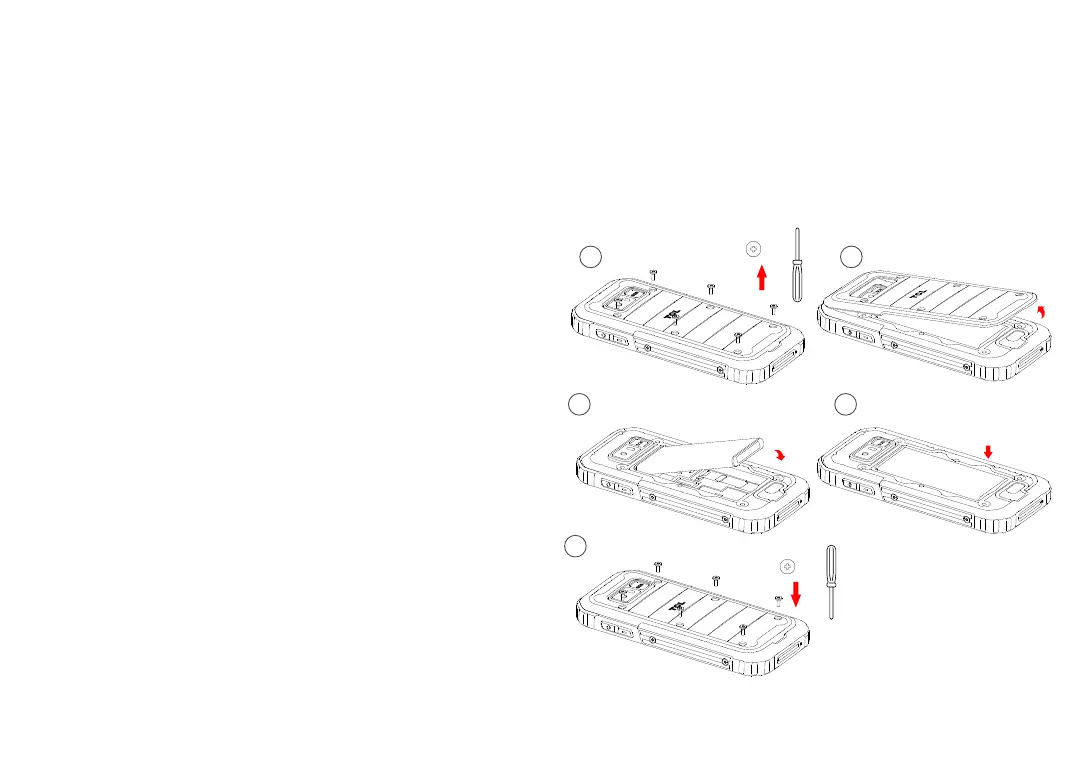
Removing the back cover and installing the battery
1 2
3
4
5
*6
*6


 To Next Page