10
OPERATION (CONTINUED)
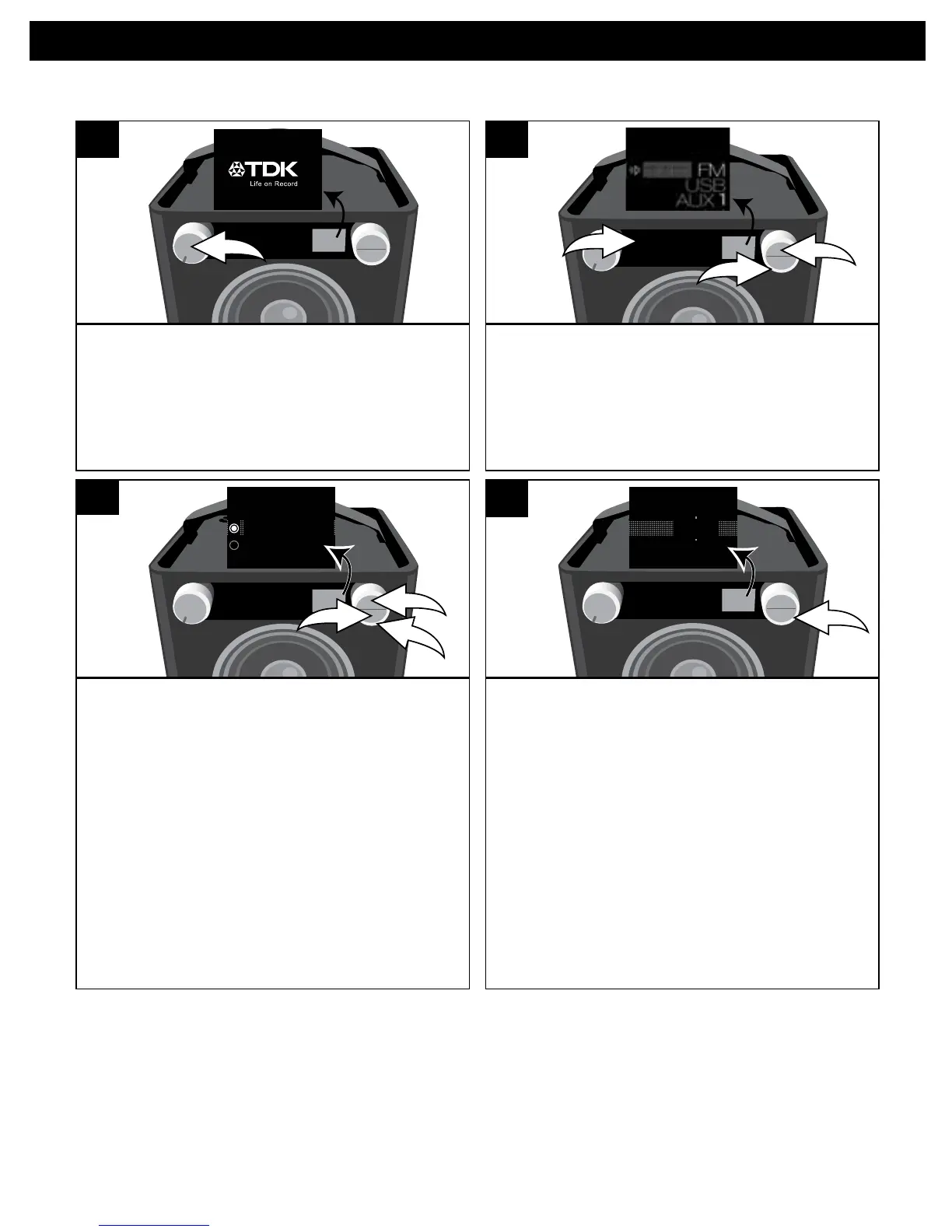
TurnthisunitonbyrotatingtheVolume/
Power control until a click is heard and
the Power indicator lights to turn the
unit on.
SOURCE EQ
Press the Source button/indicator u;
the Source menu will appear in the
display. Select FM using the Select
control v, and then press the OK button
w to confirm.
SOURCE EQ
1 2 3 4 5
O ®p n
1
2
3
USING THE FM RADIO
While the frequency appears in the
display, press the OK button u;Manual/
Seek will appear in the display. Using
the Select control v, select Manual to
adjust the frequency one step at a time,
or Seek to have the unit automatically
go to the next strong station; then press
the OK button u. Press the BACK button
w or wait a few seconds to return to the
station view.
SOURCE EQ
1 2 3 4 5
3
1
2
Manual Tune
Seek Tune
3
Select a station using the Select control.
Stronger stations will have a larger line
(see above).
Adjust the Volume and EQ as described
on the previous page.
SOURCE EQ
1 2 3 4 5
101.5
4
Antenna: For best FM reception, completely raise the FM antenna, and then once fully
raised you can rotate it for best reception.
1 2


 To Next Page