12
OPERATION (CONTINUED)
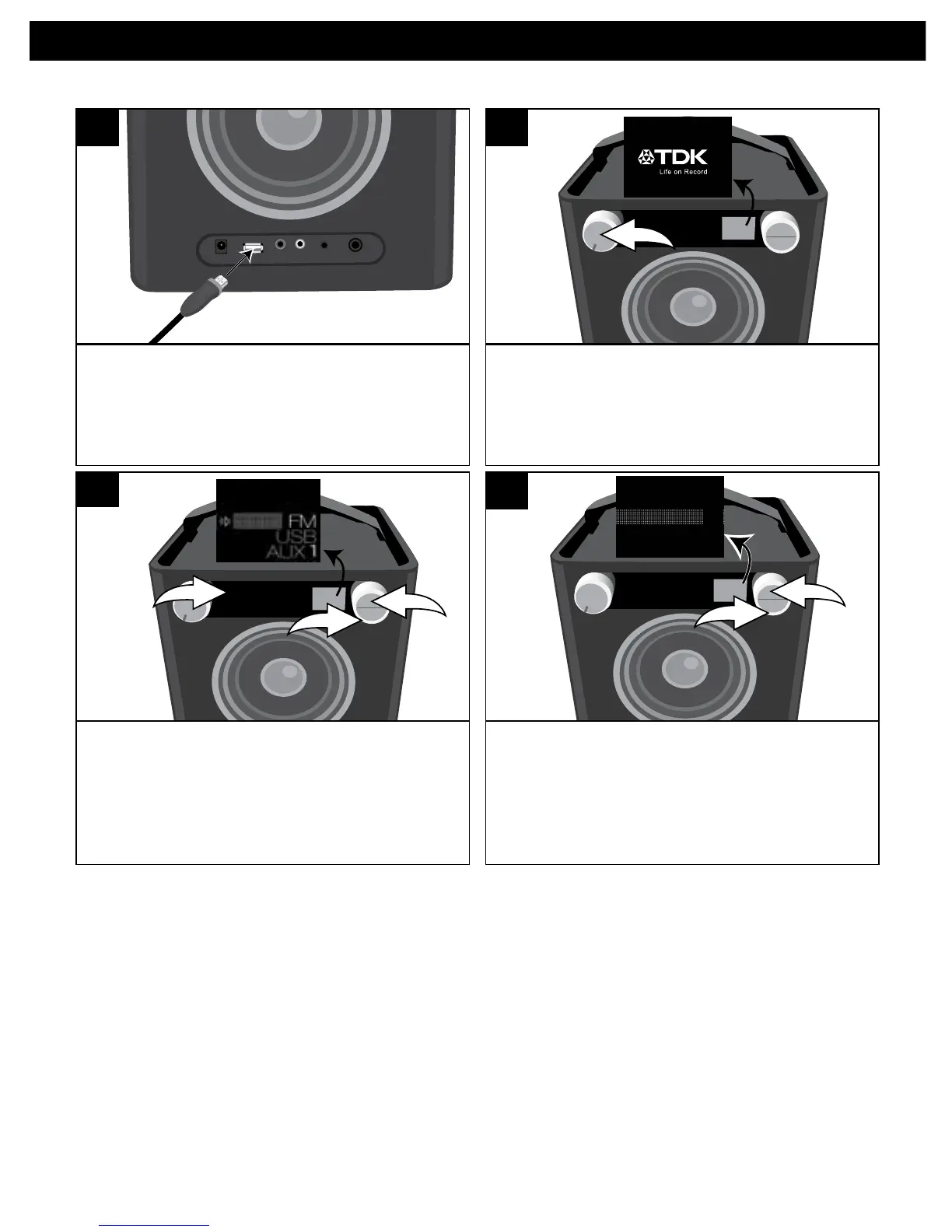
Insert the iPod cable to the iPod and the
other end with the USB plug into the USB
jack on the rear of this unit.
1
TurnthisunitonbyrotatingtheVolume/
Power control until a click is heard and
the Power indicator lights to turn the
unit on.
SOURCE EQ
2
USING AN iPod
PresstheSourcebutton/indicatoru;
the Source menu will appear in the
display. Select USB using the Select
control v, and then press the OK
button w to confirm.
SOURCE EQ
1 2 3 4 5
O ®p n
1
2
3
3
Select the desired option (see chart
below) using the Select control u,
and then press the OK button v to
enter the folder.
SOURCE EQ
All
Playlists
Artists
1
2
O ®p n
4
CONTINUED ON THE NEXT PAGE
CATEGORIES (INSIDE iPod/iPhone):
All: Shows all songs, books, etc.
Playlists: Shows playlists made on the iPod in applications such as iTunes
®
.
Artists: Shows all the artist names.
Albums: Shows all the album names.
Genres: Shows all the genres.
Songs: Shows all the song names.
Composers: Shows all the composer names.
Audiobooks: Shows all the audiobook names.
Podcasts: Shows all the podcasts.


 To Next Page