14
OPERATION (CONTINUED)
iPod PLAYBACK NOTES:
• Refertotheowner’smanualoftheiPodfordetailedconnectioninstructions.
• ThecontrolsonyouriPodwillnotoperatetheunit,youmustusethecontrolsonthis
unit as shown.
• Whengoingthroughthemenulists(Artists,Albums,etc.),presstheBACKbuttonto
return to the previous menu.
• For the titles, albums, etc. to appear correctly, they must have been tagged
properly when recorded to MP3.
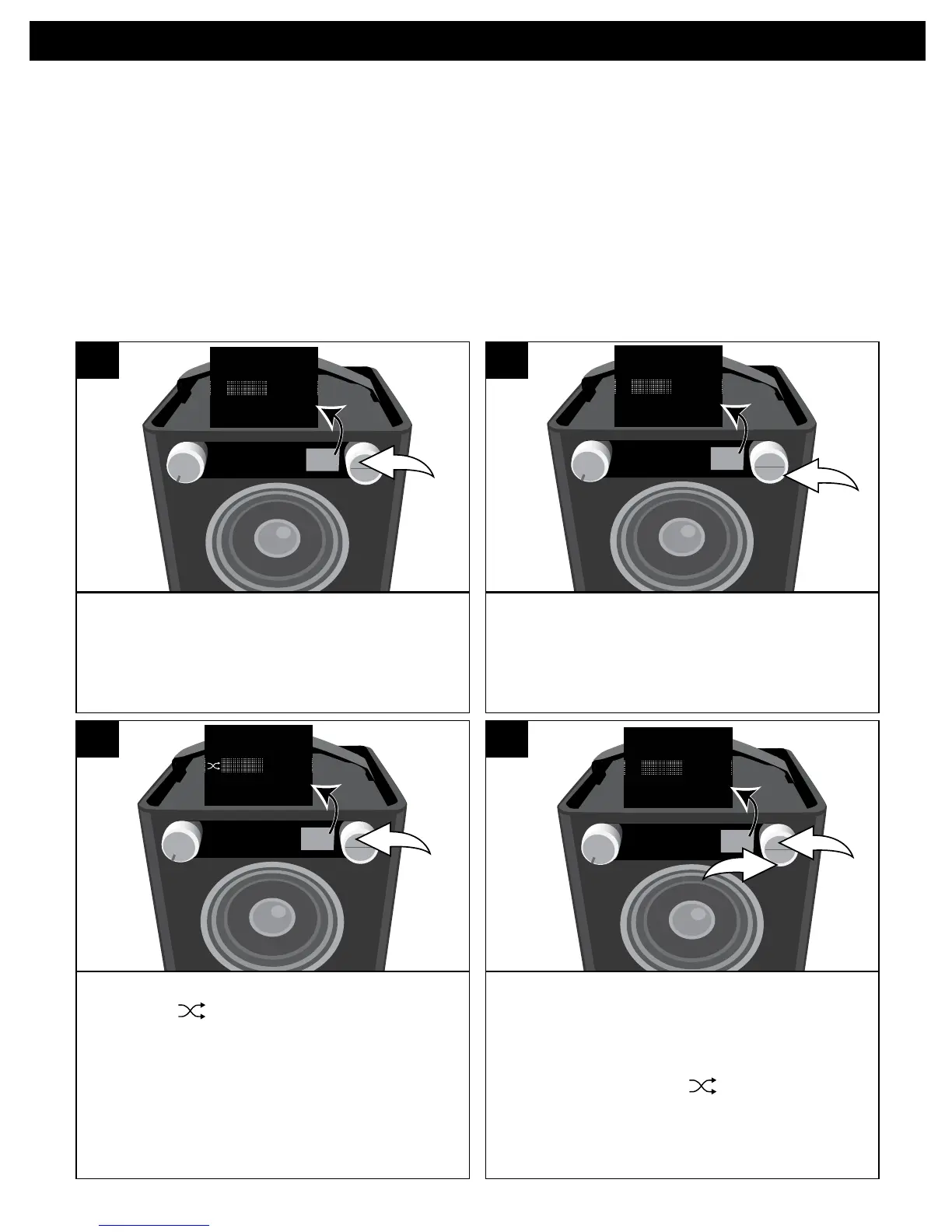
While in the Play or Paused USB mode
and with an iPod inserted, press the OK
button; Shuffle and Repeat will appear
in the display.
SOURCE EQ
O ®p n
Repeat
Shuffle
1
Select Shuffle using the Select control.
SOURCE EQ
O ®p n
Repeat
Shuffle
2
Press the OK button once; the Shuffle
indicator will light and appear on
the display. All songs in the selected
folder will randomly play and then stop.
SOURCE EQ
O ®p n
Repeat
Shuffle
3
To cancel Random playback, press the
OK button u tobringuptheShuffle/
Repeat menu. Select Shuffle using the
Select control v, and then press the
OK button u again; will disappear.
Press the OK button u to confirm the
setting or wait a few seconds to go
back to the previous menu.
SOURCE EQ
O ®p n
Repeat
Shuffl


 To Next Page