15
OPERATION (CONTINUED)
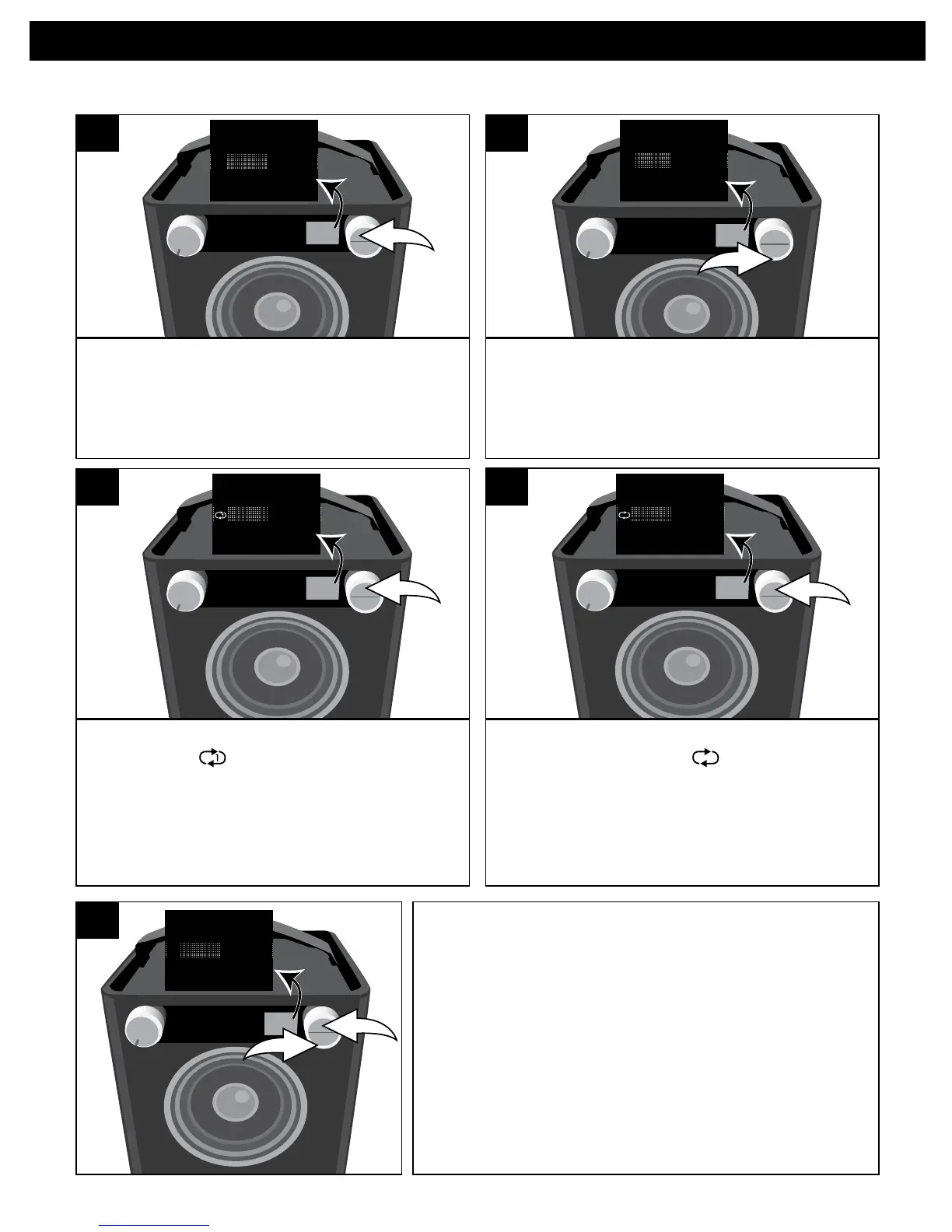
While in the Play or Pause USB mode
and with an iPod inserted, press the OK
button; Shuffle and Repeat will appear
in the display.
SOURCE EQ
O ®p n
Repeat
Shuffle
1
Select Repeat using the Select control.
SOURCE EQ
O ®p n
Repea
Shuffle
2
Press the OK button once; the Repeat
1 indicator will light and the
selected song will play repeatedly.
SOURCE EQ
O ®p n
Repeat
Shuffle
3
To cancel Repeat playback, press the OK button
u tobringuptheShuffle/Repeatmenu.Select
Repeat using the Select control v, and then
press the OK button u repeatedly until the
Repeat indicators disappear.
NOTE: You can perform Random All and Repeat
playback at the same time to repeatedly
playback all the songs randomly.
Press the OK button u to confirm the setting
or wait a few seconds to go back to the
previous menu.
SOURCE EQ
O ®p n
Repeat
Shuffle
2
1
5
REPEAT PLAYBACK
Press the OK button once more; the
Repeat All indicator will light and
all songs in the selected folder will repeat
continuously. Press the OK button to
confirm the setting or wait a few seconds
to go back to the previous menu.
SOURCE EQ
O ®p n
Repeat
Shuffle
4


 To Next Page