16
OPERATION (CONTINUED)
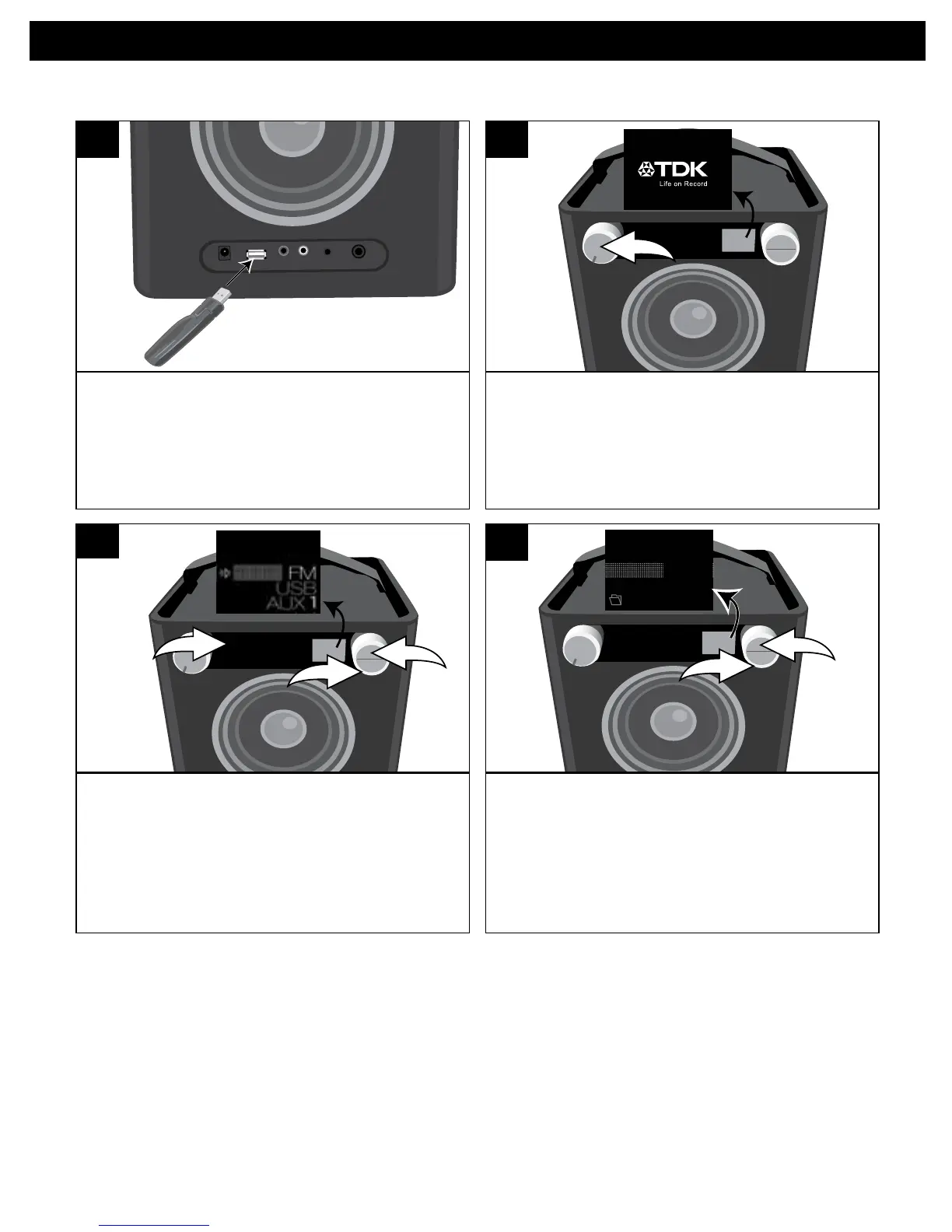
Insert a USB drive (support up to 32GB)
into the USB jack.
ThisunitsupportsMP3/WMAwithaBit
Rate up to 320kbps.
1
Turn this unit on by rotating the
Volume/Powercontroluntilaclick
is heard and the Power indicator
lights to turn the unit on.
SOURCE EQ
2
USING A USB DEVICE (i.e. USB DRIVE)
PresstheSourcebutton/indicatoru;
the Source menu will appear in the
display. Select USB using the Select
control v, and then press the OK
button w to confirm.
SOURCE EQ
1 2 3 4 5
O ®p n
1
2
3
3
If there are folders, select a folder using
the Select control u, and then press the
OK button v to enter the folder.
SOURCE EQ
O ®p n
1
2
Airbag
Creep
Misc
4
CONTINUED ON THE NEXT PAGE


 To Next Page