EasyManua.ls Logo

Teac 450 - Copying and Duplicating Cassettes; Copying Dolby Cassettes; Copying Open Reel to Cassette

Teac 450
16 pages
Print Icon
To Next Page IconTo Next Page
To Previous Page IconTo Previous Page
Loading...
loov
OPEN
REEL
DECK
11
When
lhe
cassette
playback
system
has
no
output
volume
control,
the
required
Dolby-level
calibration
must
be
per
formed
by
means
of
the
DOLBY
FM/COPY
CAL
Calibration
adjustment
controls.
To
Copy
or
Duplicate
Dolby-encoded
Cassettes.
(Transcribing
Dolby
to
Dolby
without
re-encoding)
4
.
Now
that
the
recording
level
adjustment
has
been
comple
ted,
wait
for
the
program
to
begin.
5.
Press
the
PAUSE
Button
again
to
release
it
from
the
locked
position
and
recording
will
start
immediately.
6
-Set
the
DOLBY
NR
(Dolby
NR
Selector
Switch)
to
IN
for
monitoring
the
Dolby-decoded
signal
and
to
OUT
for
monitoring
the
Dolby-encoded
signal.
Never
move
the
DOLBY
FM/COPY
switch
@
during
recording.
DOLBY
UNIT
EX.
A
N-6OI
o
o
TEAC
450
'IllLUJq
□□
llilli
Note:
Prepare
the
open
reel
tape
deck
and
separate
Dolby
Noise
Reduction
unit
as
outlined
in
their
Operating
Instructions.
Place
the
Dolby
NR
switch
IN
with
the
Dolby
unit
in
Play
mode
and
perform
Playback
Calibra
tion
as
required.
2.
On
die
450,
set
the
DOLBY
FM/COPY
(Dolby
FM/Copy
selector
switch)
(21)
OUT
and
the
DOLBY
NR
(Dolby
NR
selector
switch)
(22)
IN.
Insert
a
blank
cassette.
3.
Depress
the
PAUSE
button
(9)
until
it
locks.
Next,
while
depressing
the
REC
(record)
Button
(4).
press
the
(Play
Button)
(6),
thus
placing
the
450
in
the
Record/
Pause
mode.
4.
While
the
450
is
in
the
Record/Pause
mode,
playback
the
loudest
portions
of
the
open
reel
tape.
On
the
450,
adjust
the
LINE
input
level
controls
so
that
the
VU
meters
do
not
exceed
0
VU
and
the
peak
level
indicator
does
not
illuminate
excessively.
Obtain
the
highest
recording
level
possible
without
exceeding
these
limitations.
Rewind
the
tape.
5.
Release
the
PAUSE
button
on
the
450
and
begin
play
back
on
the
open
reel
deck.
6.
While
copying,
make
all
listening
level
adjustments
with
the
stereo
amplifier
s
output
controls
and
the
450
OUT
PUT
controls.
Do
not
change
any
level
on
the
450
INPUT
or
the
open-reel
deck
output.
To
copy
Dolby-encoded
open
reel
tape
onto
cassette
with
Dolby
encoding
Open-reel
Dolbyized
tapes
are
sometimes
recorded
at
a
higher
signal
level
than
cassettes.
If
a
direct
copy
is
attempted,
the
cassette
tape
is
liable
to
sound
distorted
because
of
high-
level
saturation.
Therefore,
the
open
reel
tape
must
be
de
coded
through
a
separate
Dolby
Noise
Reduction
Unit
and
then
re-encoded
on
the
450
to
preserve
the
desired
quality.
There
is
no
appreciable
loss
of
sound
by
this
method,
and
the
Dolby
process
maintains
the
hiss
and
noise-free
record
ings
very
affectively.
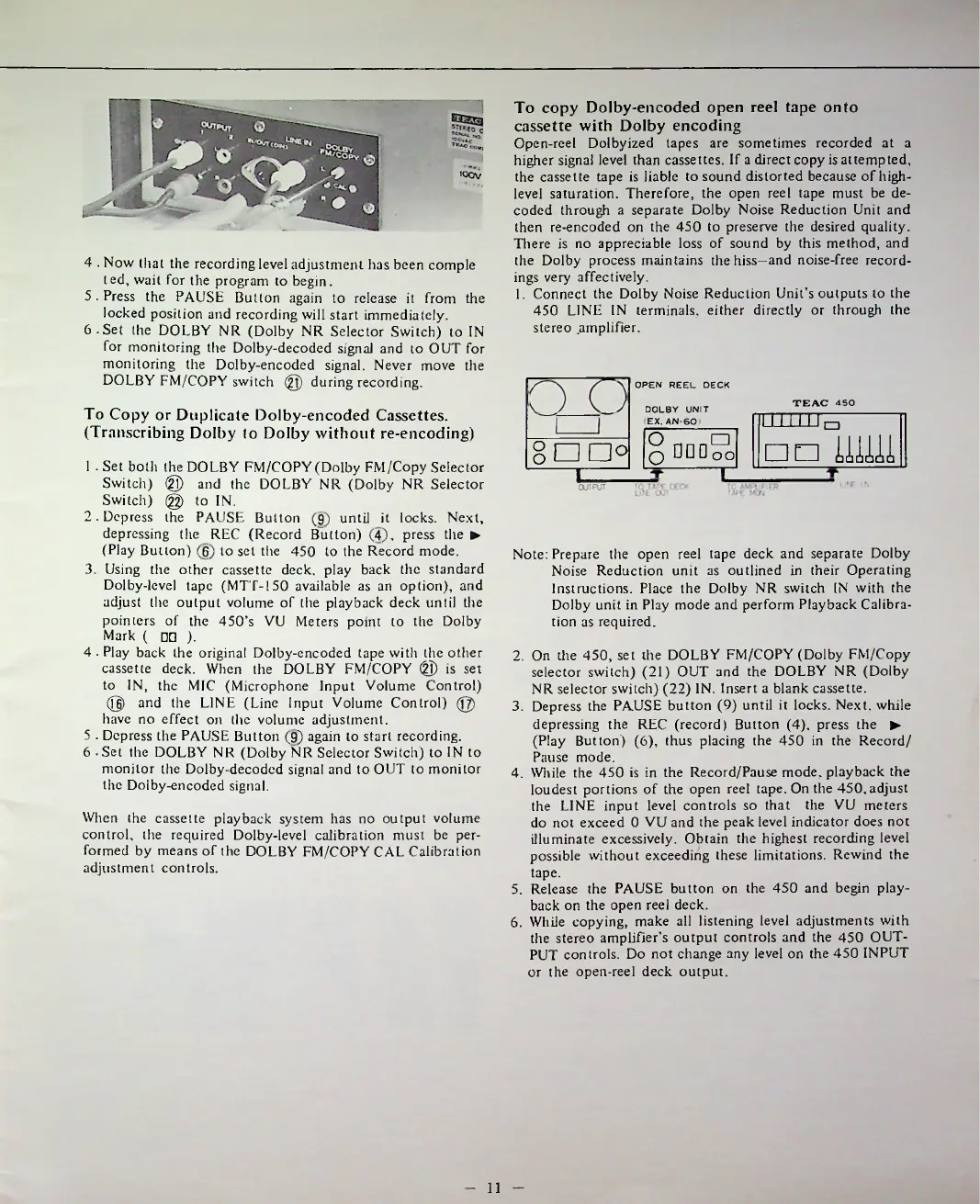
1.
Connect
the
Dolby
Noise
Reduction
Unit's
outputs
to
the
450
LINE
IN
terminals,
either
directly
or
through
the
stereo
.amplifier.
00
oo
n
1
.Set
both
the
DOLBY
FM/COPY
(Dolby
FM/Copy
Selector
Switch)
®
and
the
DOLBY
NR
(Dolby
NR
Selector
Switch)
@
to
IN.
2.
Depress
the
PAUSE
Button
(9)
until
it
locks.
Next,
depressing
the
REC
(Record
Button)
(4),
press
the
(Play
Button)
(6)
to
set
the
450
to
the
Record
mode.
3.
Using
the
other
cassette
deck,
play
back
the
standard
Dolby-level
tape
(MTT-150
available
as
an
option),
and
adjust
the
output
volume
of
the
playback
deck
until
the
pointers
of
the
450
s
VU
Meters
point
to
the
Dolby
Mark
(
□□
).
4
.
Play
back
the
original
Dolby-encoded
tape
with
the
other
cassette
deck.
When
the
DOLBY
FM/COPY
@
is
set
to
IN,
the
MIC
(Microphone
Input
Volume
Control)
@
and
the
LINE
(Line
Input
Volume
Control)
@
have
no
effect
on
the
volume
adjustment.
5
.
Depress
the
PAUSE
Button
(9)
again
to
start
recording.
6
-
Set
the
DOLBY
NR
(Dolby
NR
Selector
Switch)
to
IN
to
monitor
the
Dolby-decoded
signal
and
to
OUT
to
monitor
the
Dolby-encoded
signal.
8
an
0
I
OUTPUT

Related product manuals