EasyManua.ls Logo

Teac 450 - Function of Controls - Part 1: Front Panel; Cassette Holder Lid Operation; Cassette Holder Mechanism; EJECT Button Functionality

Teac 450
16 pages
Print Icon
To Next Page IconTo Next Page
To Previous Page IconTo Previous Page
Loading...
Function
of
Controls
n
u
n
©
©
©
©
®
®
®
2
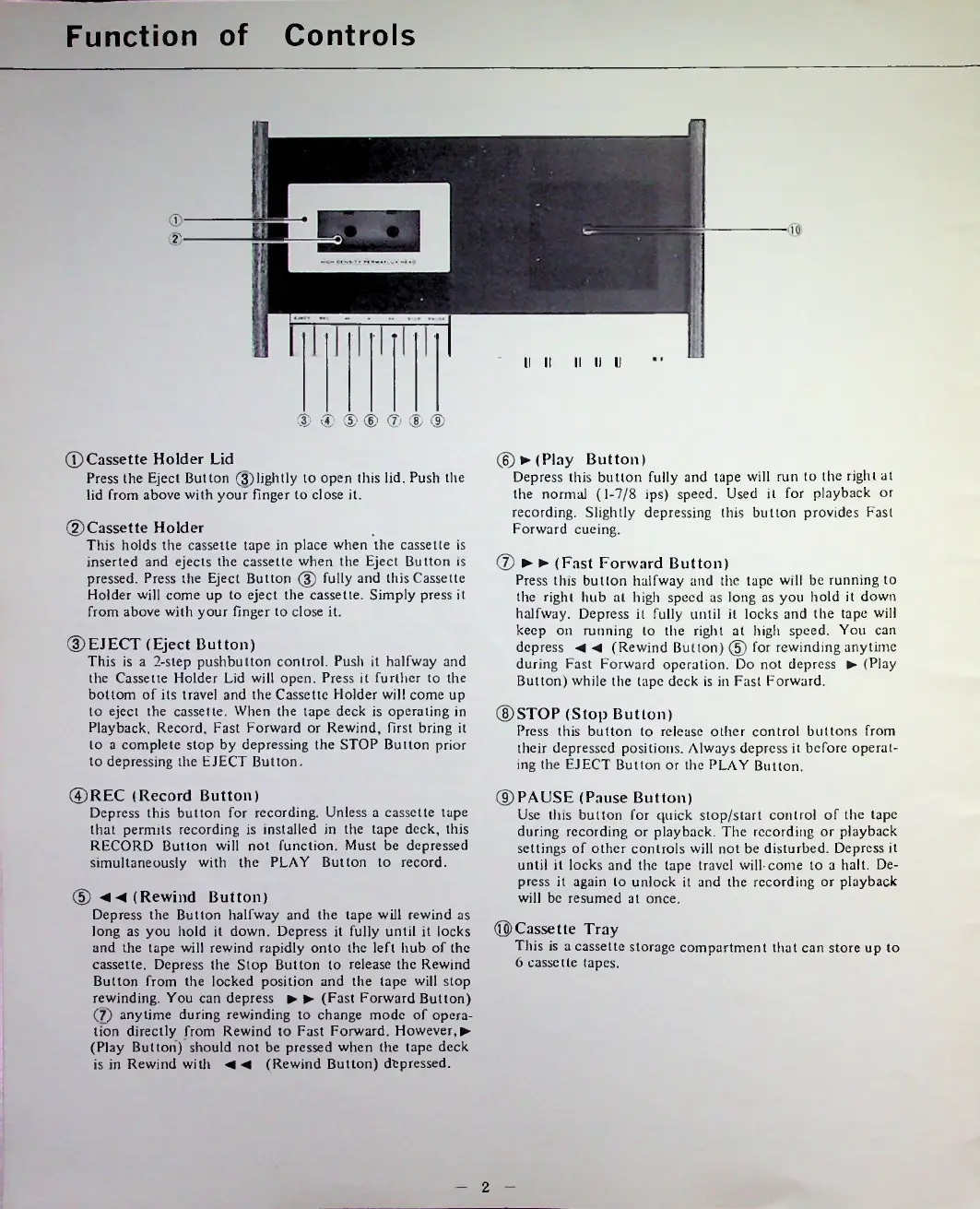
©Cassette
Holder
Lid
Press
the
Eject
Button
(3)
lightly
to
open
this
lid.
Push
the
lid
from
above
with
your
finger
to
close
it.
©Cassette
Holder
This
holds
the
cassette
tape
in
place
when
the
cassette
is
inserted
and
ejects
the
cassette
when
the
Eject
Button
is
pressed.
Press
the
Eject
Button
©
fully
and
this
Cassette
Holder
will
come
up
to
eject
the
cassette.
Simply
press
it
from
above
with
your
finger
to
close
it.
©REC
(Record
Button)
Depress
this
button
for
recording.
Unless
a
cassette
tape
that
permits
recording
is
installed
in
the
tape
deck,
this
RECORD
Button
will
not
function.
Must
be
depressed
simultaneously
with
the
PLAY
Button
to
record.
©Cassette
Tray
This
is
a
cassette
storage
compartment
that
can
store
up
to
6
cassette
tapes.
©STOP
(Stop
Button)
Press
this
button
to
release
other
control
buttons
from
their
depressed
positions.
/Mways
depress
it
before
operat
ing
the
EJECT
Button
or
the
PLAY
Button.
©EJECT
(Eject
Button)
This
is
a
2-step
pushbutton
control.
Push
it
halfway
and
the
Cassette
Holder
Lid
will
open.
Press
it
further
to
the
bottom
of
its
travel
and
the
Cassette
Holder
will
come
up
to
eject
the
cassette.
When
the
tape
deck
is
operating
in
Playback,
Record,
Fast
Forward
or
Rewind,
first
bring
it
to
a
complete
stop
by
depressing
the
STOP
Button
prior
to
depressing
the
EJECT
Button.
®
◄(Rewind
Button)
Depress
the
Button
halfway
and
the
tape
will
rewind
as
long
as
you
hold
it
down.
Depress
it
fully
until
it
locks
and
tire
tape
will
rewind
rapidly
onto
the
left
hub
of
the
cassette.
Depress
the
Stop
Button
to
release
the
Rewind
Button
from
the
locked
position
and
the
tape
will
stop
rewinding.
You
can
depress
(Fast
Forward
Button)
(7)
anytime
during
rewinding
to
change
mode
of
opera
tion
directly
from
Rewind
to
Fast
Forward.
However,
(Play
Button)
should
not
be
pressed
when
the
tape
deck
is
in
Rewind
with
(Rewind
Button)
depressed.
®-
®
(Fast
Forward
Button)
Press
this
button
halfway
and
the
tape
will
be
running
to
the
right
hub
at
high
speed
as
long
as
you
hold
it
down
halfway.
Depress
it
fully
until
it
locks
and
the
tape
will
keep
on
miming
to
the
right
at
high
speed.
You
can
depress
(Rewind
Button)
@
for
rewinding
anytime
during
Fast
Forward
operation.
Do
not
depress
(Play
Button)
while
the
tape
deck
is
in
Fast
Forward.
©PAUSE
(Pause
Button)
Use
this
button
for
quick
stop/start
control
of
the
tape
during
recording
or
playback.
The
recording
or
playback
settings
of
other
controls
will
not
be
disturbed.
Depress
it
until
it
locks
and
the
tape
travel
will-come
to
a
halt.
De
press
it
again
to
unlock
it
and
the
recording
or
playback
will
be
resumed
at
once.
V
©►(Play
Button)
Depress
this
button
fully
and
tape
will
run
to
the
right
at
the
normal
(1-7/8
ips)
speed.
Used
it
for
playback
or
recording.
Slightly
depressing
this
button
provides
Fast
Forward
cueing.
II
II
U

Related product manuals