EasyManua.ls Logo

Teac 450 - Function of Controls - Part 2: Indicators and Input Controls; Microphone and Headphone Jacks; VU Meters and Indicator Lamps; Input Volume Controls

Teac 450
16 pages
Print Icon
To Next Page IconTo Next Page
To Previous Page IconTo Previous Page
Loading...
iz
®
®
®@
3
®
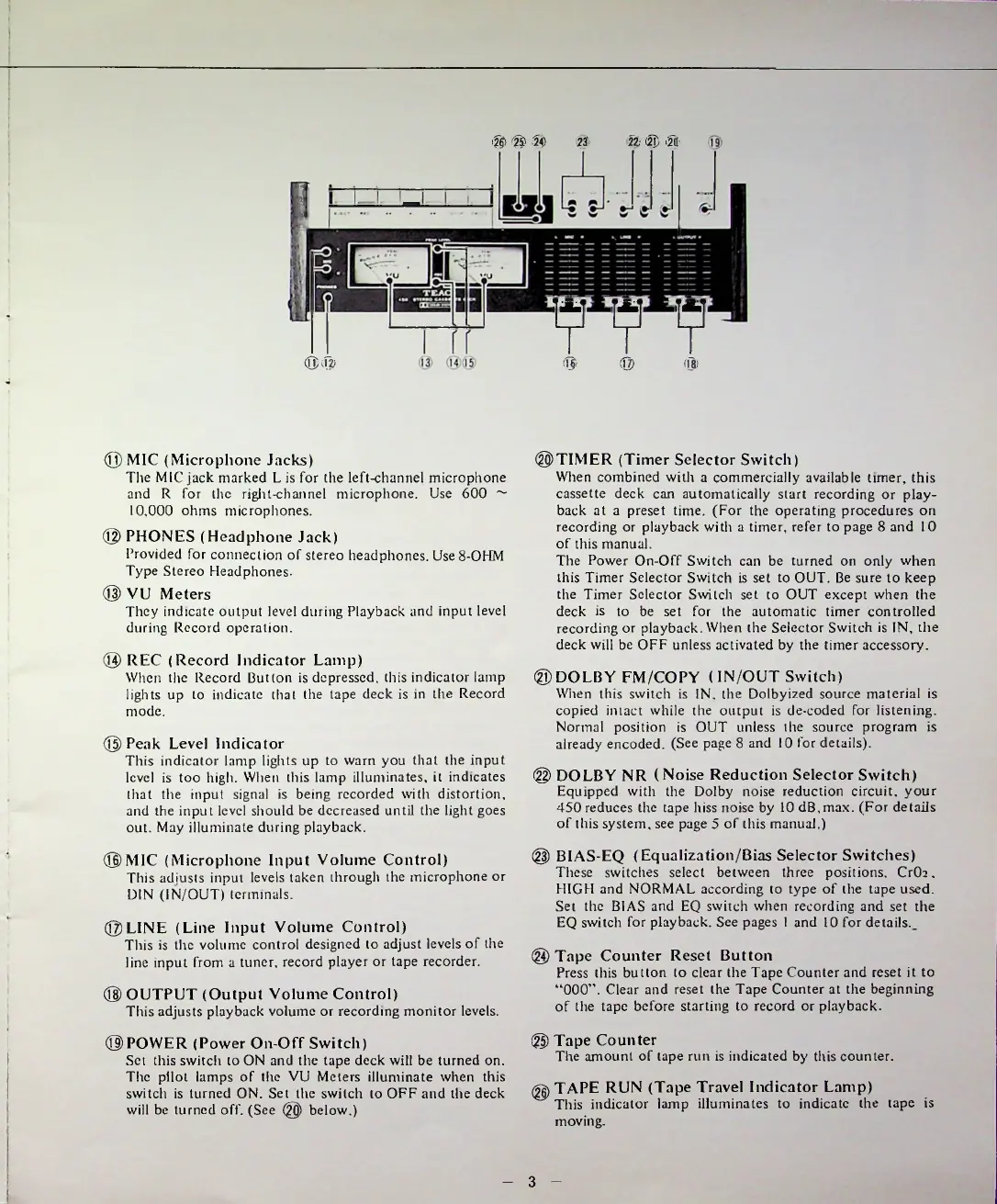
REC
(Record
Indicator
Lamp)
When
the
Record
Button
is
depressed,
this
indicator
lamp
lights
up
to
indicate
that
the
tape
deck
is
in
the
Record
mode.
©
Peak
Level
Indicator
This
indicator
lamp
lights
up
to
warn
you
that
the
input
level
is
too
high.
When
this
lamp
illuminates,
it
indicates
that
the
input
signal
is
being
recorded
with
distortion,
and
the
input
level
should
be
decreased
until
the
light
goes
out.
May
illuminate
during
playback.
©OUTPUT
(Output
Volume
Control)
This
adjusts
playback
volume
or
recording
monitor
levels.
©POWER
(Power
On-Off
Switch)
Set
this
switch
to
ON
and
the
tape
deck
will
be
turned
on.
The
pilot
lamps
of
the
VU
Meters
illuminate
when
this
switch
is
turned
ON.
Set
the
switch
to
OFF
and
the
deck
will
be
turned
off.
(See
@
below.)
®
Tape
Counter
The
amount
of
tape
run
is
indicated
by
this
counter.
©MIC
(Microphone
Jacks)
The
MIC
jack
marked
L
is
for
the
left-channel
microphone
and
R
for
the
right-channel
microphone.
Use
600
~
10.000
ohms
microphones.
®
PHONES
(Headphone
Jack)
Provided
for
connection
of
stereo
headphones.
Use
8-OHM
Type
Stereo
Headphones.
©
VU
Meters
They
indicate
output
level
during
Playback
and
input
level
during
Record
operation.
©LINE
(Line
Input
Volume
Control)
This
is
the
volume
control
designed
to
adjust
levels
of
the
line
input
from
a
tuner,
record
player
or
tape
recorder.
@
BIAS-EQ
(Equalization/Bias
Selector
Switches)
These
switches
select
between
three
positions,
CrOr
.
HIGH
and
NORMAL
according
to
type
of
the
tape
used.
Set
the
BIAS
and
EQ
switch
when
recording
and
set
the
EQ
switch
for
playback.
See
pages
1
and
10
for
details.
_
®
Tape
Counter
Reset
Button
Press
this
button
to
clear
the
Tape
Counter
and
reset
it
to
000
.
Clear
and
reset
the
Tape
Counter
at
the
beginning
of
the
tape
before
starting
to
record
or
playback.
©
DOLBY
NR
(Noise
Reduction
Selector
Switch)
Equipped
with
the
Dolby
noise
reduction
circuit,
your
450
reduces
the
tape
hiss
noise
by
10
dB.max.
(For
details
of
this
system,
see
page
5
of
this
manual.)
©DOLBY
FM/COPY
(IN/OUT
Switch)
When
this
switch
is
IN.
the
Dolbyized
source
material
is
copied
intact
while
the
output
is
de-coded
for
listening.
Normal
position
is
OUT
unless
the
source
program
is
already
encoded.
(See
page
8
and
10
for
details).
V
V
V
®
®
®
©TIMER
(Timer
Selector
Switch)
When
combined
with
a
commercially
available
timer,
this
cassette
deck
can
automatically
start
recording
or
play
back
at
a
preset
time.
(For
the
operating
procedures
on
recording
or
playback
with
a
timer,
refer
to
page
8
and
10
of
this
manual.
The
Power
On-Off
Switch
can
be
turned
on
only
when
this
Timer
Selector
Switch
is
set
to
OUT.
Be
sure
to
keep
the
Timer
Selector
Switch
set
to
OUT
except
when
the
deck
is
to
be
set
for
the
automatic
timer
controlled
recording
or
playback.
When
the
Selector
Switch
is
IN,
the
deck
will
be
OFF
unless
activated
by
the
timer
accessory.
®
®
®
23
©MIC
(Microphone
Input
Volume
Control)
This
adjusts
input
levels
taken
through
the
microphone
or
DIN
(IN/OUT)
terminals.
II
(g)
TAPE
RUN
(Tape
Travel
Indicator
Lamp)
This
indicator
lamp
illuminates
to
indicate
the
tape
is
moving.

Related product manuals