EasyManua.ls Logo

Teac A-3340S - Page 25

Teac A-3340S
64 pages
Print Icon
To Next Page IconTo Next Page
To Previous Page IconTo Previous Page
Loading...
PHONES
OUTPUT
CHECK
————
—-
1.
Place
OUTPUT
controls
at
the
Specified
Level
Setting
(400
Hz
signal
at
O
dB).
2.
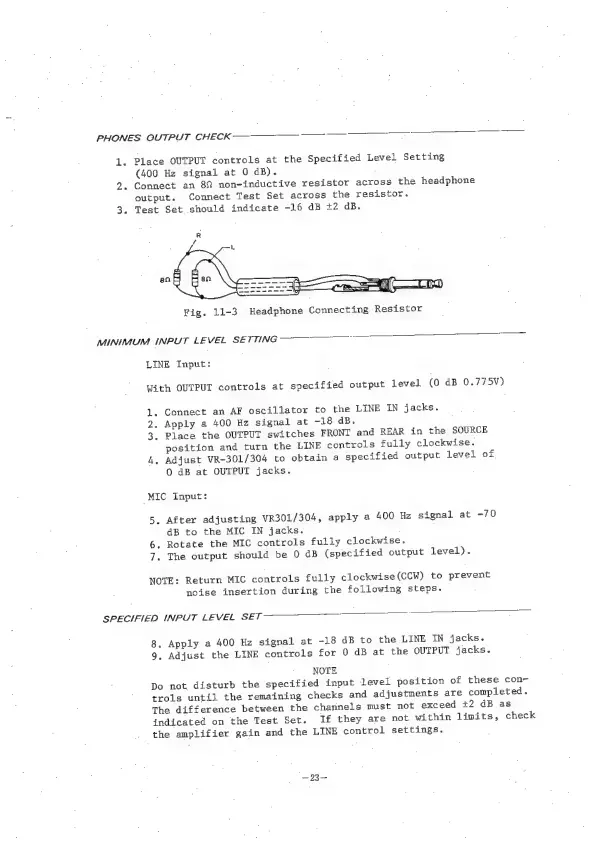
Connect
an
8%
non-inductive
resistor
across
the
headphone
output.
Connect
Test
Set
across
the
resistor.
3.
Test
Set
should
indicate
-16
dB
+2
dB.
aS
"
Fig.
11-3
Headphone
Connecting
Resistor
MINIMUM
INPUT
LEVEL
SETTING
LINE
Input:
With
OUTPUT
controls
at
specified
output
level
(0
dB
0.775V)
1.
Connect
an
AF
oscillator
to
the
LINE
IN
jacks.
2,
Apply
a
400
Hz
signal
at
-18
dB.
3.
Place
the
OUTPUT
switches
FRONT
and
REAR
in
the
SOURCE
position
and
turn
the
LINE
controls
fully
clockwise.
4,
Adjust
VR-301/304
to
obtain
a
specified
output
level
of
0
dB
at
OUTPUT
jacks.
“MIC
Input:
5.
After
adjusting
VR301/304,
apply
a
400
Hz
signal
at
-70
4B
to
the
MIC
IN
jacks.
6.
Rotate
the
MIC
controls
fully
clockwise.
7.
The
output
should
be
0
dB
(specified
output
level).
NOTE:
Return
MIC
controls
fully
clockwise(CCW)
to
prevent
noise
insertion
during
the
following
steps.
SPECIFIED
INPUT
LEVEL
SET
a
8,
Apply
a
400
Hz
signal
at
-18
dB
to
the
LINE
IN
jacks.
9,
Adjust
the
LINE
controls
for
0
dB
at
the
OUTPUT
jacks.
NOTE
Do
not.
disturb
the
specified
input
level
position
of
these
con~
trols
until
the
remaining
checks
and
adjustments
are
completed.
The
difference
between
the
channels
must
not
exceed
+2
dB
as
indicated
on
the
Test
Set.
If
they
are
not
within
limits,
check
the
amplifier
gain
and
the
LINE
control
settings.
“—23—

Other manuals for Teac A-3340S

Related product manuals