EasyManua.ls Logo

Teac A-450 - SPECIFIED LINE CONTROL SETTING; DOLBY FM;COPY CAL CONTROL SETTING; VUMETER CALIBRATION -RECORD-; LED PEAK LEVEL INDICATOR CALIBRATION

Teac A-450
58 pages
Print Icon
To Next Page IconTo Next Page
To Previous Page IconTo Previous Page
Loading...
7-2-2.
SPECIFIED
LINE
CONTROL
SETTING
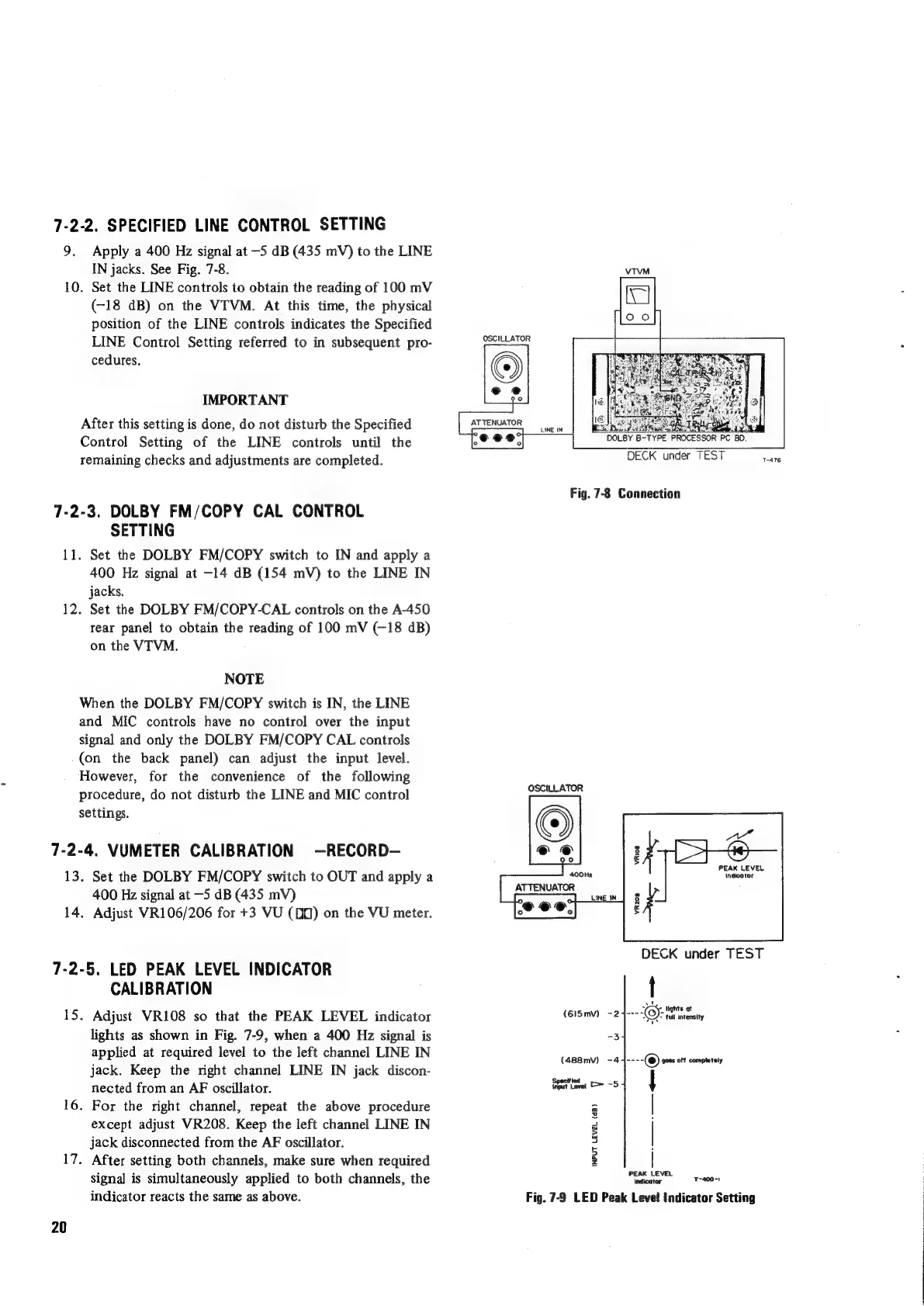
9.
Apply
a
400
Hz
signal
at
—-5
dB
(435
mV)
to
the
LINE
IN
jacks.
See
Fig.
7-8.
10.
Set
the
LINE
controls
to
obtain
the
reading
of
100
mV
(-18
dB)
on
the
VTVM.
At
this
time,
the
physical
position of
the
LINE
controls
indicates
the
Specified
LINE
Control
Setting
referred
to
in
subsequent
pro-
cedures.
IMPORTANT
After
this
setting
is
done,
do
not
disturb
the
Specified
Control
Setting
of
the
LINE
controls
until
the
remaining
checks
and
adjustments
are
completed.
7-2-3.
DOLBY
FM/COPY
CAL
CONTROL
SETTING
11.
Set
the
DOLBY
FM/COPY
switch
to
IN
and
apply
a
400
Hz
signal
at
-14
dB
(154
mV)
to
the
LINE
IN
jacks.
12.
Set
the
DOLBY
FM/COPY-CAL
controls
on
the
A-450
rear
panel
to
obtain
the
reading
of
100
mV
(—18
dB)
on
the
VTVM.
NOTE
When
the
DOLBY
FM/COPY
switch
is
IN,
the
LINE
and
MIC
controls
have
no
control
over
the
input
signal
and
only
the
DOLBY
FM/COPY
CAL
controls
(on
the
back
panel)
can
adjust
the
input
level.
However,
for
the
convenience
of
the
following
procedure,
do
not
disturb
the
LINE
and
MIC
control
settings.
7-2-4,
VUMETER
CALIBRATION
—RECORD-
13.
Set
the
DOLBY
FM/COPY
switch
to
OUT
and
apply
a
400
Hz
signal
at
—5
dB
(435
mV)
14,
Adjust
VR106/206
for
+3
VU
(D0)
on
the
VU
meter.
7-2-5.
LED
PEAK
LEVEL
INDICATOR
CALIBRATION
15.
Adjust
VR108
so
that
the
PEAK
LEVEL
indicator
lights
as
shown
in
Fig.
7-9,
when
a
400
Hz
signal
is
applied
at
required
level
to
the
left
channel
LINE
IN
jack.
Keep
the
right
channel
LINE
IN
jack
discon-
nected
from
an
AF
oscillator.
16.
For
the
right
channel,
repeat
the
above
procedure
except
adjust
VR208.
Keep
the
left
channel
LINE
IN
jack
disconnected
from
the
AF
oscillator.
17.
After
setting
both
channels,
make
sure
when
required
signal
is
simultaneously
applied
to
both
channels,
the
indicator
reacts
the
same
as
above.
20
VTVM
OSCILLATOR
LINE
IN
DOLBY
B-TYPE
PROCESSOR
PC
BD.
DECK
under
TEST
oe
Fig.
7-8
Connection
OSCILLATOR
PEAK
LEVEL
400Hr
(Indicator
ATTENUATOR
DECK
under
TEST
t
ut
v
lights
at
(615mv)
-2
TT
SEES
tall
intensity
(488mv)
-4
~---(@)
goes
ot
completely
Specified
igut
Lever
C=
—5
|
Fa
=
a
s
4
rs
:
>
z
PEAK
LEVEL
indicator
Ta0o=
Fig.
7-9
LED
Peak
Level
Indicator
Setting

Other manuals for Teac A-450

Related product manuals