EasyManua.ls Logo

Teac A-H01 - Windows Edition Installation; Recommended System Requirements; Installation Warning

Teac A-H01
27 pages
Print Icon
To Next Page IconTo Next Page
To Previous Page IconTo Previous Page
Loading...
TEAC
Windows
edition
Recommended
system
Computer
with
an
Intel Core
2 Duo
processor
or
faster
Note:
Windows
XP
64-bit edition
is
not
supported
Warning before installation
Install
the
dedicated
driver
on a
computer before connecting
it
with
the unit by
USB.
If
you connect the unit to a computer
before
installing
the driver
on
it, it
will
not function
properly.
Moreover,
if
using
Windows
XP,
the computer might
become
much
slower
and
require
restarting.
Note:
The
following
screen
examples
are
from
Windows
7.
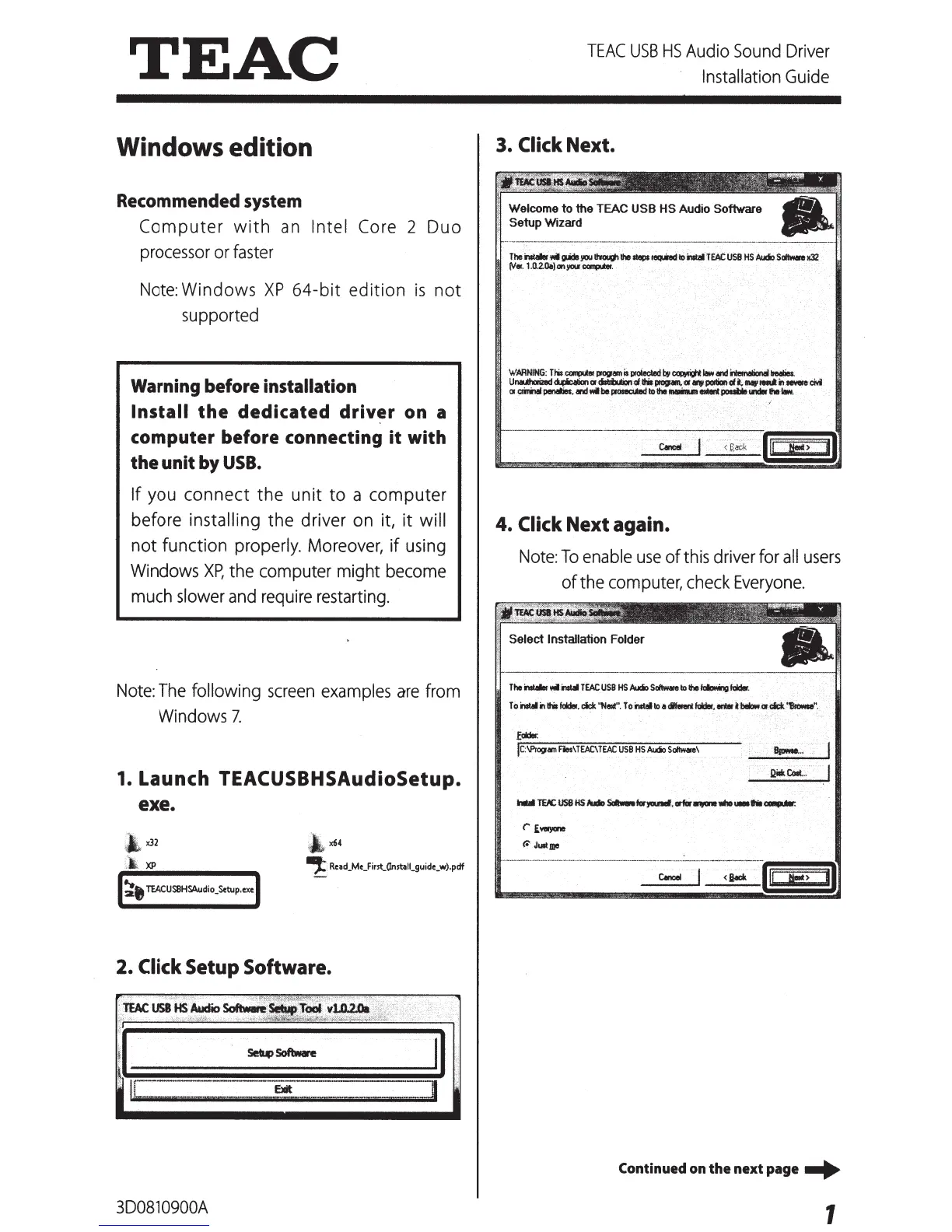
1. Launch
TEACUSBHSAudioSetup.
ex e.
~
x32
;,
a
XP
~.
TEACUSBHSAudio_Setup.exe
-,:
:
Rellld_Me_First_(Instl!lll_guide_w).pdf
2.
Click Setup Software.
3D0810900A
TEAC
USB
HS
Audio
Sound
Driver
Installation
Guide
3.
Click
Next.
Welcome
to
the TEAC
USB HS
Audio
Software
Setup Wizard
The
..
wtMJ!tyou
~the
._,equiredto~
.
TEAC
USB
HSAI.doS._.
~
tv•·
1.(),2.(le).on}IOI;f~.
4.
Click Next again.
Note:
To
enable
use
of
this
driver
for
all
users
of
the
computer,
check
Everyone.
The~
..
iW1
TEAC
USB
HS
Aucio
Sottw.re
to
the
fdlr:Ming
fddlr,
l
o
instal
inlhil
fddel.
cick
"Next"
.
To~
to
adltend
fddlr,
enl8r
UllowCifdl:k
~"
.
.
.
lc:\PrOIJam
Res\
TEAC\
TEAC
USB
HS
Audio
S~e\
BloMe
...
<.
iadt
Continued
on
the
next
page
-+
1

Other manuals for Teac A-H01

Related product manuals