EasyManua.ls Logo

Teac A-H01 - Identification des Parties (A-H01)

Teac A-H01
27 pages
Print Icon
To Next Page IconTo Next Page
To Previous Page IconTo Previous Page
Loading...
TEAC
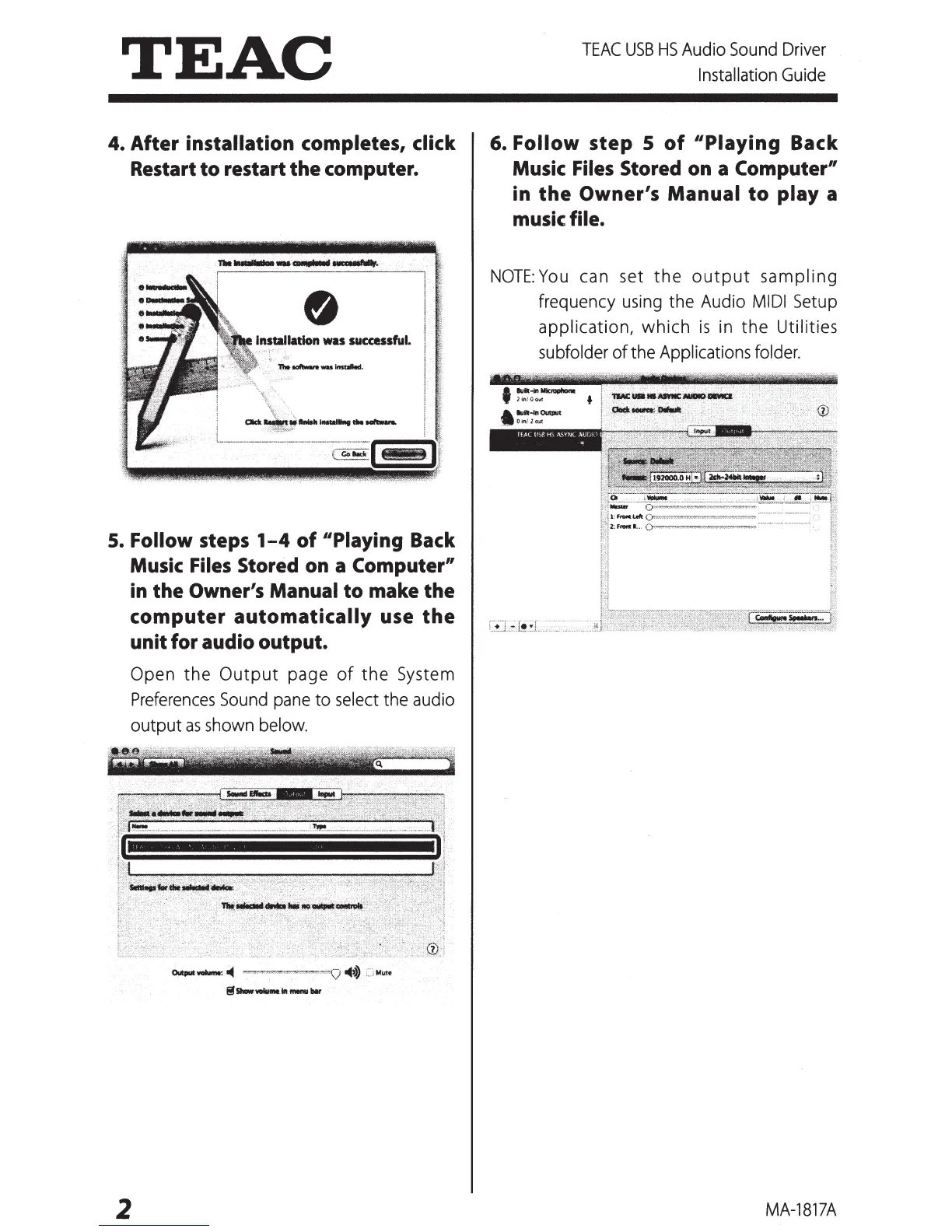
4. After installation completes, click
Restart
to
restart
the
computer.
S.
Follow
steps
1-4
of
"Playing Back
Music Files Stored on a Computer"
in
the
Owner's Manual
to
make
the
computer
automatically
use
the
unit for audio output.
Open the
Output
page
of
the
System
Preferences
Sound
pane
to
select
the
audio
output
as
shown
below.
Outputwalume:
..
~··•"~""'''<w"'"""'·~··"~Q
...
:··,Mute
S
Show
VODiumt
1ft
menu
blr
2
TEAC
USB
HS
Audio
Sound
Driver
Installation
Guide
6. Follow
step
S
of
"Playing
Back
Music Files Stored on a Computer"
in
the
Owner's
Manual
to
play a
music file.
NOTE:
You
can
set the
output
sampling
frequency
using
the Audio
MIDI
Setup
application, which
is
in
the Utilities
subfolder of the Applications
folder.
MA-1817A

Other manuals for Teac A-H01

Related product manuals