EasyManua.ls Logo

Teac A-H01 - Branchements

Teac A-H01
27 pages
Print Icon
To Next Page IconTo Next Page
To Previous Page IconTo Previous Page
Loading...
8. Follow steps
1-4
of "Playing
Back
Music
Files
Stored
on
a Computer"
in the Owner's Manual to connect
the unit.
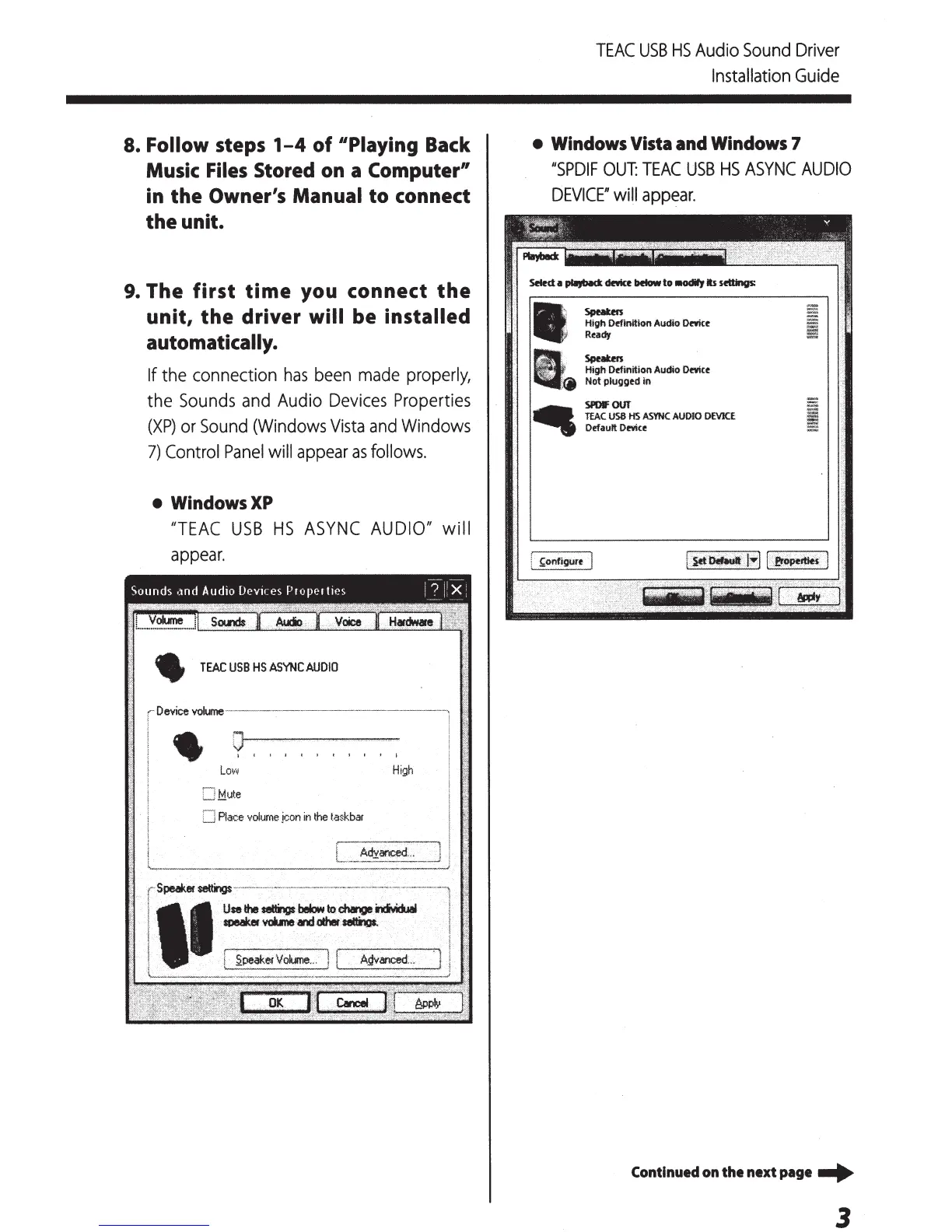
9.
The
first
time
you connect
the
unit,
the
driver will be installed
automatically.
If
the connection
has
been
made
properly,
the
Sounds
and
Audio
Devices
Properties
(XP)
or
Sound
(Windows
Vista
and
Windows
7)
Control
Panel
will
appear
as
follows.
WindowsXP
1/TEAC
USB
HS
ASYNC
AUDIOI/
will
appear.
TEAC
USB
HS
ASYNC
AUDIO
rDevice
volume------·---~--~-------"'
1 l
Low
High
..JM.ute
Place
volume
jc:on
in
the
taskbar
>-'
......
__
-
settings>>'"'''
M>-~-"''"""'''>--'><>•M>,W-'>>>>>'>'<'M'>~>->>M'-'''">'-'-~'·~'''''''''""'~«<>>•-'-~
Use
the
setti9
below
to
chatvt
i1c:iYd.aal
speaker
vobne
and
other
telliagt.
TEAC
USB
HS
Audio
Sound
Driver
Installation
Guide
Windows
Vista
and
Windows
7
1/SPDIF
OUT:
TEAC
USB
HS
ASYNC
AUDIO
DEVICE"
will
appear.
Sputm
High Offtnition Audio
Omu
Ready
Speatm
High Definition Audio
Omce
Not
plugged
in
SPDIFOUT
.
TEAC
USB
HS
ASYNC
AUOJO
DEVICE
OefaurtOmce
Continued
on
the next page -+
3

Other manuals for Teac A-H01

Related product manuals