6
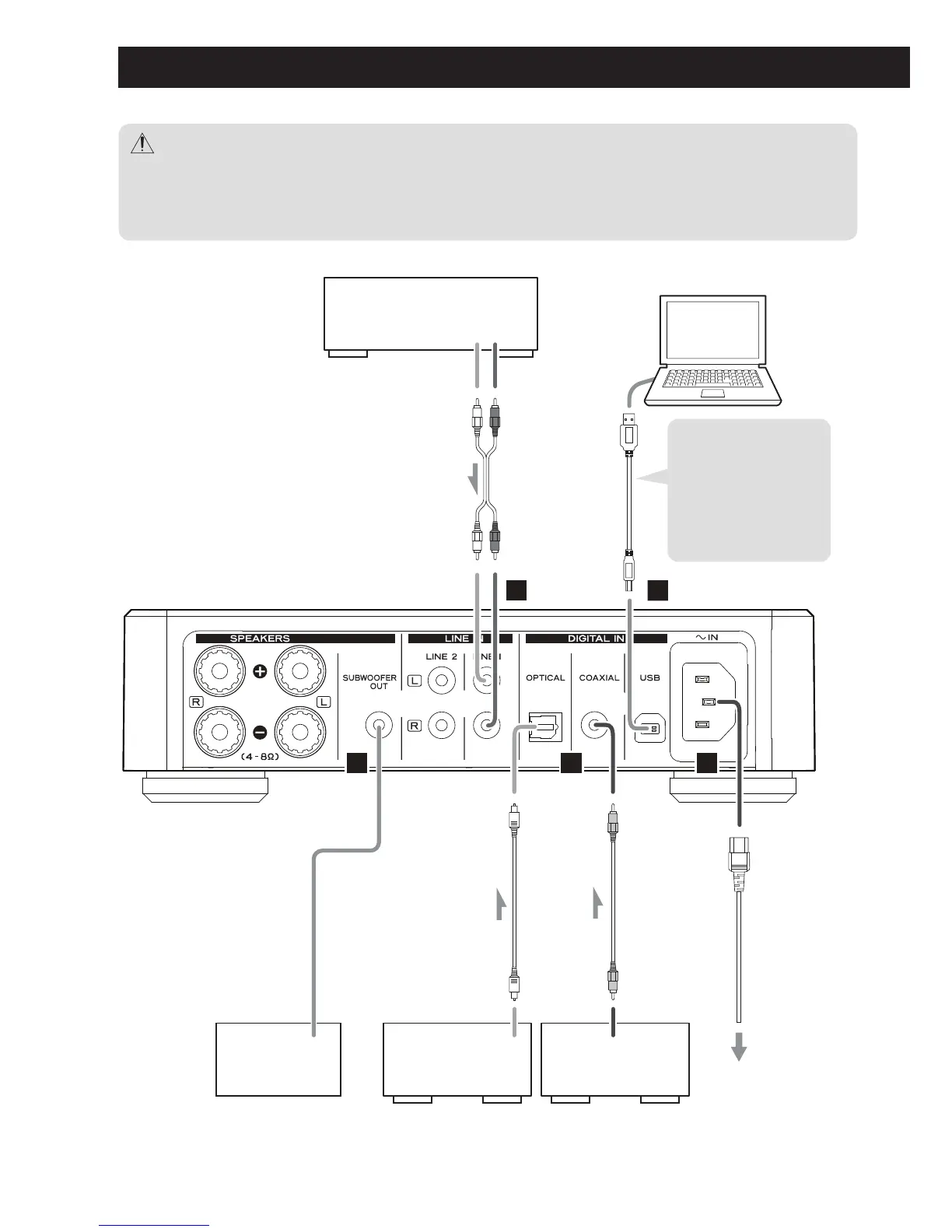
A B
LR
DC
E
Install the dedicated
TEAC driver software
on your computer
before connecting
the TEAC A-H01
unit to the
computer. (page 12)
Computer
Cassette deck, CD player, etc.
LINE OUT
DIGITAL OUT
(OPTICAL)
DIGITAL OUT
(COAXIAL)
Digital audio
output device
Digital audio
output device
Subwoofer
Connection
terminal
or audio input
USB cable
RCA cable
Optical digital cable
RCA digital coaxial cable
Wall socket
Provided power cord
After all connections are complete, connect the power cord’s plug to the AC wall socket.
<
Read the instructions of each device that you intend to use with this unit.
<
To avoid hum and noise, do not bundle the connection cords.
<
Be sure to connect each plug securely.
Connections



 To Next Page