EasyManua.ls Logo

Teac A-H01 - Page 21

Teac A-H01
27 pages
Print Icon
To Next Page IconTo Next Page
To Previous Page IconTo Previous Page
Loading...
TEAC
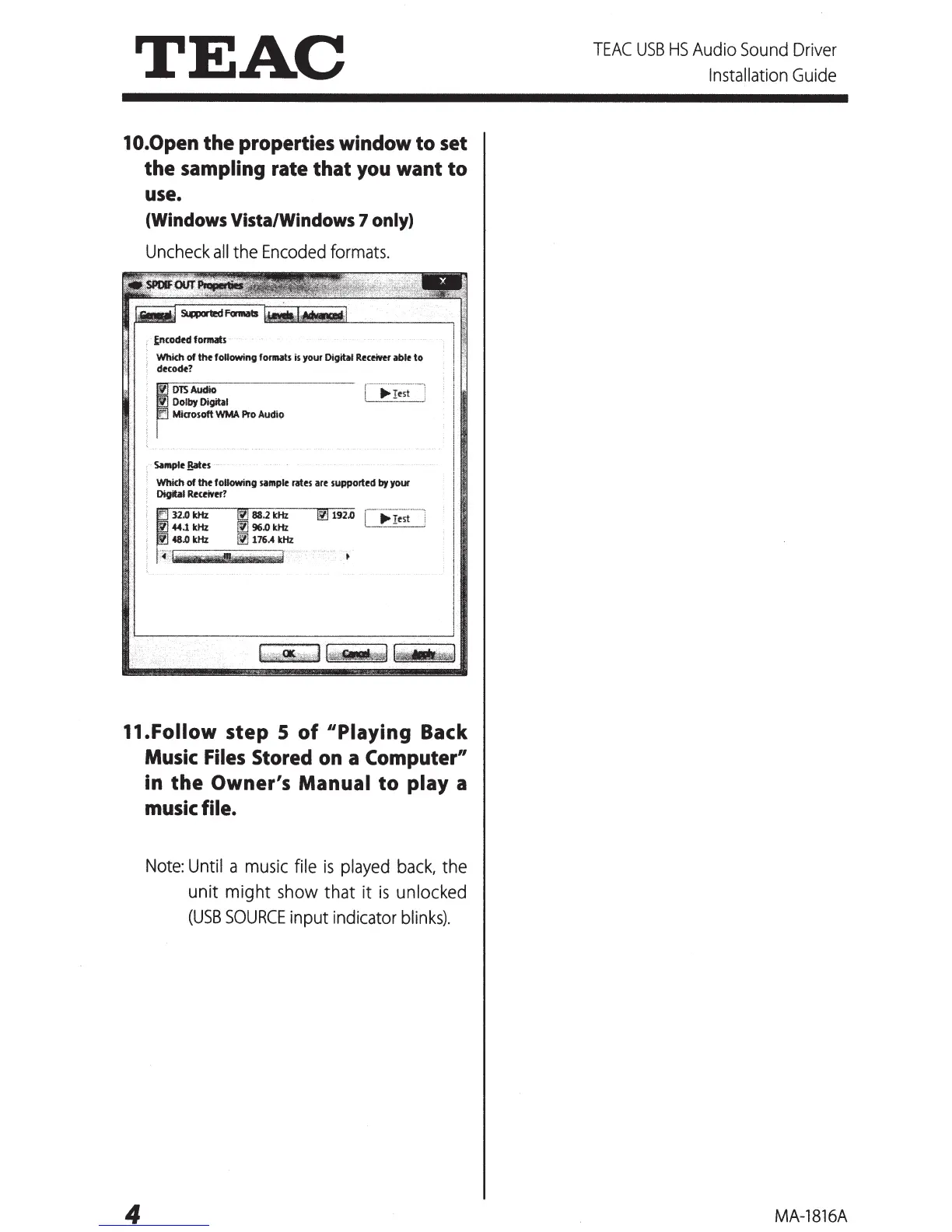
10.0pen the properties window to set
the sampling rate that
you
want to
use.
(Windows
Vista/Windows 7
only)
Uncheck
all
the
Encoded
formats.
~ncodN
formats
·
Whkh
of
the following formats is your Digital Receiftr able
to
decode?
fl
DTSAudio
Dolby Digital
Microsoft
WMA
Pro Audio
Sample Bates
Which
of
the
following sample rates are
supported
by
your
Digital Receiver?
31.0kHz
44.1
kHz
48.0 kHz
11.Follow step S
of
"Playing Back
Music
Files
Stored
on
a Computer"
in
the
Owner's Manual
to
play a
music
file.
4
Note:
Until a
music
file
is
played
back,
the
unit might
show
that it
is
unlocked
(USB
SOURCE
input indicator
blinks).
TEAC
USB
HS
Audio
Sound
Driver
Installation
Guide
MA-1816A

Other manuals for Teac A-H01

Related product manuals