EasyManua.ls Logo

Teac AG-500 - Operations; Initial Setup and Basic Operations; Radio Reception; Audio Source Playback

Teac AG-500
14 pages
Print Icon
To Next Page IconTo Next Page
To Previous Page IconTo Previous Page
Loading...
Operations
SIMPLIFIED
OPERATING
PROCEDURE
ne
When
operating
your
unit
for
the
first
time,
follow
these
simplified
instructions.
1,
Set
the
VOLUME
control
to
the
“0”
position.
2.
Set
the
LOUDNESS
control
to
the
OFF
position.
3.
Set
the
BASS,
TREBLE
and
BALANCE
controls
to
their
center
(click)
positions.
4,
Press
the
POWER
button
to
turn
the
power
on.
5.
Select
the
required
input
source
by
pressing
one
of
the
FUNCTION
buttons.
6.
Select
the
speaker
system
to
be
used
with
the
SPEAKERS
select
buttons.
For
more
detailed
information,
refer
to
@
SPEAKERS
select
buttons
on
page
8.
7.
Start
playing
the
source
component,
and
gradually
turn
up
the
volume
to
the
required
level
with
the
VOLUME
control.
LISTENING
TO
RADIO
BROADCASTS
.
Press
the
POWER
button
to
ON.
.
Press
the
TUNER
button,
then
select
the
required
band
FM1,
FM2
or
AM
by
pressing
either
the
AM
or
FM
button.
Pressing
the
FM
button
repeatedly
alternates
between
the
FM1
and
FM2
bands.
3.
Tune
to
the
desired
station
using
the
AUTO
or
MANUAL
tuning
modes
or
by
pressing
STATION
MEMORY
button
corresponding
to
the
required
channel.
For
detailed
information
on
this,
refer
to
the
“TUNING
METHODS”
section
below.
4.
Adjust
the
volume
and
tone
as
required
using
the
VOLUME,
BASS
and
TREBLE
controls.
no
TUNING
METHODS
Following
step
2
in
“LISTENING
TO
RADIO
BROADCASTS”’
above,
tune
to
the
required
station
using
one
of
three
tuning
methods;
auto
tuning,
manual
tuning
and
preset
tuning.
Auto
Tuning:
First
press
the
TUNING
MODE
button
(the
AUTO
indicator
lights)
to
set
to
the
Auto
Tuning
mode.
Check
that
the
AUTO
indicator
is
lit
and
press
the
TUNING
UP
or
DOWN
button.
The
next
station
broadcasting
at
a
higher
or
lower
frequency
is
automatically
located
and
tuned
in.
During
tuning,
interstation
noise
will
be
eliminated
automatically.
When
the
upper
limit
frequency
in
each
band
is
reached,
the
frequency
displayed
changes
to
the
lower
limit
frequency,
then
tuning
starts
again
upward.
When
the
lower
limit
frequency
is
reached,
tuning
restarts
downward
from
the
top
frequency.
Manual
Tuning:
The
Manual
Tuning
mode
is
normally
used
to
tune
to
stations
broadcasting
weak
signals.
Press
the
TUNING
MODE
button
again
(so
that
the
AUTO
indicator
goes
out)
to
set
to
the
Manual
mode.
When
the
TUNING
UP
or
DOWN
button
is
pressed,
the
frequency
is
changed
up
or
down
at
fixed
steps
in
the
each
band.
Holding
the
UP
or
DOWN
button
pressed
for
more
than
0.2
seconds
causes
the
frequency
to
change
continuously
upward
or
downward.
Preset
Tuning:
The
AG-500
has
a
station
preset
memory
which
is
convenient
when
there
are
many
radio
stations
which
you
listen
to.
Preset
tuning
allows
you
to
store
the
frequencies
of
up
to
24
of
these
stations
in
the
STATION
MEMORY
buttons
(8
in
the
FM1
band,
8
in
the
FM2
band
and
8
in
the
AM
band).
Once
these
stations
have
been
stored
in
memory,
they
are
retained
indefinitely
unless
the
power
cord
of
the
unit
is
disconnected.
Refer
to
“Memory
Backup
Function”
on
page
9.
Therefore,
it
is
not
necessary
to
re-enter
the
preset
stations
every
time
the
power
is
turned
on.
Setting
the
preset
memory
1.
Tune
to
a
required
station
using
the
AUTO
or
MANUAL
tuning
mode
as
described
above.
2.
To
store
a
station
into
the
preset
memory,
press
the
MEMORY
button.
The
MEMORY
indicator
will
light
for
approximately
5
seconds.
While
the
MEMORY
indicator
is
lit,
press
one
of
the
STATION
MEMORY
buttons.
Recalling
the
preset
memory
To
recall
a
preset
station,
press
the
STATION
MEMORY
button
corresponding
to
the
required
station.
LISTENING
TO
RECORDS
OR
©
COMPACT
DISCS
ea ee
.
Press
the
POWER
button
to
ON.
2.
Press
the
PHONO
or
CD/VCR
FUNCTION
button.
3.
Operate
the
turntable
or
CD
player
to
start
playback.
4.
Adjust
the
volume
and
tone
as
desired
using
the
VOLUME,
BASS
and
TREBLE
controls.
TAPE
PLAYBACK
1.
Press
the
POWER
button
to
ON.
2.
Press
the
TAPE/DAT
MONITOR
button.
~e—
3.
Operate
your
tape
deck
for
playback
according
to
the
tape
deck’s
instruction
manual.
4.
Adjust
the
volume
and
tone
as
required
using
the
VOLUME,
BASS
and
TREBLE
controls.
TAPE
RECORDING
Press
the
POWER
button
to
ON.
.
Select
the
required
recording
source
with
the
FUNCTION
selector
buttons;
CD/VCR,
PHONO
or
TUNER.
If
the
TUNER
button
is
selected,
tune
to
the
required
station.
3.
Play
back
the
program
source.
4.
Operate
your
tape
deck
for
recording
according
to
the
tape
deck’s
manual.
eit
Remote
Control
Unit
The
UR-300
Remote
Control
Unit
provided
allows
the
receiver
(and
the
entire
system,
if
it
consists
of
TEAC
components)
to
be
operated
from
a
distance.
With
it,
you
can
control
most
of
the
functions
of
the
receiver
and
other
components
included
in
the
system
from
your
listening
position.
When
operating
with
the
remote
control
unit,
point
the
top
of
the
remote
control
unit
at
the
REMOTE
SENSOR
window
of
the
receiver
within
the
effective
range
for
remote
control
operation
shown
in
the
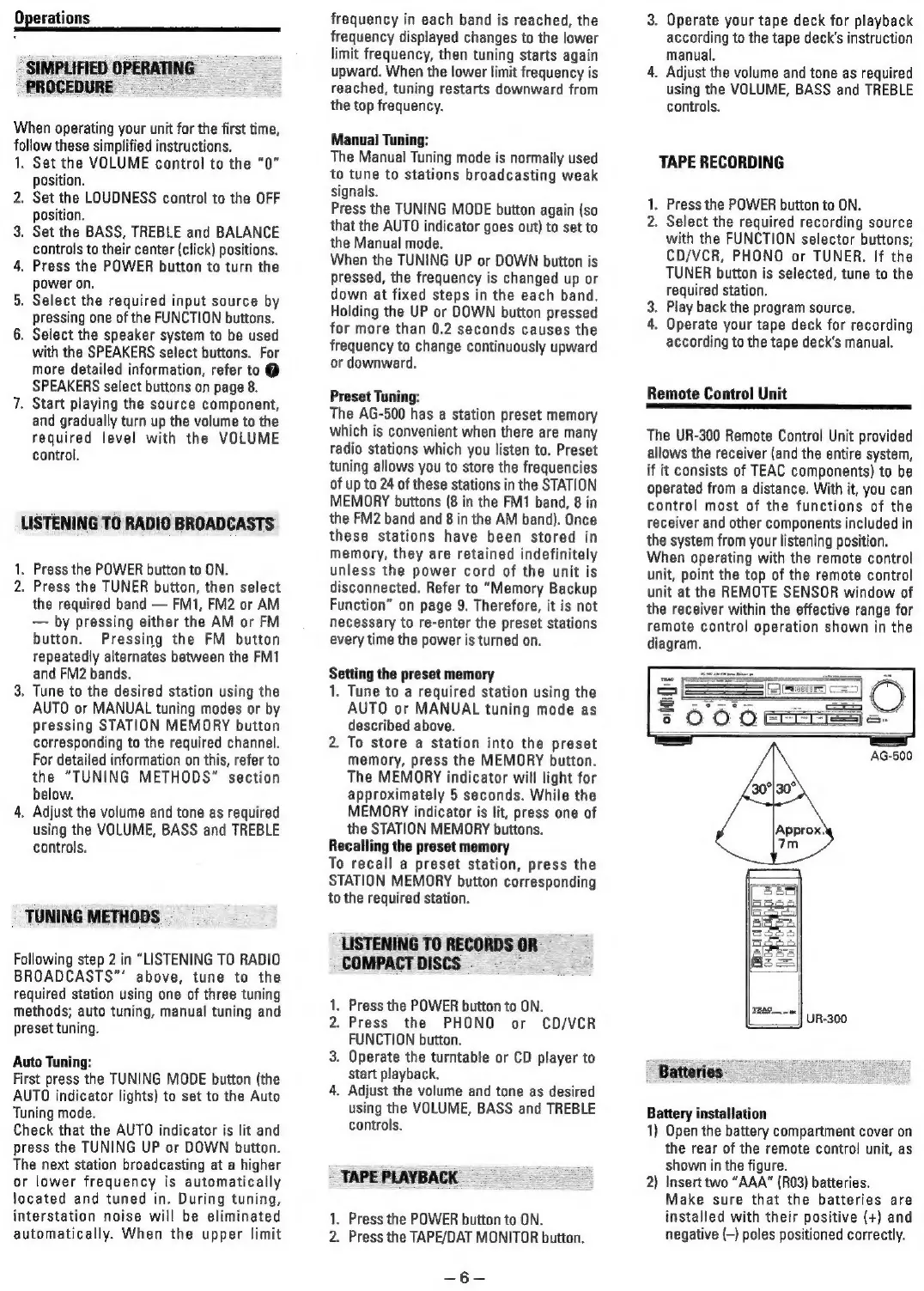
diagram.
UR-300
Batteries
Battery
installation
1)
Open
the
battery
compartment
cover
on
the
rear
of
the
remote
control
unit,
as
shown
in
the
figure.
2)
Insert
two
“AAA”
(R03)
batteries.
Make
sure
that
the
batteries
are
installed
with
their
positive
(+)
and
negative
(-)
poles
positioned
correctly.

Related product manuals