EasyManua.ls Logo

Teac AG-500 - Page 7

Teac AG-500
14 pages
Print Icon
To Next Page IconTo Next Page
To Previous Page IconTo Previous Page
Loading...
3)
Replace
the
battery
compartment
cover.
Battery
replacement
if
you
notice
that
the
distance
between
the
remote
control
unit
and
the
receiver
within
which
correct
operation
is
possible
becomes
shorter,
it
indicates
that
the
batteries
are
nearly
exhausted.
In
this
case,
replace
both
batteries
with
new
ones.
Precautions
concerning
batteries
©
Be
sure
to
insert
the
batteries
with
correct
positive
(+)
and
negative
(-)
polarities
as
indicated
in
the
battery
compartment.
©
Do
not
use
an
old
battery
and
a
new
battery
at
the
same
time.
©
Use
batteries
of
the
same
type.
Never
use
batteries
of
different
types
together,
even
when
they
have
the
same
shape.
@
Both
rechargeable
and
non-
rechargeable
batteries
can
be
used.
Refer
to
the
precautions
on
their
labels
before
use.
©
Do
not
heat
or
disassemble
batteries
and
never
dispose
of
old
batteries
by
throwing
them
in
a
fire.
Cautions
on
Use
of
the
Remote
Control
Unit
e
Even
if
the
remote
control
unit
is
Operated
within
the
effective
range,
remote
control
operation
may
be
impossible
if
there
is
any
obstacle
between
the
receiver
and
the
remote
control
unit
or
if it
is
outside
the
effective
angle.
If
the
remote
control
unit
is
operated
near
other
appliances
which
generate
infrared
rays,
or
if
other
remote
controls
using
infrared
rays
are
used
near
the
receiver,
it
may
operate
incorrectly.
The
opposite
is
also
true,
and
other
appliances
may
work
incorrectly.
©
Do
not
place
books
or
other
objects
on
the
remote
control
unit
as
they
could
press
its
buttons
and
the
batteries
could
become
exhausted
more
quickly.
@
When
the
remote
control
unit
is
not
to
be
used
for
an
extended
period
(more
than
a
month),
remove
its
batteries
to
prevent
them
from
leaking.
If
they
leak,
wipe
away
the
liquid
inside
the
battery
compartment
and
replace
the
batteries
with
new
ones.
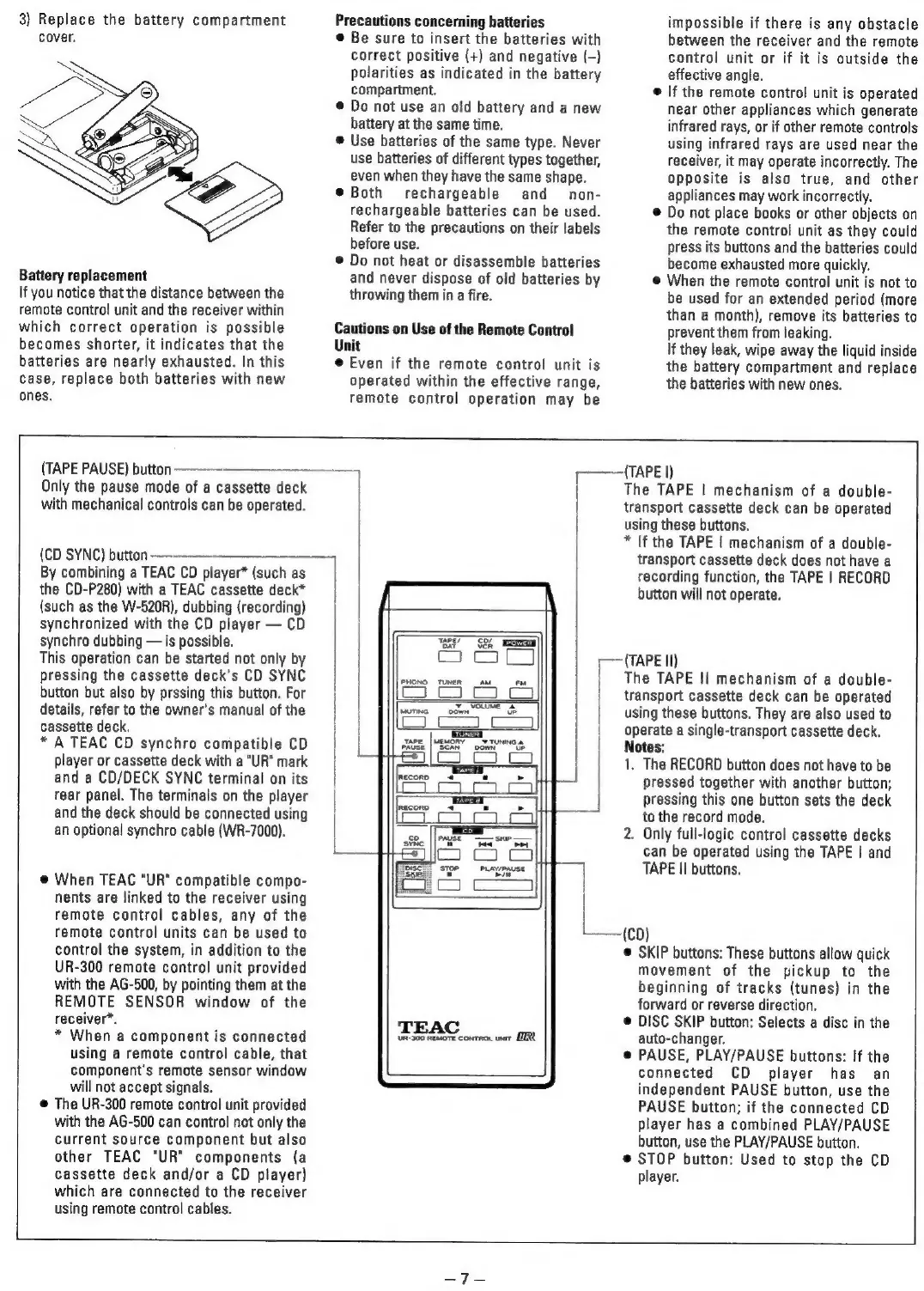
(TAPE
PAUSE)
button
——-____-
Only
the
pause
mode
of
a
cassette
deck
with
mechanical
controls
can
be
operated.
(CD
SYNC)
button
—-——-
By
combining
a
TEAC
CD
player*
(such
as
the
CD-P280)
with
a
TEAC
cassette
deck*
(such
as
the
W-520R),
dubbing
(recording)
synchronized
with
the
CD
player
CD
synchro
dubbing
is
possible.
This
operation
can
be
started
not
only
by
pressing
the
cassette
deck's
CD
SYNC
button
but
also
by
prssing
this
button.
For
details,
refer
to
the
owner's
manual
of
the
cassette
deck.
*
A
TEAC
CD
synchro
compatible
CD
player
or
cassette
deck
with
a
"UR"
mark
and
a
CD/DECK
SYNC
terminal
on
its
rear
panel.
The
terminals
on
the
player
and
the
deck
should
be
connected
using
an
optional
synchro
cable
(WR-7000).
@
When
TEAC
"UR"
compatible
compo-
nents
are
linked
to
the
receiver
using
remote
control
cables,
any
of
the
remote
control
units
can
be
used
to
control
the
system,
in
addition
to
the
UR-300
remote
control
unit
provided
with
the
AG-500,
by
pointing
them
at
the
REMOTE
SENSOR
window
of
the
receiver*.
*
When
a
component
is
connected
using
a
remote
control
cable,
that
component's
remote
sensor
window
will
not
accept
signals.
@
The
UR-300
remote
control
unit
provided
with
the
AG-500
can
control
not
only
the
current
source
component
but
also
other
TEAC
"UR"
components
(a
cassette
deck
and/or
a
CD
player)
which
are
connected
to
the
receiver
using
remote
control
cables.
notell
TAPE?
CO)
ae
bat
See
=a
PHONO
TUNER
AM
FM
|
|
|
Le
PLAY/PAUSE
ern
TEAC
Ur-300
REMOTE
conTRot
unr
ER
———{TAPE
|)
The
TAPE
|
mechanism
of
a
double-
transport
cassette
deck
can
be
operated
using
these
buttons.
*
lf
the
TAPE
|
mechanism
of
a
double-
transport
cassette
deck
does
not
have
a
recording
function,
the
TAPE
|
RECORD
button
will
not
operate.
—~(TAPE
II)
The
TAPE
Il
mechanism
of
a
double-
transport
cassette
deck
can
be
operated
using
these
buttons.
They
are
also
used
to
operate
a
single-transport
cassette
deck.
Notes:
1.
The
RECORD
button
does
not
have
to
be
pressed
together
with
another
button;
pressing
this
one
button
sets
the
deck
to
the
record
mode.
2.
Only
full-logic
control
cassette
decks
can
be
operated
using
the
TAPE
|
and
TAPE
II
buttons.
—(CD)
©
SKIP
buttons:
These
buttons
allow
quick
movement
of
the
pickup
to
the
beginning
of
tracks
(tunes)
in
the
forward
or
reverse
direction.
©
DISC SKIP
button:
Selects
a
disc
in
the
auto-changer.
©
PAUSE,
PLAY/PAUSE
buttons:
If
the
connected
CD
player
has
an
independent
PAUSE
button,
use
the
PAUSE
button;
if
the
connected
CD
player
has
a
combined
PLAY/PAUSE
button,
use
the
PLAY/PAUSE
button.
©
STOP
button:
Used
to
stop
the
CD
player.

Related product manuals