EasyManua.ls Logo

Teac AG-620 - Page 11

Teac AG-620
39 pages
Print Icon
To Next Page IconTo Next Page
To Previous Page IconTo Previous Page
Loading...
REMOTE
CONTROL
UNIT
Using
the
provided
UR-401
Remote
Control
Unit,
the
AG-620
Receiver
and
some
other
TEAC
components
used
with
it
can
be
controlled
from
your
listening
position.
Remote
control
of
other
TEAC
components
using
the
UR-401
is
explained
later,
on
page
17.
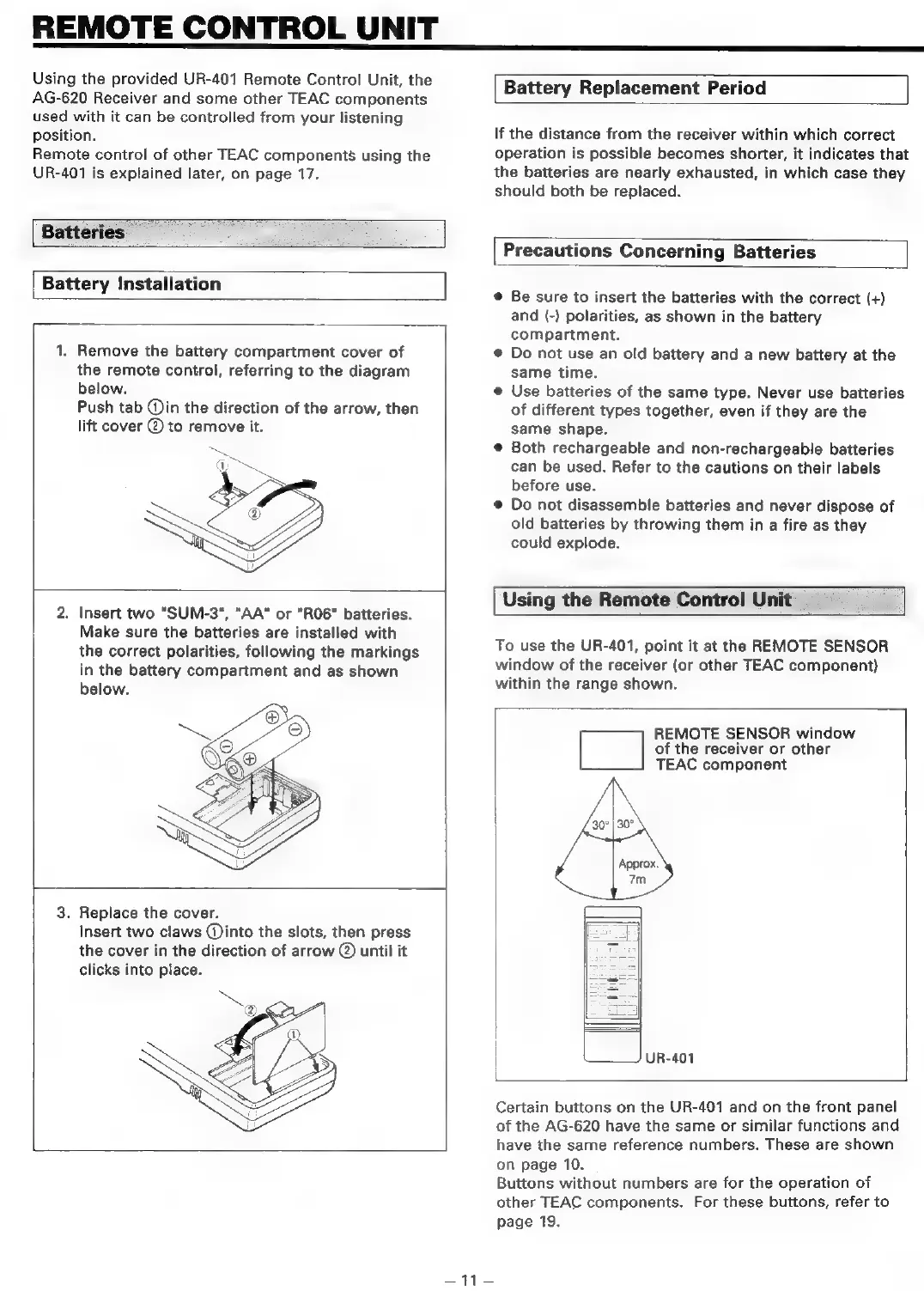
Batteries
Battery
Installation
1,
Remove
the
battery
compartment
cover
of
the
remote
control,
referring
to
the
diagram
below.
Push
tab
Qin
the
direction
of
the
arrow,
then
lift
cover
@
to
remove
it.
2.
Insert
two
"SUM-3",
"AA"
or
"R06"
batteries.
Make
sure
the
batteries
are
installed
with
the
correct
polarities,
following
the
markings
in
the
battery
compartment
and
as
shown
below.
3.
Replace
the
cover.
Insert
two
claws
(into
the
slots,
then
press
the
cover
in
the
direction
of
arrow
@
until
it
clicks
into
place.
ae
ee
Battery
Replacement
Period
If
the
distance
from
the
receiver
within
which
correct
operation
is
possible
becomes
shorter,
it
indicates
that
the
batteries
are
nearly
exhausted,
in
which
case
they
should
both
be
replaced.
Precautions
Concerning
Batteries
©
Be
sure
to
insert
the
batteries
with
the
correct
(+)
and
(-)
polarities,
as
shown
in
the
battery
compartment.
@
Do
not
use
an
old
battery
and
a
new
battery
at
the
same
time.
e
Use
batteries
of
the
same
type.
Never
use
batteries
of
different
types
together,
even
if
they
are
the
same
shape.
@
Both
rechargeable
and
non-rechargeable
batteries
can
be
used. Refer
to
the
cautions
on
their
labels
before
use.
©
Do
not
disassemble
batteries
and
never
dispose
of
old
batteries
by
throwing
them
in
a
fire
as
they
could
explode.
Using
the
Remote
Control
Unit
To
use
the
UR-401,
point
it
at
the
REMOTE
SENSOR
window
of
the
receiver
(or
other
TEAC
component)
within
the
range
shown.
REMOTE
SENSOR
window
[|
of
the
receiver
or
other
TEAC
component
Approx.
7m
UR-401
Certain
buttons
on
the
UR-401
and
on
the
front
panel
of
the
AG-620
have
the
same
or
similar
functions
and
have
the
same
reference
numbers.
These
are
shown
on
page
10.
Buttons
without
numbers
are
for
the
operation
of
other
TEAC
components.
For
these
buttons,
refer
to
page
19.

Related product manuals