EasyManua.ls Logo

Teac AG-620 - Page 12

Teac AG-620
39 pages
Print Icon
To Next Page IconTo Next Page
To Previous Page IconTo Previous Page
Loading...
Cautions
on
Use
of
the
Remote
Control
Unit
Even
when
the
remote
control
unit
is
used
within
the
range
shown,
if
there
is
any
obstacle
between
it
and
the
receiver,
operation
will
be
impossible.
If
you
have
other
appliances
controlled
by
infrared
signals
installed
in
the
same
room
as
your
AG-620,
these could
be
operated
erroneously
by
signals
from
the
remote
control.
(TEAC
cannot
take
responsibility
for
any
incidental
or
consequential
damage
this
may
cause.)
Conversely,
their
remote
controls
could
cause
the
AG-620
to
operate
erroneously.
Be
careful
not
to
place
books,
etc.
on
the
remote
control
unit.
These
could
press
its
buttons
in
which
case
its
batteries
would
become
exhausted
more
quickly.
When
the
remote
control
unit
is
not
to
be
used
for
more
than
a
month
or
so,
remove
the
batteries
so
they
cannot
leak
and
cause
damage.
If
they
do
leak,
clean
the
battery
compartment
by
wiping
with
a
clean
tissue,
then
insert
new
batteries.
a
OPERATIONS
The
following
instructions
apply
throughout
the
“OPERATIONS"
sections
unless
otherwise
noted.
@
To
simplify
explanations,
they
use
the
names
of
buttons
and
controls
on
the
front
panel,
making
no
mention
of
the
use
of
remote
control
unit.
Be
sure
the
TAPE
2
MONITOR
button
is
set
to
OFF
(the
TAPE
MONITOR
indicator
will
not
Hereafter,.this
instruction
will
not
be
repeated.
|
Basic
Operations
——---—6)
a
~
_
~
Source
component
.
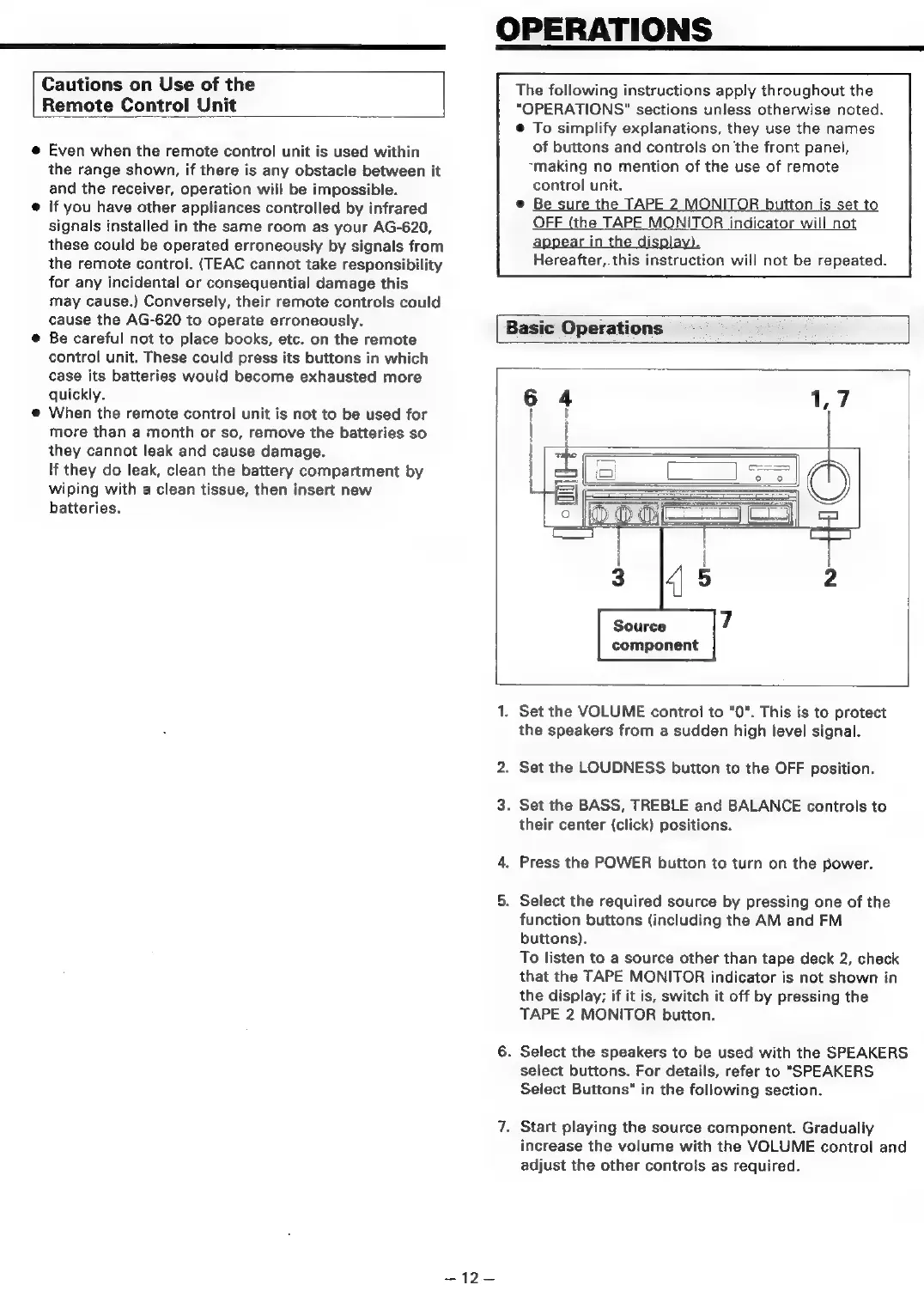
Set
the
VOLUME
control
to
"0".
This
is
to
protect
the
speakers
from
a
sudden
high
level
signal.
.
Set
the
LOUDNESS
button
to
the
OFF
position.
.
Set
the
BASS,
TREBLE
and
BALANCE
controls
to
their
center
(click)
positions.
.
Press
the
POWER
button
to
turn
on
the
power.
.
Select
the
required
source
by
pressing
one
of
the
function
buttons
(including
the
AM
and
FM
buttons).
To
listen
to
a
source
other
than
tape
deck
2,
check
that
the
TAPE
MONITOR
indicator
is
not
shown
in
the
display;
if
it
is,
switch
it
off
by
pressing
the
TAPE
2
MONITOR
button.
.
Select
the
speakers
to
be
used
with
the
SPEAKERS
select
buttons.
For
details,
refer
to
"SPEAKERS
Select
Buttons"
in
the
following
section.
.
Start
playing
the
source
component.
Gradually
increase
the
volume
with
the
VOLUME
control
and
adjust
the
other
controls
as
required.

Related product manuals