EasyManua.ls Logo

Teac AG-620 - Page 14

Teac AG-620
39 pages
Print Icon
To Next Page IconTo Next Page
To Previous Page IconTo Previous Page
Loading...
Direct
Tuning
Preset
Tuning
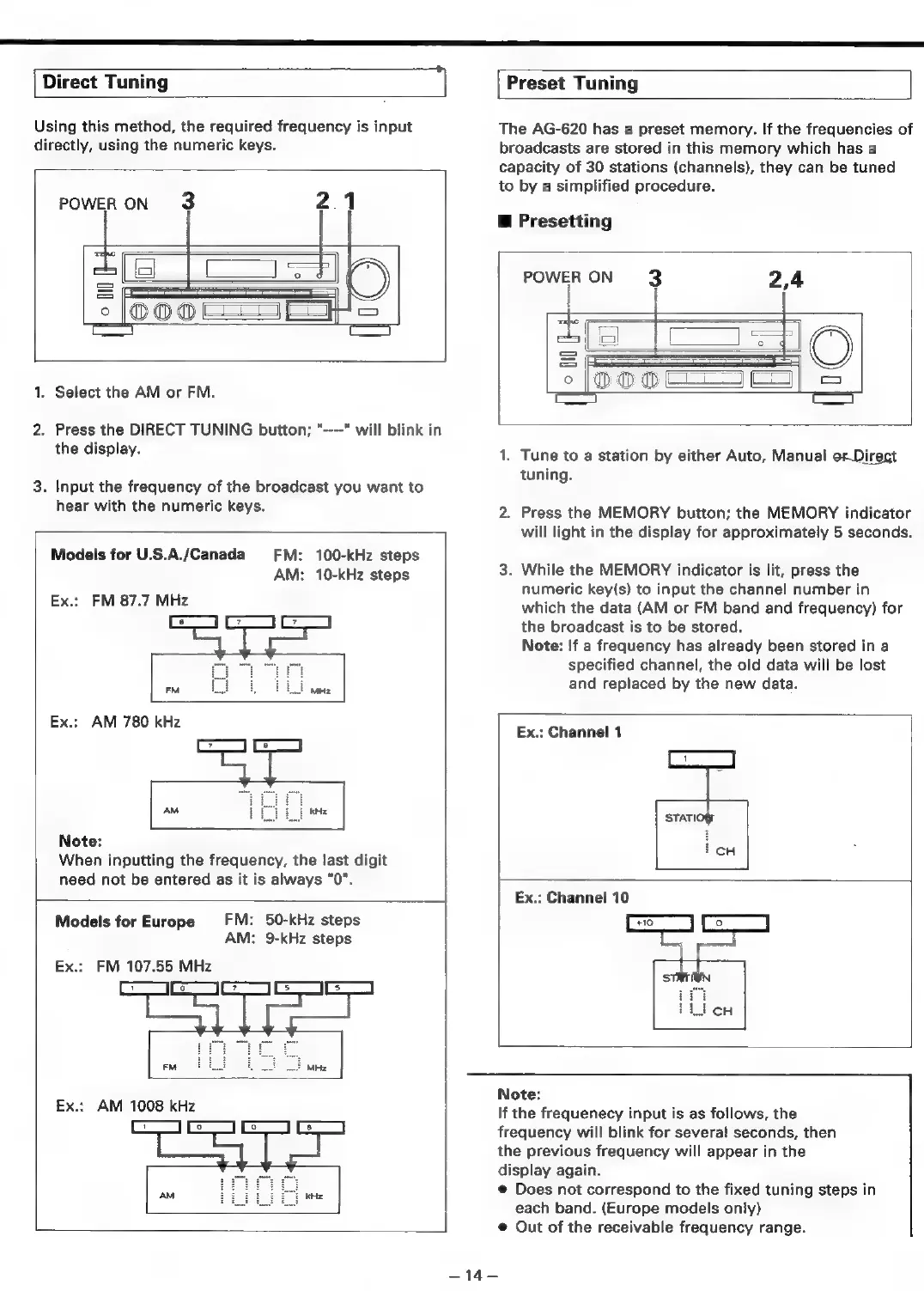
Using
this
method,
the
required
frequency
is
input
directly,
using
the
numeric
keys.
POWER
ON
3
2.1
i=
S
;
°°
(OOO
LJ
Lats
=
1.
Select
the
AM
or
FM.
2.
Press
the
DIRECT
TUNING
button;
"----"
will
blink
in
the
display.
3.
Input
the
frequency
of
the
broadcast
you
want
to
hear
with
the
numeric
keys.
Models
for
U.S.A./Canada
FM:
100-kHz
steps
AM:
10-kHz
steps
Ex.:
FM
87.7
MHz
Ex.:
AM
780 kHz
Note:
When
inputting
the
frequency,
the
last
digit
need
not
be
entered
as
it
is
always
"0".
FM:
50-kHz
steps
AM:
9-kHz
steps
Models
for
Europe
Ex.:
FM
107.55
MHz
ae
Ex.:
AM
1008
kHz
ae
The
AG-620
has
a
preset
memory.
If
the
frequencies
of
broadcasts
are
stored
in
this
memory
which
has
a
capacity
of
30
stations
(channels),
they
can
be
tuned
to
by
a
simplified
procedure.
@
Presetting
POWER
ON
3
2,4
|
|
+
aa
co)
i
S
°
1.
Tune
to
a
station
by
either
Auto,
Manual
orDirect
tuning.
2.
Press
the
MEMORY
button;
the
MEMORY
indicator
will
light
in
the
display
for
approximately
5
seconds.
3.
While
the
MEMORY
indicator
is
lit,
press
the
numeric
key(s)
to
input
the
channel
number
in
which
the
data
(AM
or
FM
band
and
frequency)
for
the
broadcast
is
to
be
stored.
Note:
If
a
frequency
has
already
been
stored
in
a
specified
channel,
the
old
data
will
be
lost
and
replaced
by
the
new
data.
Ex.:
Channel
1
Note:
If
the
frequenecy
input
is
as
follows,
the
frequency
will
blink
for
several
seconds,
then
the
previous
frequency
will
appear
in
the
display
again.
@
Does
not
correspond
to
the
fixed
tuning
steps
in
each
band.
(Europe
models
only)
@
Out
of
the
receivable
frequency
range.
=
146

Related product manuals