EasyManua.ls Logo

Teac AG-620 - Page 16

Teac AG-620
39 pages
Print Icon
To Next Page IconTo Next Page
To Previous Page IconTo Previous Page
Loading...
Recording
Tapes
Note:
If
two
TEAC
tape
decks
are
used
in
the
system,
the
use
of
the
UR-401
remote
control
unit
may
cause
the
two
decks
to
operate
simultaneously.
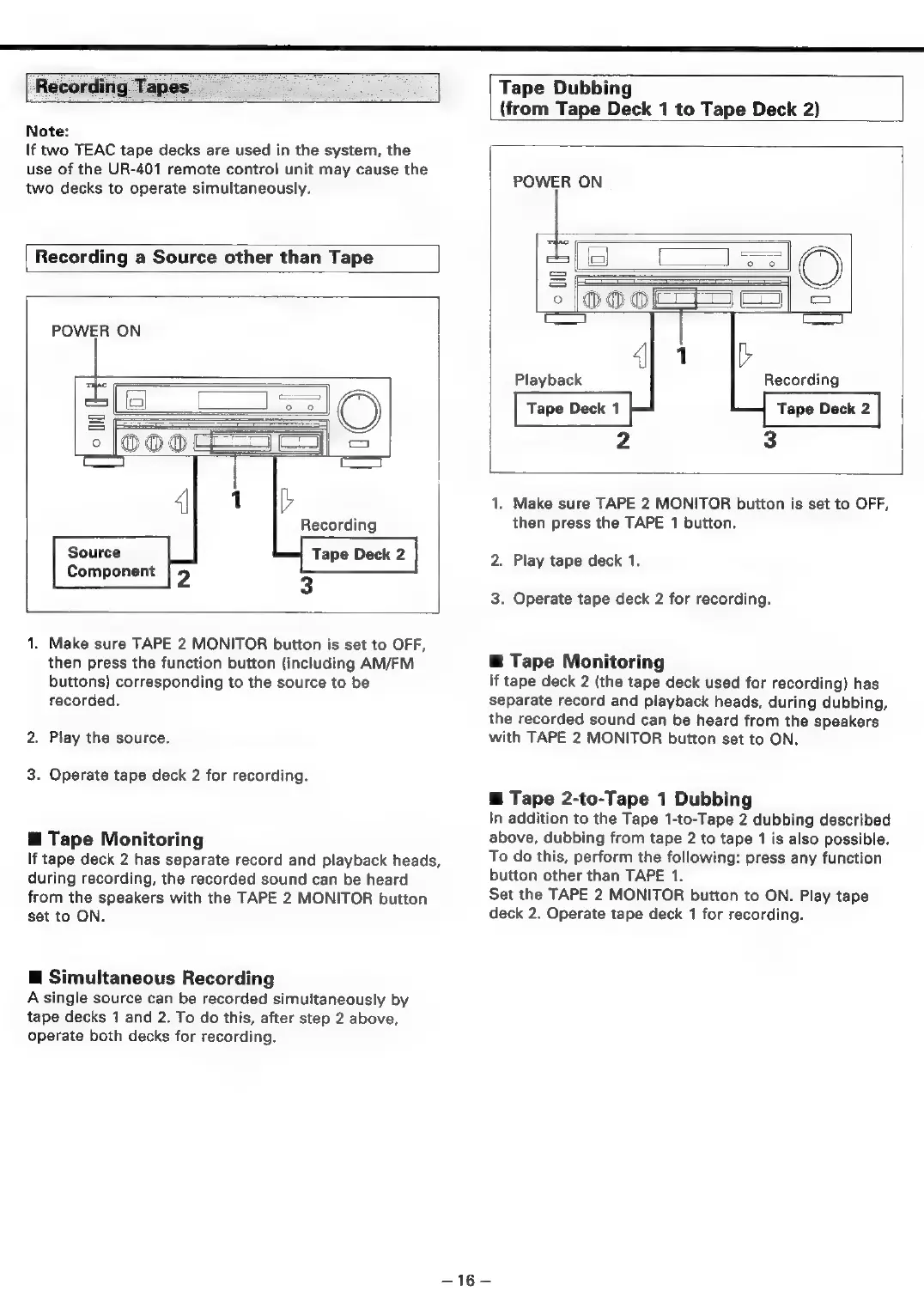
Recording
a
Source
other
than
Tape
POWER
ON
ae
=
°
Source
Component
1.
Make
sure
TAPE
2
MONITOR
button
is
set
to
OFF,
then
press
the
function
button
(including
AM/FM
buttons)
corresponding
to
the
source
to
be
recorded.
2.
Play
the
source.
3.
Operate
tape
deck
2
for
recording.
@
Tape
Monitoring
If
tape
deck
2
has
separate
record
and
playback
heads,
during
recording,
the
recorded
sound
can
be
heard
from
the
speakers
with
the
TAPE
2
MONITOR
button
set
to
ON.
@
Simultaneous
Recording
A
single
source
can
be
recorded
simultaneously
by
tape
decks
1
and
2.
To
do
this,
after
step
2
above,
operate
both
decks
for
recording.
Tape
Dubbing
(from
Tape
Deck
1
to
Tape
Deck
2)
POWER
ON
IC)
fies)
1.
Make
sure
TAPE
2
MONITOR
button
is
set
to
OFF,
then
press
the
TAPE
1
button.
2.
Play
tape
deck
1.
3.
Operate
tape
deck
2
for
recording.
@
Tape
Monitoring
If
tape
deck
2
(the
tape
deck
used
for
recording)
has
separate
record
and
playback
heads,
during
dubbing,
the
recorded
sound
can
be
heard
from
the
speakers
with
TAPE
2
MONITOR
button
set
to
ON.
@
Tape
2-to-Tape
1
Dubbing
In
addition
to
the
Tape
1-to-Tape
2
dubbing
described
above,
dubbing
from
tape
2
to
tape
1
is
also
possible.
To
do
this,
perform
the
following:
press
any
function
button
other
than
TAPE
1.
Set
the
TAPE
2
MONITOR
button
to
ON.
Play
tape
deck
2.
Operate
tape
deck
1
for
recording.
—16—

Related product manuals