EasyManua.ls Logo

Teac AG-620 - Page 19

Teac AG-620
39 pages
Print Icon
To Next Page IconTo Next Page
To Previous Page IconTo Previous Page
Loading...
Buttons
for
the
Operation
of
Other
TEAC
Components
:
TAPE
1
MONITOR
CO/VIDEO
PHONO
1
Funerion
———
1
2
3
AM
eM
WENORY
MEUORY
SHH
[
AUTO/MANU
DIRECT
pe
a
a
sr
|
+10
0
Memory
cow
SNUB
patise
|pecono
.
>
3]
Uf
sfc
|heconD
.
>
[4]
2
TEAC
UR-401
REMOTE
CONTROL
UNIT
HR
Remote
Control
Unit
(UR-401)
Note:
Do
not
confuse
"TAPE
I"
as
described
in
this
section
and
“TAPE
1"
which
means
the
tape
deck
connected
to
the
TAPE
1
terminals.
The
same
thing
also
applies
to
"TAPE
II"
and
“TAPE
2".
i
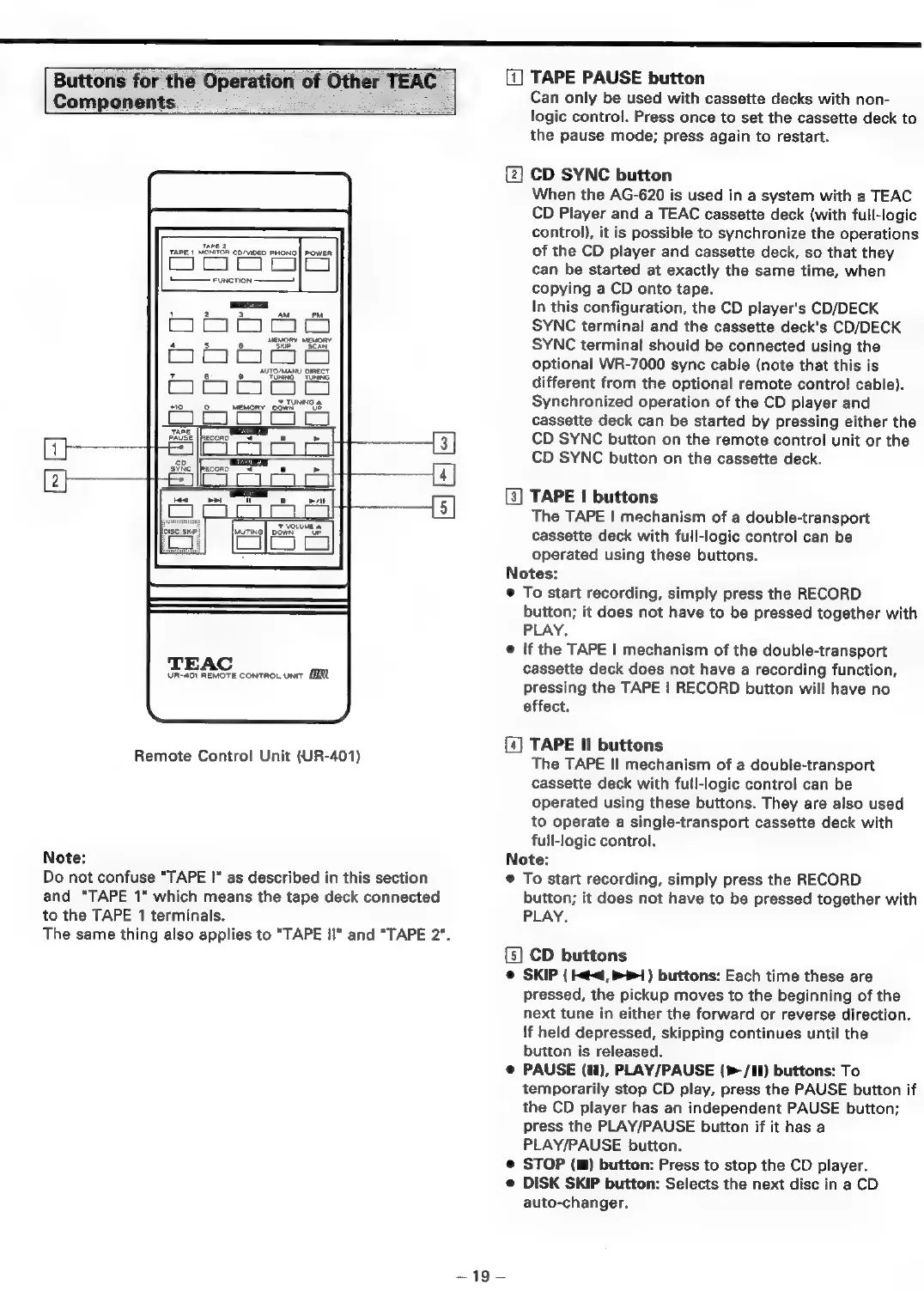
[1]
TAPE
PAUSE
button
Can
only
be
used
with
cassette
decks
with
non-
logic
control.
Press
once
to
set
the
cassette
deck
to
the
pause
mode;
press
again
to
restart.
CD
SYNC
button
When
the
AG-620
is
used
in
a
system
with
a
TEAC
CD
Player
and
a
TEAC
cassette
deck
(with
full-logic
control),
it
is
possible
to
synchronize
the
operations
of
the
CD
player
and
cassette
deck,
so
that
they
can
be
started
at
exactly
the
same
time,
when
copying
a
CD
onto
tape.
In
this
configuration,
the
CD
player's
CD/DECK
SYNC
terminal
and
the
cassette
deck's
CD/DECK
SYNC
terminal
should
be
connected
using
the
optional
WR-7000
sync
cable
(note
that
this
is
different
from
the
optional
remote
control
cable).
Synchronized
operation
of
the
CD
player
and
cassette
deck
can
be
started
by
pressing
either
the
CD
SYNC
button
on
the
remote
control
unit
or
the
CD
SYNC
button
on
the
cassette
deck.
[3]
TAPE
|
buttons
The
TAPE
|
mechanism
of
a
double-transport
cassette
deck
with
full-logic
control
can
be
operated
using
these
buttons.
Notes:
To
start
recording,
simply
press
the
RECORD
button;
it
does
not
have
to
be
pressed
together
with
PLAY.
If
the
TAPE
|
mechanism
of
the
double-transport
cassette
deck
does
not
have
a
recording
function,
pressing
the
TAPE
|
RECORD
button
will
have
no
effect.
TAPE
Il
buttons
The
TAPE
Il
mechanism
of
a
double-transport
cassette
deck
with
full-logic
control
can
be
Operated
using
these
buttons.
They
are
also
used
to
operate
a
single-transport
cassette
deck
with
full-logic
control.
Note:
on
To
start
recording,
simply
press
the
RECORD
button;
it
does
not
have
to
be
pressed
together
with
PLAY.
CD
buttons
SKIP
(
¢<4,
1)
buttons:
Each
time
these
are
pressed,
the
pickup
moves
to
the
beginning
of
the
next
tune
in
either
the
forward
or
reverse
direction.
!f
held
depressed,
skipping
continues
until
the
button
is
released.
PAUSE
(11),
PLAY/PAUSE
(>>
/II)
buttons:
To
temporarily
stop
CD
play,
press
the
PAUSE
button
if
the
CD
player
has
an
independent
PAUSE
button;
press
the
PLAY/PAUSE
button
if
it
has
a
PLAY/PAUSE
button.
STOP
(m)
button:
Press
to
stop
the
CD
player.
DISK
SKIP
button:
Selects
the
next
disc
in
a
CD
auto-changer.

Related product manuals