Checking preset stations (FM/AM/DAB)
You can see the list of preset stations.
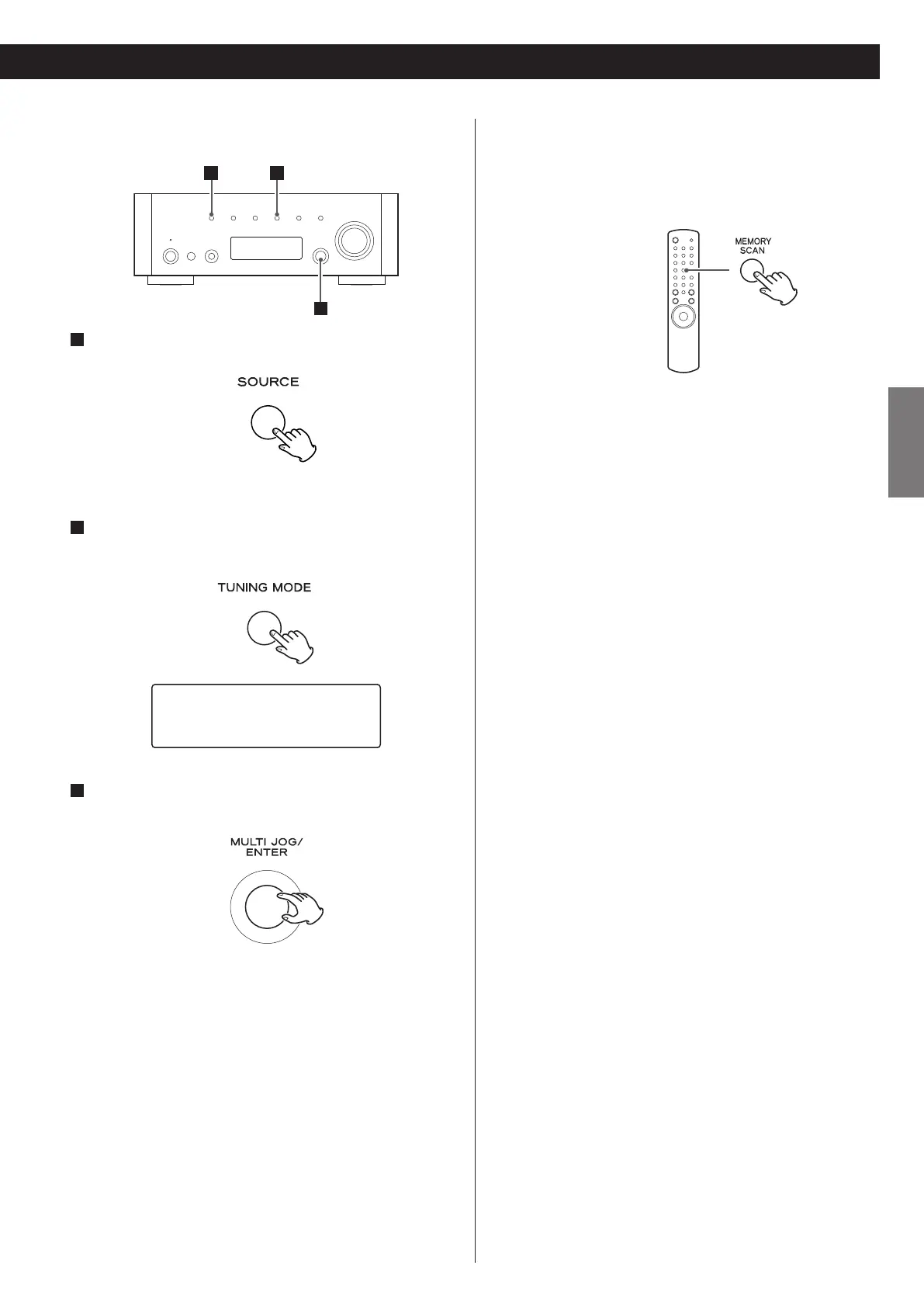
Press the MEMORY SCAN button while listening to FM, AM or
DAB.
FM/AM:
Preset number and its frequency is displayed in turn. The unit
turns to the preset tuning mode after all the preset stations have
been displayed.
DAB:
Preset number is displayed in turn. The unit tunes in the first
preset station available. Turn the MULTI JOG/ENTER knob (or
press the TUNING/PRESET button (‡ or °) on the remote
control unit) to select another preset station.
How to select preset stations (FM/AM/DAB)
1
Select DAB, AM or FM by pressing the SOURCE button
repeatedly.
< You can also use the BAND button on the remote control unit.
2
Select the preset tuning mode.
Press the TUNING MODE button repeatedly until “CH” is
displayed.
3
Select a preset channel by turning the MULTI JOG/ENTER
knob.
The selected preset channel is tuned in.
1
3
2
FM
CH01 108.00MHz



 To Next Page