12
4
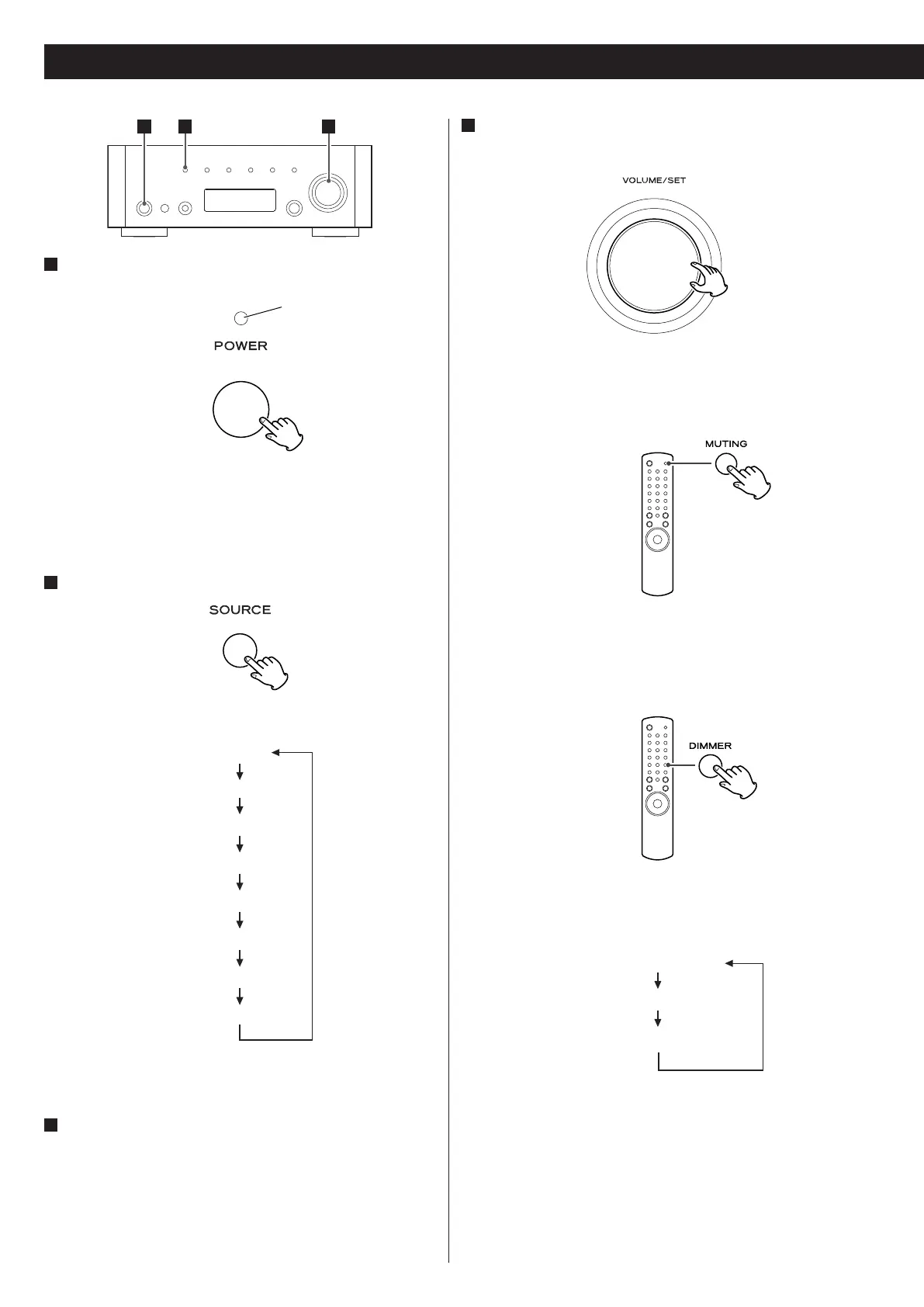
Gradually turn up the volume to the required level by
turning the VOLUME/SET knob.
Muting
Press the MUTING button to mute the sound temporarily.
< To restore the sound, press the MUTING button again.
Dimmer
Each time you press the DIMMER button, the display changes as
follows:
NORMAL (Normal)
DIMMER (Dimmed)
LIGHT OFF (Display off)
< This setting is not memorized when the unit turns into standby.
The next time the unit is turned on, the display is illuminated as
normal.
< When the unit is operated during the setting is “LIGHT OFF“, the
display turns normal briefly and will turn off again.
Basic Operation
1
Press the power switch to turn the unit on.
The standby indicator lights blue.
< When the system control functions are activated, always set this
switch on, and turn the unit on/standby using the remote control
unit.
2
Select a source.
Each time you press the SOURCE button, the source changes as
follows:
CD
iPod
AUX
PHONO
DAB
Internet radio
FM
AM
< You can also use the TUNER, CD, iPod, AUX, PHONO and BAND
buttons on the remote control unit to select a source.
3
Start playback of the component, or tune in a radio station
on this unit.
Please read the instructions of each component.
421
standby indicator



 To Next Page