22
5
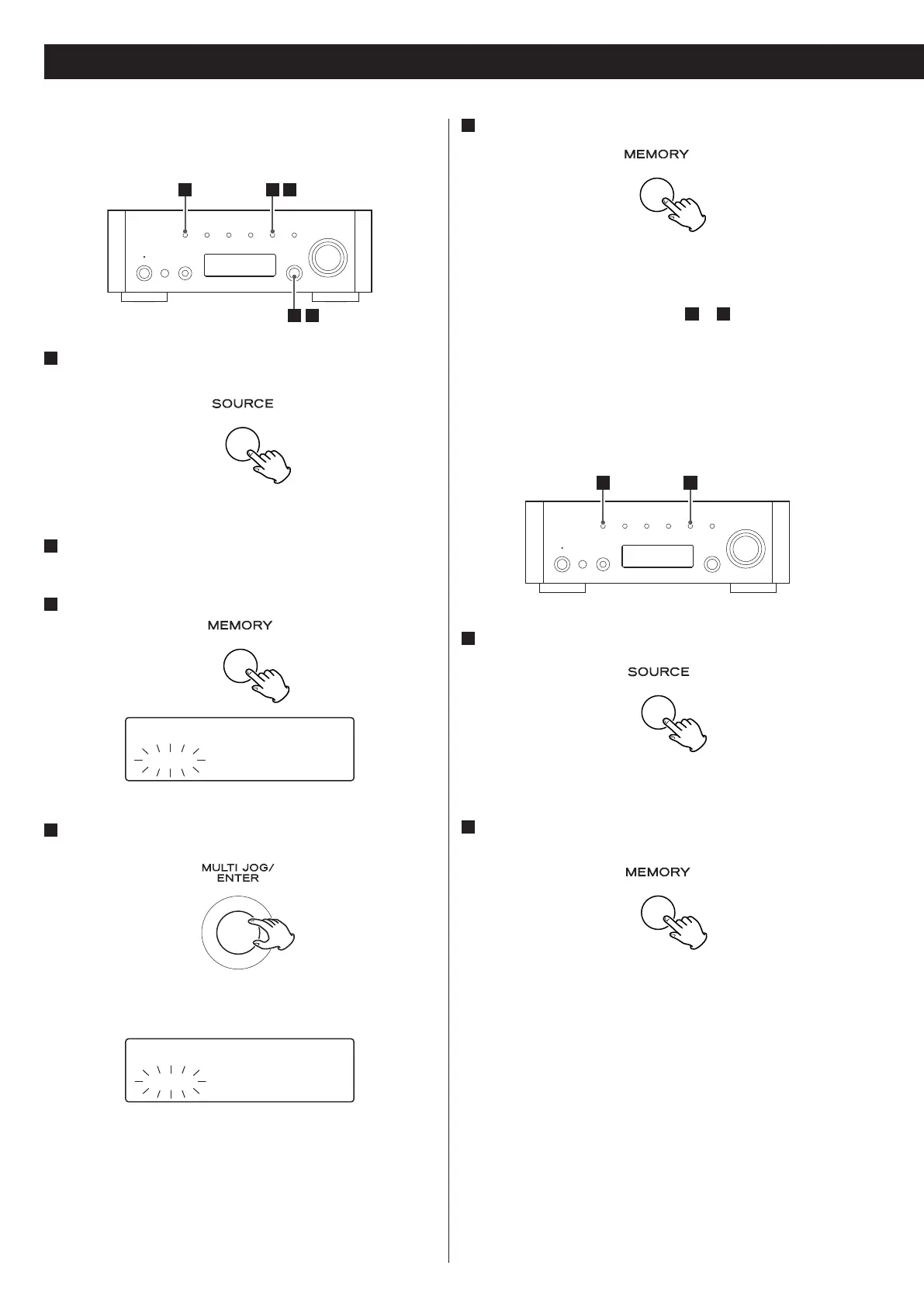
Within 4 seconds, press the MEMORY button.
The station is stored.
< To store more stations, repeat steps
2
to
5
.
< If you do not press the MEMORY button within 4 seconds after
selecting the preset number, presetting will be cancelled.
Presetting Automatically (FM/AM only)
1
Select FM or AM by pressing the SOURCE button repeatedly.
< You can also use the BAND button on the remote control unit.
2
Press and hold the MEMORY button for more than 3
seconds.
Up to 30 of the best received stations in your area will be stored
automatically.
Preset Tuning
Manual Preset (FM/AM/DAB)
You can store up to 30 FM, 30 AM and 10 DAB stations.
1
Select DAB, AM or FM by pressing the SOURCE button
repeatedly.
< You can also use the BAND button on the remote control unit.
2
Tune in the station you want to store.
See the previous page for the procedure of tuning.
3
Press the MEMORY button.
4
Within 4 seconds, select the preset number for this station.
Turn the MULTI JOG/ENTER knob.
< You can also use the TUNING/PRESET buttons (‡/°) on the
remote control unit to scroll through menu items.
1
2 4
3 5
FM ¤S
CH01 108.00MHz
FM ¤S
CH12 108.00MHz



 To Next Page