EasyManua.ls Logo

Teac C-2X - Timer Controlled Operation; Record Operation with Timer; Playback Operation with Timer

Teac C-2X
36 pages
Print Icon
To Next Page IconTo Next Page
To Previous Page IconTo Previous Page
Loading...
Timer
Controlled
Operation
TUNER
jo]
_]
©
4
88
fe}
To
ouTPUT
A
§
{
|
TO
TUNER
(~)
TO
SPARE
IN/AUX
AC
OUTLET
SPEAKER
O
CS
O
=
O
[
TIMER
RECORDING
and
PLAYBACK
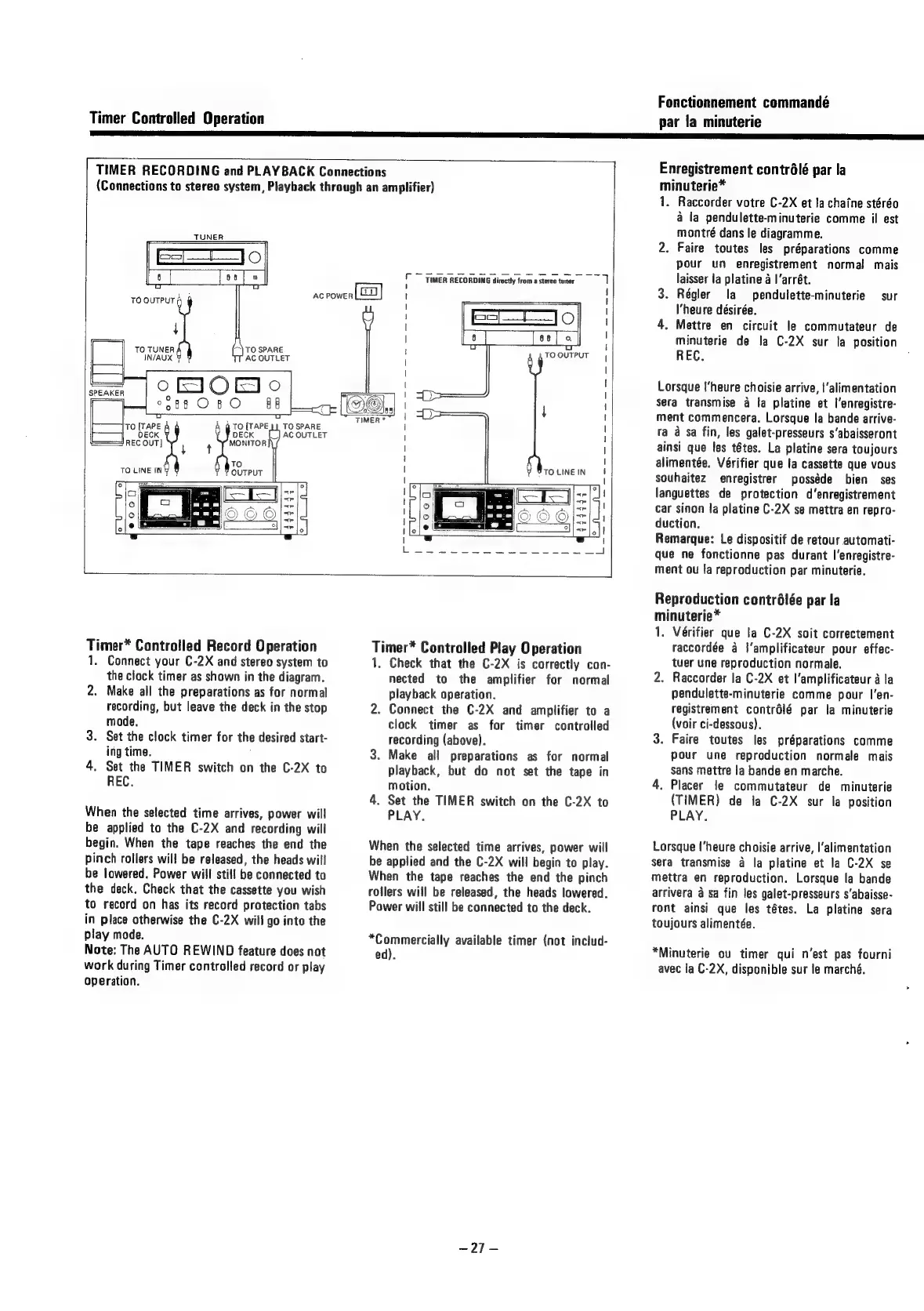
Connections
(Connections
to
stereo
system,
Playback
through
an
amplifier)
r
1
AC
POWER
i
TIMER
RECORDING
directly
from
a
stereo
tuner
Oo
TO
OUTPUT
088
O8
O
g
é
TO
ihpe
i
TO
{TAPE
Cae
SPARE
DECK DECK
AC
OUTLET
===
REC
OUT]
MONITOR
qT
To
TO
LINE
IN
OUTPUT
a
OG
aoe
ai
TO
LINE
IN
“=
?
Timer*
Controlled
Record
Operation
1.
Connect
your
C-2X
and
stereo
system
to
the
clock
timer
as
shown
in
the
diagram.
2.
Make
all
the
preparations
as
for
normal
recording,
but
leave
the
deck
in
the
stop
mode.
3.
Set
the
clock
timer
for
the
desired
start-
ing
time.
4.
Set
the
TIMER
switch
on
the
C-2X
to
REC.
When
the
selected
time
arrives,
power
will
be
applied
to
the
C-2X
and
recording
will
begin.
When
the
tape
reaches
the
end
the
pinch
rollers
will
be
released,
the
heads
will
be
lowered.
Power
will
still
be
connected
to
the
deck.
Check
that
the
cassette
you
wish
to
record
on
has
its
record
protection
tabs
in
place
otherwise
the
C-2X
will
go
into
the
play
mode.
Note:
The
AUTO
REWIND
feature
does
not
work
during
Timer
controlled
record
or
play
operation.
Timer*
Controlled
Play
Operation
1,
Check
that
the
C-2X
is
correctly
con-
nected
to
the
amplifier
for
normal
playback
operation.
2.
Connect
the
C-2X
and
amplifier
to
a
clock
timer
as
for
timer
controlled
recording
(above).
3.
Make
all
preparations
as
for
normal
playback,
but
do
not
set
the
tape
in
motion.
4.
Set
the
TIMER
switch
on
the
C-2X
to
PLAY.
When
the
selected
time
arrives,
power
will
be
applied
and
the
C-2X
will
begin
to
play.
When
the
tape
reaches
the
end
the
pinch
rollers
will
be
released,
the
heads
lowered.
Power
will
still
be
connected
to
the
deck.
*Commercially
available
timer
(not
includ-
ed).
-27-
Fonctionnement
commandé
par
la
minuterie
Enregistrement
contrélé
par
la
minuterie*
1.
Raccorder
votre
C-2X
et
lachaine
stéréo
a
la
pendulette-minuterie
comme
il
est
montré
dans
le
diagramme.
2.
Faire
toutes
les
préparations
comme
pour
un
enregistrement
normal
mais
laisser
la
platine
a
|’arrét.
3.
Régler
la
pendulette-minuterie
sur
l'heure
désirée.
4.
Mettre
en
circuit
le
commutateur
de
minuterie
de
la
C-2X
sur
la
position
REC.
Lorsque
l'heure
choisie
arrive,
l‘alimentation
sera
transmise
a
fa
platine
et
l’enregistre-
ment
commencera.
Lorsque
la
bande
arrive-
ra
a
sa
fin,
les
galet-presseurs
s‘abaisseront
ainsi
que
les
tétes.
La
platine
sera
toujours
alimentée.
Vérifier
que
la
cassette
que
vous
souhaitez
enregistrer
posséde
bien
ses
languettes
de
protection
d’enregistrement
car
sinon
la
platine
C-2X
se
mettra
en
repro-
duction.
Remarque:
Le
dispositif
de
retour
automati-
que
ne
fonctionne
pas
durant
l’enregistre-
ment
ou
fa
reproduction
par
minuterie.
Reproduction
contrélée
par
la
minuterie*
1.
Vérifier
que
la
C-2X
soit
correctement
raccordée
a
|'amplificateur
pour
effec-
tuer
une
reproduction
normale.
2.
Raccorder
la
C-2X
et
l’amplificateur
a
la
pendulette-minuterie
comme
pour
I’en-
registrement
contrélé
par
la
minuterie
(voir
ci-dessous).
3.
Faire
toutes
les
préparations
comme
pour
une
reproduction
normale
mais
sans
mettre
la
bande
en
marche.
4.
Placer
le
commutateur
de
minuterie
(TIMER)
de
la
C-2X
sur
la
position
PLAY.
Lorsque
l'heure
choisie
arrive,
|’alimentation
sera
transmise
a
la
platine
et
la
C-2X
se
mettra
en
reproduction.
Lorsque
la
bande
arrivera
a
sa
fin
les
galet-presseurs
s‘abaisse-
ront
ainsi
que
les
tétes.
La
platine
sera
toujours
alimentée.
*Minuterie
ou
timer
qui
n’est
pas
fourni
avec
la
C-2X,
disponible
sur
le
marché.

Related product manuals