EasyManua.ls Logo

Teac CX-350 - Voltage Conversion

Teac CX-350
25 pages
Print Icon
To Next Page IconTo Next Page
To Previous Page IconTo Previous Page
Loading...
CX-350/CX:351
|
4B
LUBRICATION
Lubrication
is
only
required
when
parts
are
replaced.
For
this
pur-
pose,
use
the
oil
and
grease
specified
below.
Oil:
TEAC
spindle
oil
(from
TEAC
TZ-255
oil
kit),
Mobil
D.T.E.
Oil
(Light,
or
equivalent)
4-9
VOLTAGE
CONVERSION
(GENERAL
EXPORT
MODEL
ONLY)
ALWAYS
OISCONNECT
THE
POWER
LINE
CORD
BEFORE
MAKING
THESE
ADJUSTMENTS.
1.
Remove
the
top
cover
of
the
deck
by
removing
the
screws
from
Grease:
ORE-LUBE
61/3
or
equivalent
the
sides.
1.
Apply
a
drop
of
oil
with
an
oil
applicator
to
a
point
about
1/3
2.
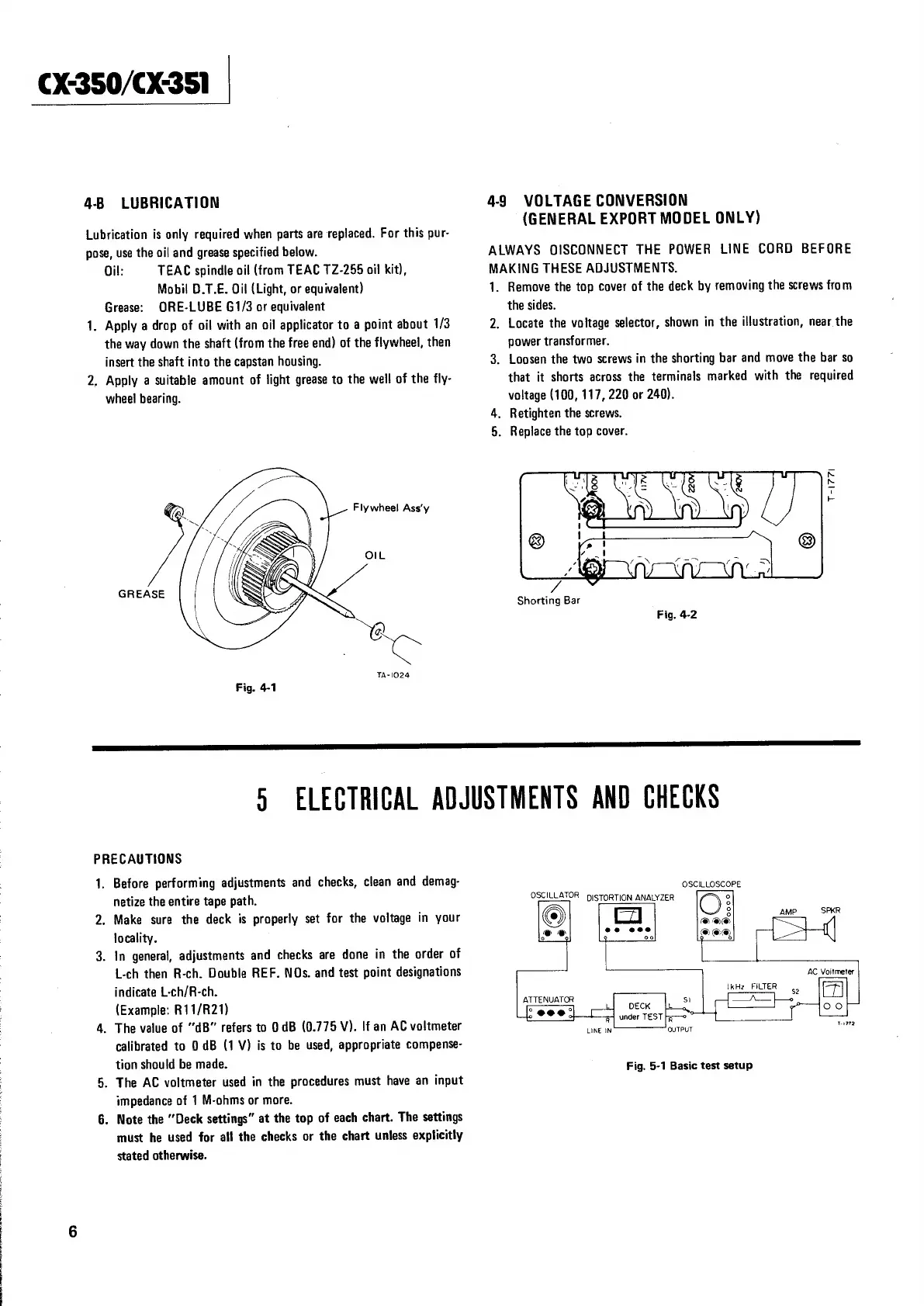
Locate
the
voltage
selector,
shown
in
the
illustration,
near
the
the
way
down
the
shaft
(from
the
free
end)
of
the
flywheel,
then
power
transformer.
insert
the
shaft
into
the
capstan
housing.
3.
Loosen
the
two
screws
in
the
shorting
bar
and
move
the
bar
so
2.
Apply
a
suitable
amount
of
light
grease
to
the
well
of
the
fly-
that
it
shorts
across
the
terminals
marked
with
the
required
wheel
bearing.
voltage
(100,
117,
220
or
240).
4.
Retighten
the
screws.
5.
Replace
the
top
cover.
<
&
Flywheel
Ass’y
re
OIL
GREASE
Shorting
Bar
Fig.
4-2
ca,
TA-1024
Fig.
4-1
PRECAUTIONS
1.
Before
performing
adjustments
and
checks,
clean
and
demag-
GscuioscoRe
netize
the
entire
tape
path.
OSCILLATOR
piSTORTION
ANALYZER
2.
Make
sure
the
deck
is
properly
set
for
the
voltage
in
your
AMP.
SPER
locality.
3.
In
general,
adjustments
and
checks
are
done
in
the
order
of
L-ch
then
R-ch.
Double
REF.
NOs.
and
test
point
designations
AC
Voltmeter
indicate
L-ch/R-ch.
ieee
ikHz
FILTER
(Example:
R11/R21)
oo
4.
The
value
of
“dB”
refers
to
0
dB
(0.775
V).
!f
an
AC
voltmeter
calibrated
to
0
dB
(1
V)
is
to
be
used,
appropriate
compense-
tion
should
be
made.
Fig.
5-1
Basic
test
setup
5.
The
AC
voltmeter
used
in
the
procedures
must
have
an
input
impedance
of
1
M-ohms
or
more.
6.
Note
the
“Deck
settings”
at
the
top
of
each
chart.
The
settings
must
he
used
for
all
the
checks
or
the
chart
unless
explicitly
stated
otherwise.

Related product manuals