13
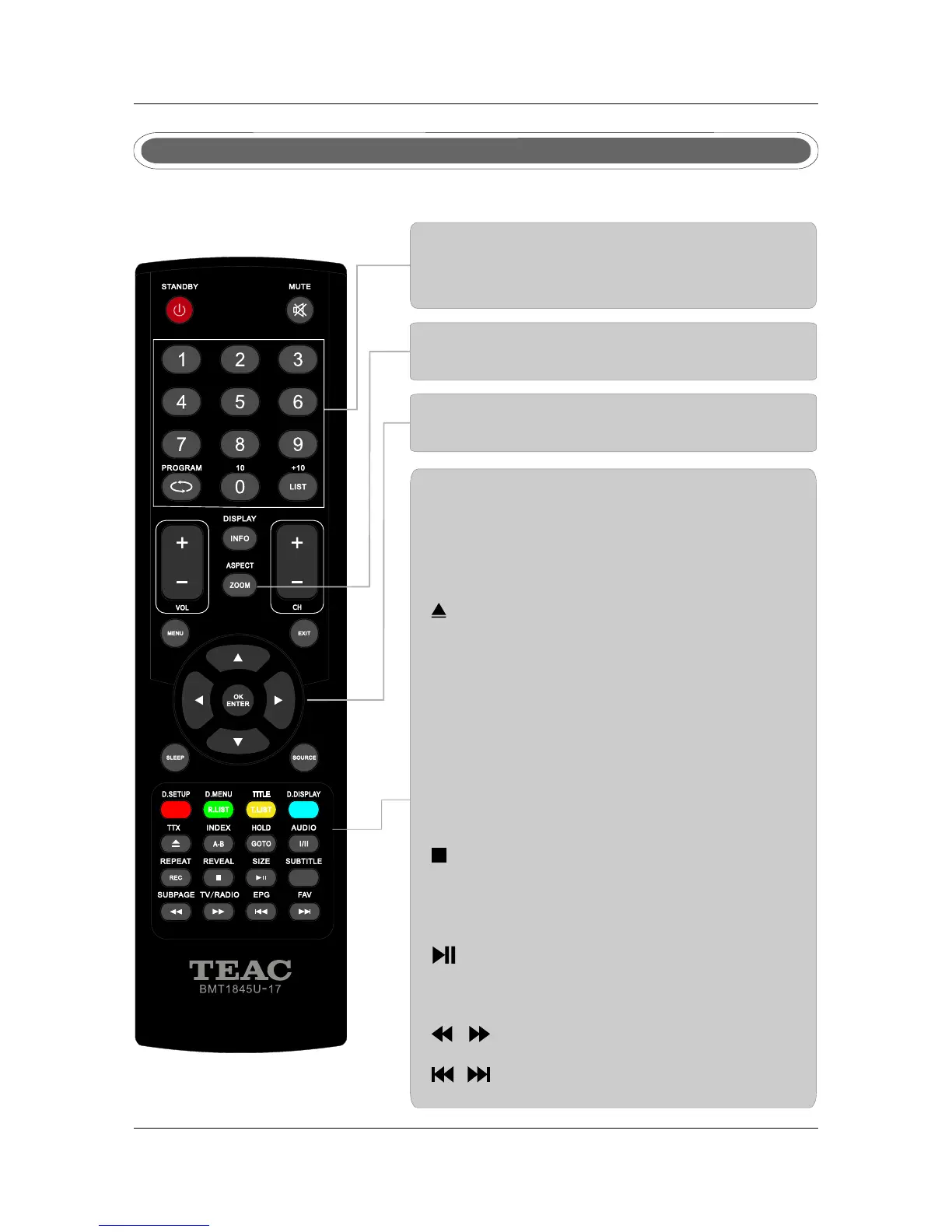
Remote control instructions in DVD mode
D.SETUP
Used for selecting programs. It may also be used to
execute commands.
REPEAT
Press REPEAT to cycle through the repeat play options.
A-B
This button enables you to repeat a selected section
from the disc.
SUBTITLE
Select a different subtitle language(the DVD disc must have
the subtitle you selected.
D.DISPLAY
Press to display the DVD information of DVD mode.
PLAY/PAUSE in DVD mode.
To eject the disc.
DVD STOP
Jump to previous and next track.
Fast backward and forward key.
D.MENU
DVD disc menu Access to menu.
NUMBER BUTTONS
Numerical buttons for various data.
PROGRAM
Program a disc playing in a desired sequence.
THUMBSTICK( ▲/ ▼/◄ / ►/ OK ENTER )
Allows you to navigate the on-screen menus and
adjust the system settings to your preference.
SIZE
Change the picture format.
AUDIO(I/II)
AUDIO selection buttons in DVD mode.
GOTO
It is possible to get access to any point on the directly
using the "GOTO" menu.
Press GOTO to access the "GOTO" menu.
ZOOM
In play state, press ZOOM, the player will zoom
in the picture one time.
Note: Please ensure that the TV you have bought with DVD loader, otherwise, all these parts
with no effect.



 To Next Page