25
ENGLISH
Setting the clock (1)
Set the current time before using the unit.
You can set the clock when the unit is in standby.
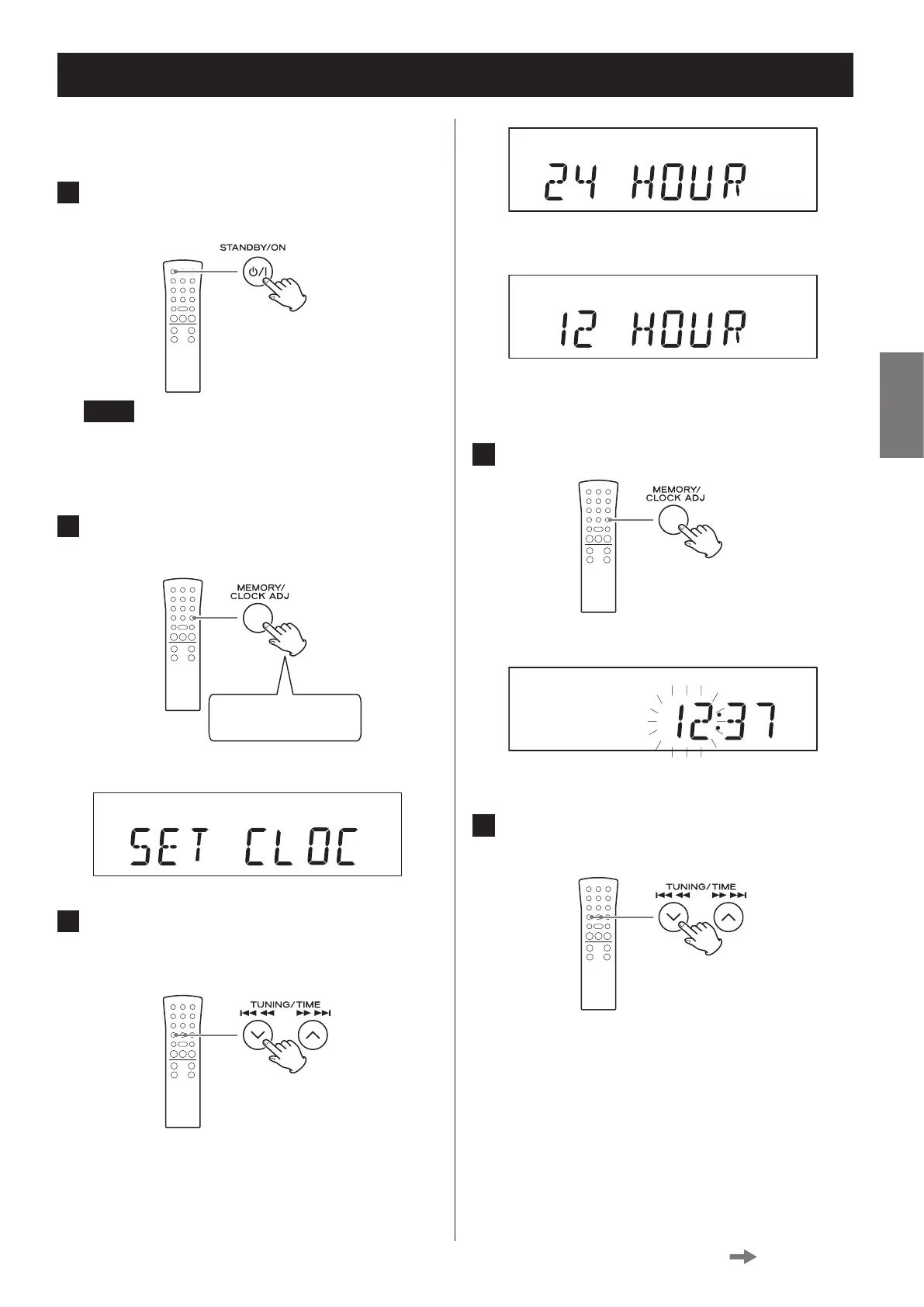
1 Press the STANDBY/ON button to put
the unit into standby.
NOTE
When the ring around the button is not lit blue, the
unit is in standby. Note that the clock cannot be set
when the unit is on.
2 Press and hold the CLOCK ADJUST but-
ton for at least two seconds.
Press and hold for at
least 2 seconds
“SET CLOCK” scrolls across the display.
3 Press the TIME (j/k) buttons to switch
between 24 HOUR and 12 HOUR (24-
hour or 12-hour time display).
c3
o If a setting is left for more than 20 seconds, this
time setting mode will end.
4 Press the CLOCK ADJUST button again.
Display example
The “hour” value blinks.
5 Press the TIME (j/k) buttons to set
the current hour.
Continued on the next page


 To Next Page