58
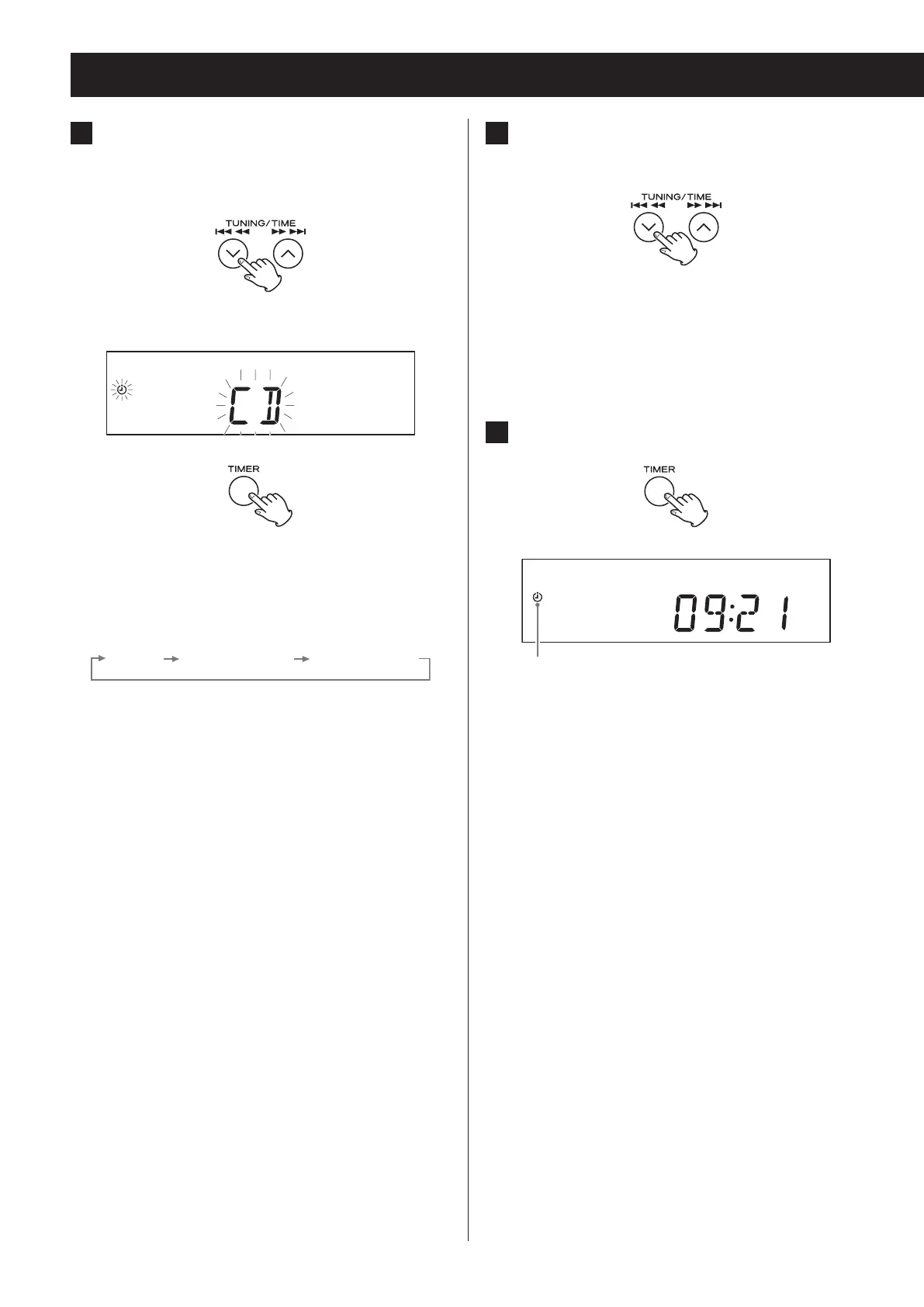
7 Press the TIME (j/k) buttons to set
the volume level.
You can set the volume between 5 (minimum) and
32 (maximum).
o When the wake-up timer turns the unit on, the
volume will gradually increase until the set vol-
ume is reached.
8 Press the TIMER button.
Timer indicator
The timer indicator appears.
This completes wakeup timer setting.
o The wakeup timer settings will be erased if
a power outage occurs or the power cord is
unplugged from an outlet.
o At the TIMER ON time, operation starts and the
timer indicator blinks.
Prepare the playback source before the wake-
up timer turns the unit on.
If you have selected “CD”, place a disc. (If no disc is
loaded, the FM tuner will be used.)
Wakeup timer (2)
6 Press the TIME (j/k) buttons to select
the playback source and press the
TIMER button.
Display example
The sources that can be selected are CD, FM TUNER
and AM TUNER.
Press the TIME (j/k) button to cycle through the
following source settings.
“BLUETOOTH” and “PHONO” cannot be set.


 To Next Page