ENGLISH
Program Playback 1
18
1
Up to 32 tracks can be selected from any discs and played in any
desired order.
A program cannot be entered during playback.
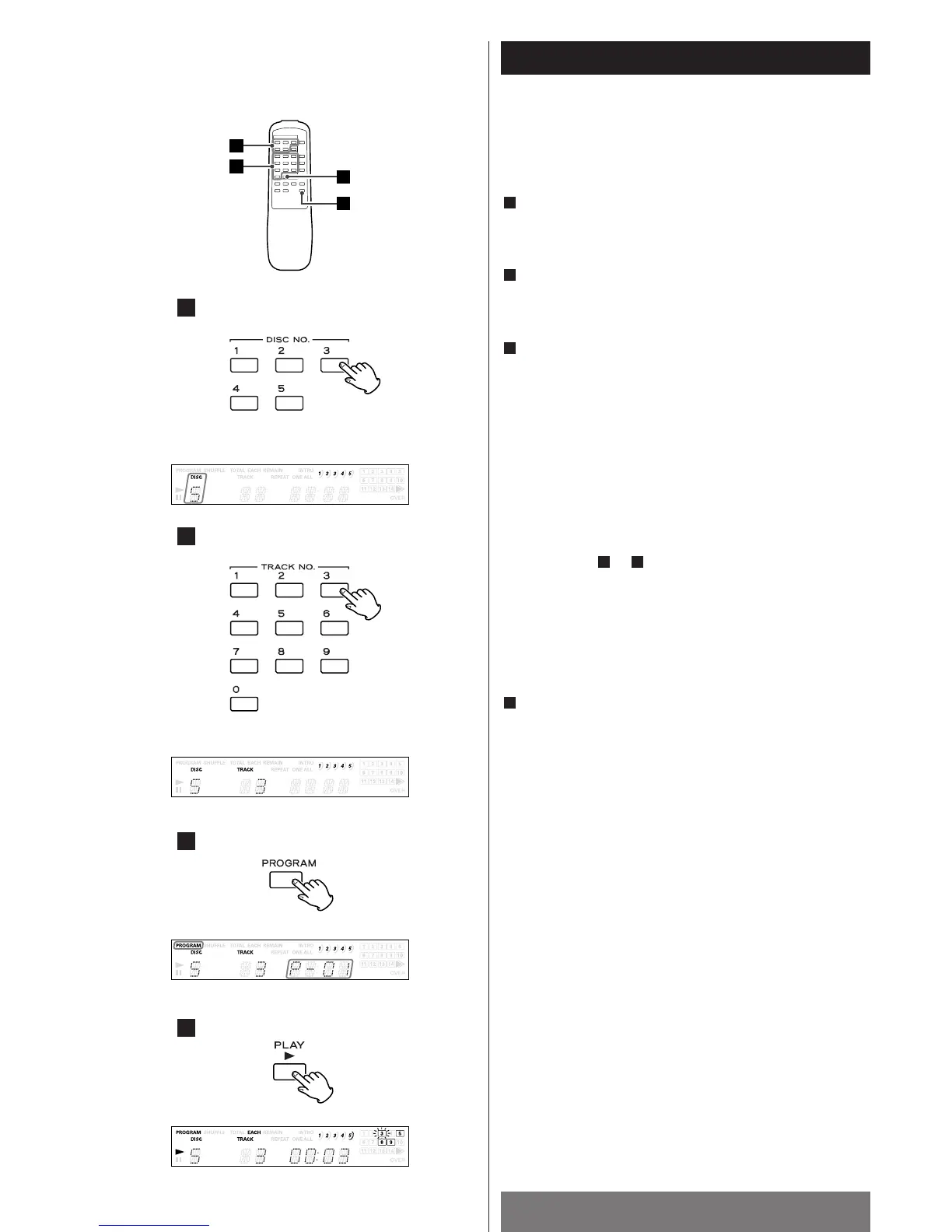
In the stop mode, press the DISC NO. (1~5) button to select a
disc number.
Press the TRACK NO. buttons (1~9, 0) or MUSIC SKIP buttons
(.
//) to select a track number.
Press the PROGRAM button.
The PROGRAM indicator lights.
The TIME display shows “P-01“.
<
If the PROGRAM button is pressed before a disc number and a
track number are selected, track 1 of the displayed disc
number is entered as program selection number 1.
<
To enter all of the tracks on a disc, select the disc number with
a DISC NO. (1~5) button, then press the PROGRAM button.
The TRACK number display shows “A”.
<
The first program selection is now stored in the program
memory.
Repeat steps to to store more tracks (a maximum of 32
tracks can be stored).
<
If you try to enter more than 32 selections, the display shows
“FULL” for about 1 second.
When the selection of track numbers has been finished, press
the PLAY button (y
) to start program playback.
Programmed play starts from the beginning of the first
programmed track.
<
When programmed play starts, the entered track numbers are
displayed (1–14 only) for each disc, and the currently playing
track number blinks.
<
When all of the programmed tracks have been played, the CD
changer stops.
The y
indicator goes off.
The PROGRAM indicator remains lit.
Notes:
<
Disc and track numbers cannot be selected during
programmed play.
<
The DISC SKIP button cannot be used during programmed
play.
4
31
3
2
1


 To Next Page
 Loading...