ENGLISH
15
ALARM 1
DISPLAY
SNOOZE
ALARM 2
2
1 3
Timer
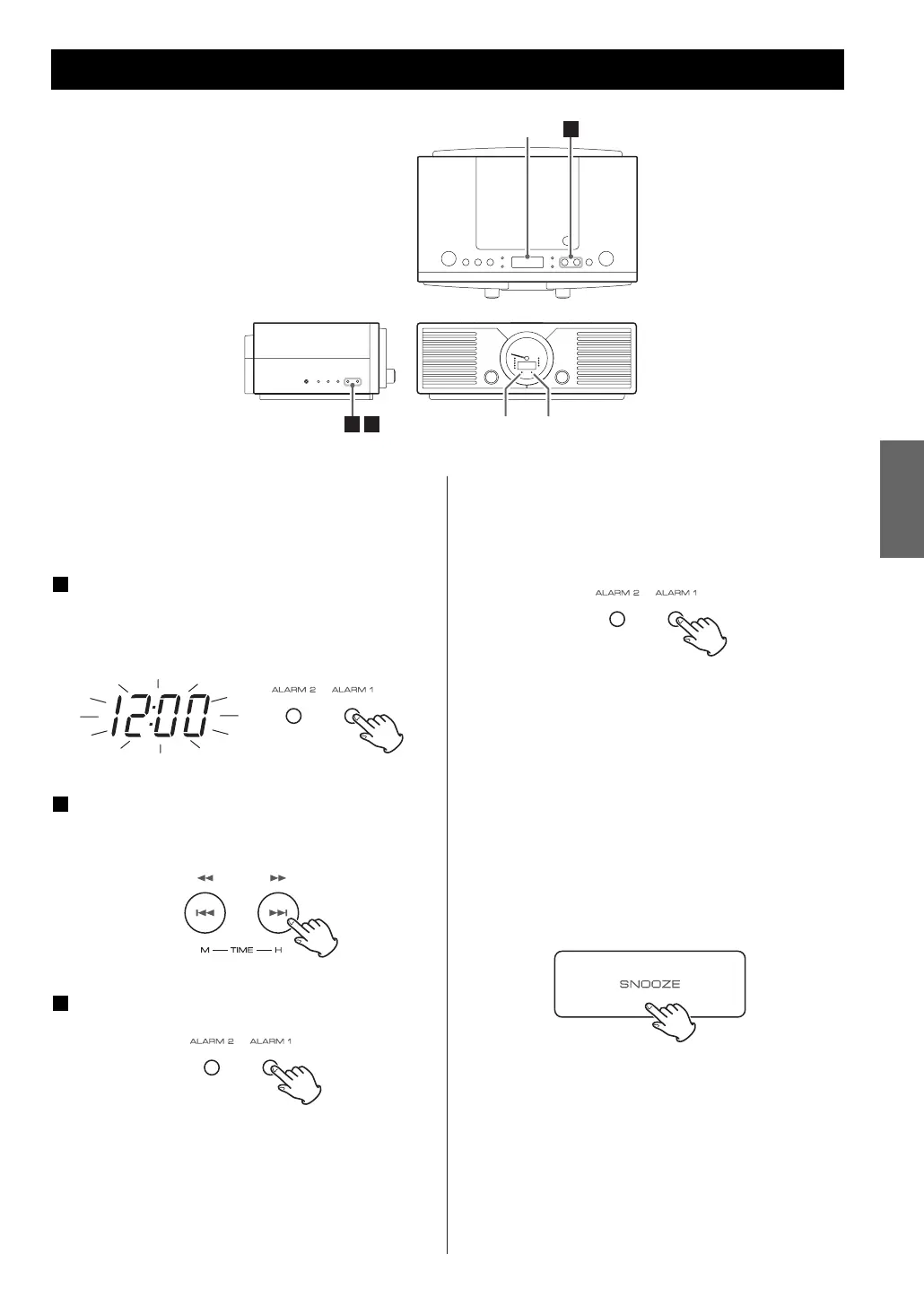
Setting the timer
ALARM 1 and ALARM 2 can be set independently.
Adjust the clock before setting the timer.
Press the ALARM 1 or ALARM 2 button to
select the timer mode.
The clock display blinks and selected ALARM indicator
(ALARM 1 or ALARM 2) lights.
Press the ,/ button to set the start hour
and press the .m button to set the start
minute.
Press the ALARM 1 or ALARM2 button.
The alarm time is set and the ALARM 1 or ALARM
2 indicator will stop blinking.
The unit will turn on at the specified time every
day, and will return to standby in one hour from
the start time.
3
2
1
To cancel the timer mode
Press the ALARM 1 or ALARM 2 button again.
The ALARM indicator goes off.
To cancel the Snooze function
Press the STANDBY/ON button to turn the unit off.
How to Use the Snooze function
After the on time is reached, press the SNOOZE
button and the unit will turn off for 6 minutes then
turn on again.
The “SNOOZE” indicator appears on the display
while the snooze function is activated.
You can use this function repeatedly for one hour.



 To Next Page