10
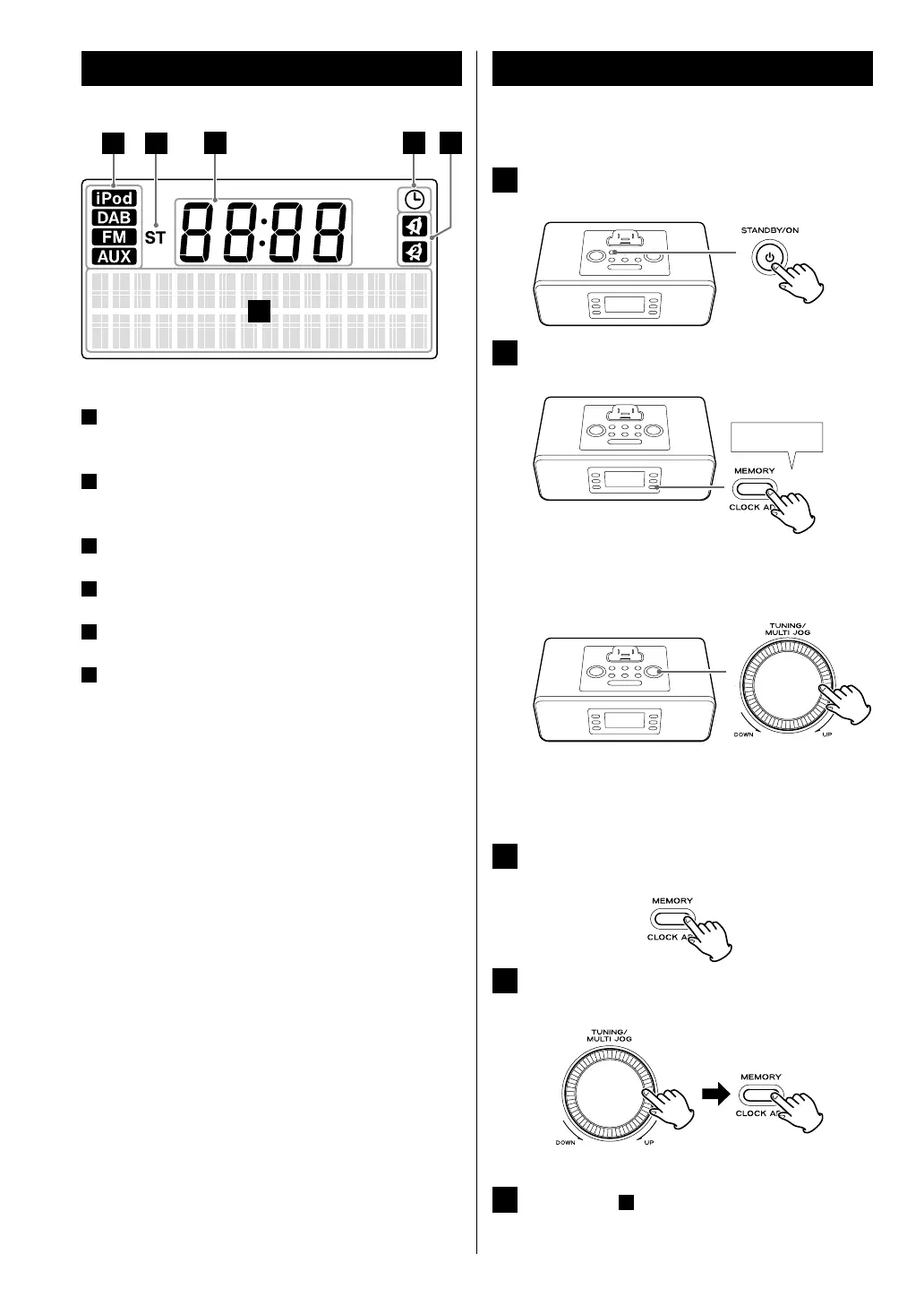
A
When the unit is on, one of these indicators lights to
show the current sound source.
B
Lights when a stereo FM broadcast is tuned in stereo
mode.
C
Shows the digital clock or timer on/off time.
D
Lights when the sleep timer is active.
E
Lights when the wake up timer is active.
F
Shows the current source, date, frequency, volume,
muting status, preset channel, etc.
Identifying the Parts (Display)
Setting the Clock
Adjust the clock before attempting any operations.
1
If the unit is on, press the STANDBY/ON button
to put it in standby.
2
Press and hold the CLOCK ADJ button for more
than 3 seconds.
“24 HR” or “12 HR” blinks on the display.
If you want to change the hour mode (12-hour or
24-hour), turn the MULTI JOG.
< You can also use the Skip buttons (.//) on the
remote control unit instead of the MULTI JOG.
< If no button is pressed for 10 seconds, timer setting
mode ends.
3
Press the CLOCK ADJ button again.
The “hour” value blinks.
4
Turn the MULTI JOG to set the current hour, and
then press the CLOCK ADJ button.
The “minute” value blinks.
5
Repeat step
4
to set “minute”, “year”, “month”
and “day”.
After “day” is set, the clock starts.



 To Next Page