7
A
AC Power Cord
Be sure to connect the power cord to an AC socket
that supplies the correct voltage.
If the power cord is unplugged and the batteries for
the backup are exhausted, settings for the clock, timer
and radio station presets will be lost.
B
PHONES
To listen with headphones, first lower the volume
level to the minimum. Then, connect the headphones
plug into the PHONES jack, and adjust the volume by
turning the VOLUME knob.
The speakers will make no sound when headphones
are plugged in.
Caution:
Do not turn the unit on or off, or connect or
disconnect headphones from this jack while
wearing headphones. Very loud sound could be
output from the headphones.
AVOID DAMAGING YOUR HEARING - Do not put
on headphones until after plugging them in.
C
AUX IN
You can connect a portable audio player to this jack
(page 13).
D
VIDEO OUT
This terminal outputs the video signal from a
connected iPod/iPhone.
Use the supplied RCA (pin)
W@
mini-plug video cable
to connect this to the composite video connector of a
television or monitor.
Make the following settings on your iPod/iPhone’s
menu to output video to a TV via the Dock.
In the [Video] menu, select [Video Settings], and
then set [TV OUT] to [On] or [Ask].
< When you have set [TV OUT] to [Ask], each time
you play a video your iPod/iPhone prompts you
to specify whether to output it to a TV.
< When you output video to a TV from your iPod/
iPhone, the video is not displayed on the iPod/
iPhone’s screen.
iPod touch* and iPhone models do not have
this menu. You must specify whether to output
video to a TV each time you play it.
* iPod touch 1st generation: Software ver. 2.2 or
later
E
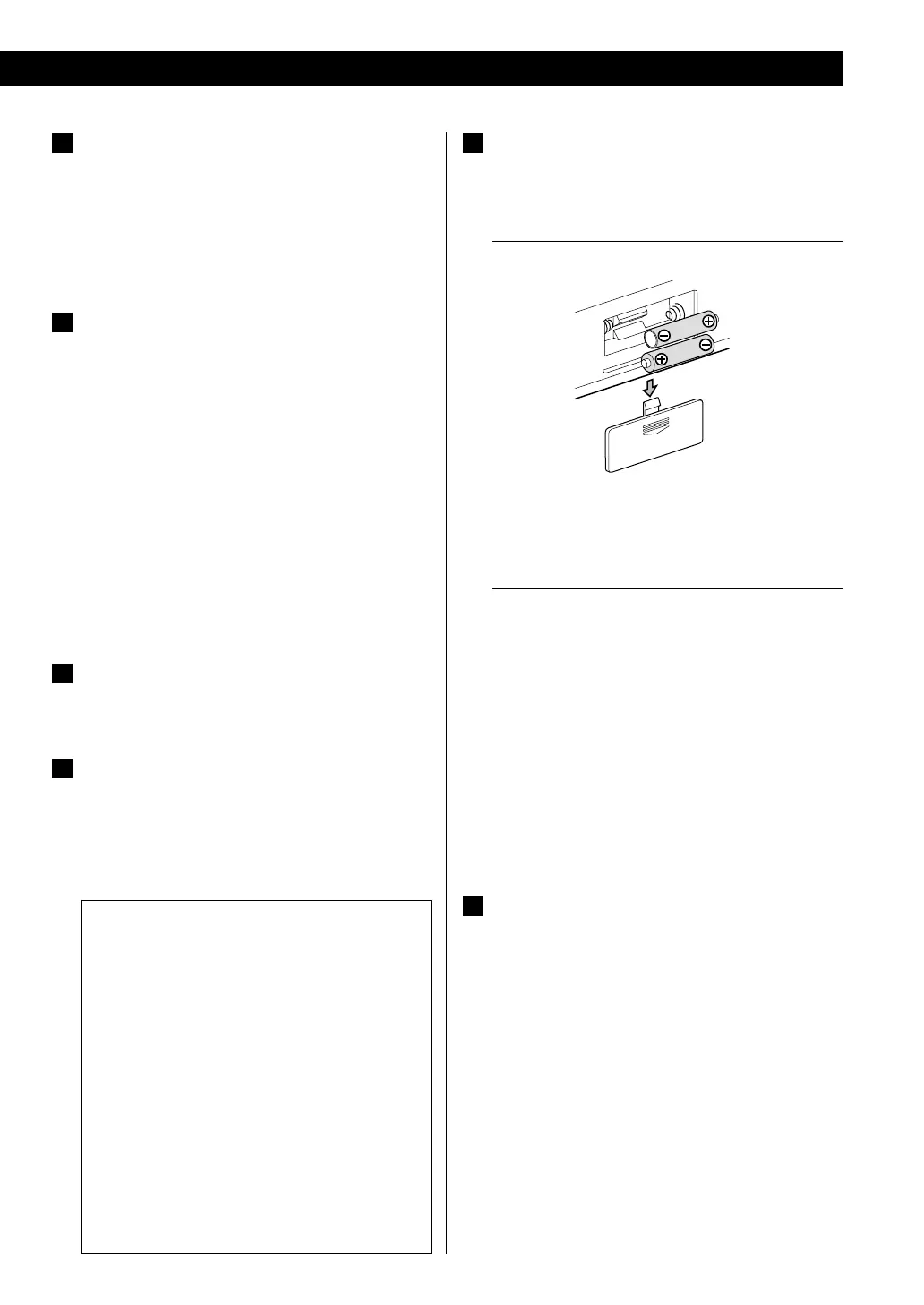
Battery compartment
The batteries supply backup power to the built-in
clock and memory when the unit is temporarily
disconnected from an AC socket.
Battery installation
1. Slide down to remove the cover.
2. Insert two commercially-available AAA alkaline
batteries.
3. Replace the cover.
Battery replacement
If the clock starts to show the wrong time when
the unit is disconnected from AC power, replace the
batteries with new ones.
< For information about the collection of batteries,
please contact your local municipality, your waste
disposal service or the place where you purchased
them.
Note:
Alkaline bateries should be used.
F
DAB/FM antenna
Extend the antenna into a “T” shape, find the best
position for reception and attach it to a window frame
or wall with thumbtacks or the like. This antenna may
need to be repositioned if you move your unit to a
new location.
< For DAB reception, you can check the antenna
adjustment or positioning for the best reception by
viewing the signal strength on the display (page 19).



 To Next Page