EasyManua.ls Logo

Teac V-2030S - Operation

Teac V-2030S
10 pages
Print Icon
To Next Page IconTo Next Page
To Previous Page IconTo Previous Page
Loading...
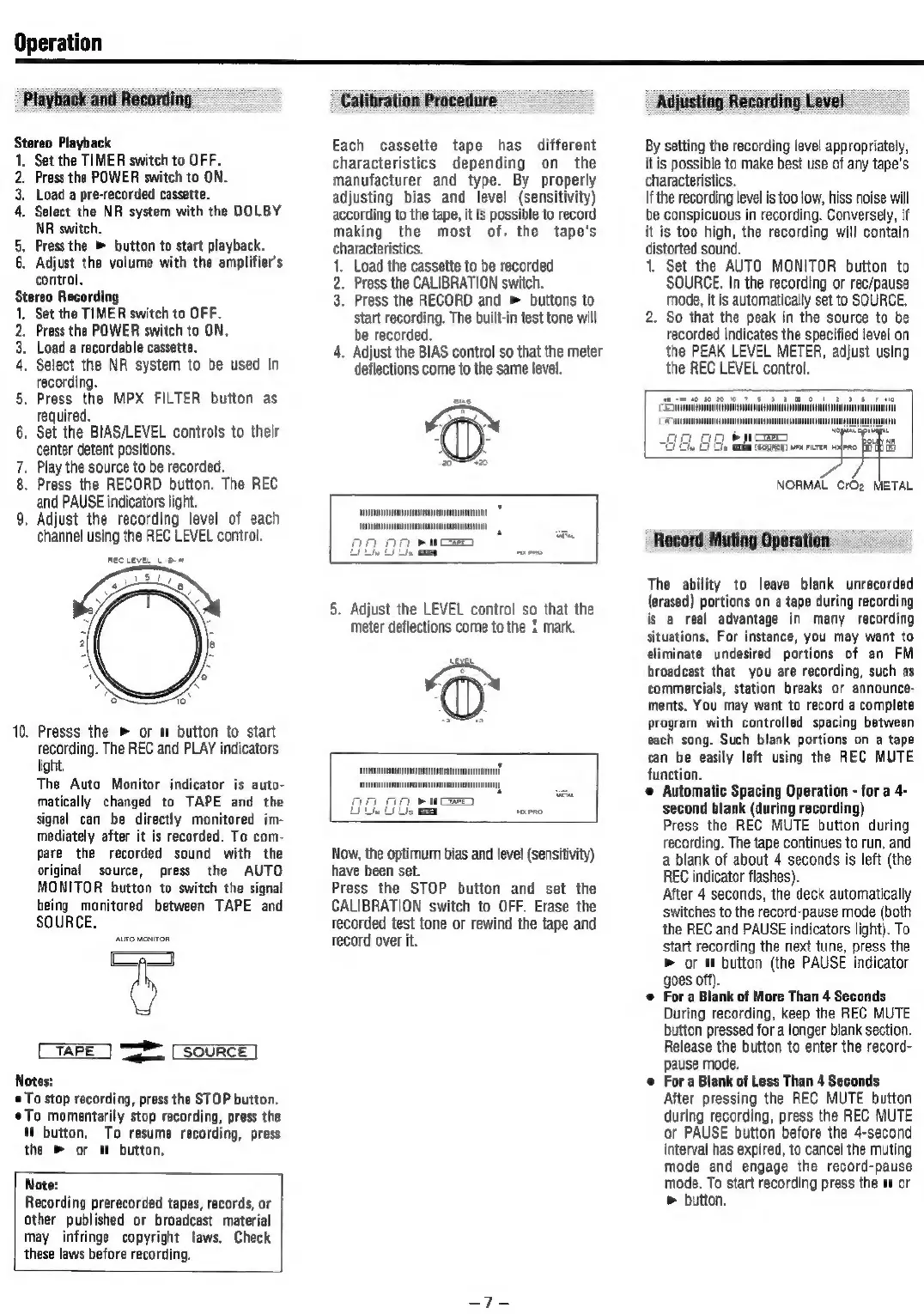
Operation
Playback
and
Recording
Stereo
Playback
1.
Set
the
TIMER
switch
to
OFF.
2.
Prass
the
POWER
switch
to
ON.
3,
Load
a
pre-recorded
cassette.
4.
Select
the
NR
system
with
the
DOLBY
NR
switch,
5,
Press
the
®
button
to
start
playback.
6.
Adjust
the
volume
with
the
amplifier’s
control,
Stereo
Recording
1,
Set
the
TIMER
switch
to
OFF.
2.
Press
the
POWER
switch
to
ON.
3.
Load
a
recordable
cassette.
4.
Select
the
NR
system
to
be
used
in
recording.
.
Press
the
MPX
FILTER
button
as
required.
.
Set
the
BIAS/LEVEL
controls
to
their
center
detent
positions.
.
Play
the
source
to
be
recorded.
.
Press
the
RECORD
button.
The
REC
and
PAUSE
indicators
light.
.
Adjust
the
recording
level
of
each
channel
using
the
REC
LEVEL
control.
Rec
LeveL
oH
ist
oa
co
ON
10.
Presss
the
»
or
m
button
to
start
recording.
The
REC
and
PLAY
indicators
light.
The
Auto
Monitor
indicator
is
auto-
matically
changed
to
TAPE
and
the
signal
can
be
directly
monitored
im-
mediately
after
it is
recorded.
To
com-
pare
the
recorded
sound
with
the
original
source,
press
the
AUTO
MONITOR
button
to
switch
the
signal
being
monitored
between
TAPE
and
SOURCE.
Q
TAPE
res
SOURCE
Notes:
©
To
stop
recording,
press
the
STOP
button,
To
momentarily
stop
recording,
press
the
button,
To
resume
recording,
press
the
»
or
m!
button,
Note:
Recording
prerecorded
tapes,
records,
or
other
published
or
broadcast
material
may
infringe
copyright
laws.
Check
these
laws
before
recording.
Calibration
Procedure
Each
cassette
tape
has
different
characteristics
depending
on
the
manufacturer
and
type.
By
properly
adjusting
bias
and
level
(sensitivity)
according
to
the
tape,
it
is
possible
to
record
making
the
most
of.
the
tape's
characteristics.
Load
the
cassette
to
be
recorded
.
Press
the
CALIBRATION
switch.
Press
the
RECORD
and
»
buttons
to
start
recording.
The
built-in
test
tone
will
be
recorded.
.
Adjust
the
BIAS
control
so
that
the
meter
deflections
come
to
the
same
level.
enn
i
5.
Adjust
the
LEVEL
control
so
that
the
Meter
deflections
come
to
the
1
mark.
Now,
the
optimum
bias
and
level
(sensitivity)
have
been
set.
Press
the
STOP
button
and
set
the
CALIBRATION
switch
to
OFF.
Erase
the
recorded
test
tone
or
rewind
the
tape
and
tecord
over
it.
Adjusting
Recording
Level
By
setting
the
recording
level
appropriately,
it
is
possible
to
make
best
use
of
any
tape's
characteristics.
|f
the
recording
level
is
too
low,
hiss
noise
will
be
conspicuous
in
recording.
Conversely,
if
it
is
too
high,
the
recording
will
contain
distorted
sound.
1.
Set
the
AUTO
MONITOR
button
to
SOURCE.
In
the
recording
or
rec/pause
mode,
it
is
automatically
set
to
SOURCE.
2.
So
that
the
peak
in
the
source
to
be
recorded
indicates
the
specified
level
on
the
PEAK
LEVEL
METER,
adjust
using
the
REC
LEVEL
control.
Ti
mm
mn
mi
no
Ga.
au
my ie
NORMAL
CrO2
METAL
Record
Muting
Operation
The
ability
to
leave
blank
unrecorded
(erased)
portions
on
a
tape
during
recording
is
a
real
advantage
in
many
recording
situations.
For
instance,
you
may
want
to
eliminate
undesired
portions
of
an
FM
broadcast
that
you
are
recording,
such
as
commercials,
station
breaks
or
announce-
ments.
You
may
want
to
record
a
complete
program
with
controlled
spacing
between
each
song.
Such
blank
portions
on
a
tape
can
be
easily
left
using
the
REC
MUTE
function.
e
Automatic
Spacing
Operation
-
for
a
4-
second
blank
(during
recording)
Press
the
REC
MUTE
button
during
recording.
The
tape
continues
to
run,
and
a
blank
of
about
4
seconds
is
left
(the
REC
indicator
flashes).
After
4
seconds,
the
deck
automatically
switches
to
the
record-pause
mode
(both
the
REC
and
PAUSE
indicators
light).
To
start
recording
the
next
tune,
press
the
»
or
m
button
(the
PAUSE
indicator
goes
off).
For
a
Blank
of
More
Than
4
Seconds
During
recording,
keep
the
REG
MUTE
button
pressed
for
a
longer
blank
section.
Release
the
button
to
enter
the
record-
pause
mode.
For
a
Blank
of
Less
Than
4
Seconds
After
pressing
the
REC
MUTE
button
during
recording,
press
the
REC
MUTE
or
PAUSE
button before
the
4-second
interval
has
expired,
to
cancel
the
muting
mode
and
engage
the
record-pause
mode.
To
start
recording
press
the
w
or
>
button.

Related product manuals