EasyManua.ls Logo

Teac V-8000S - Connecting Your Cassette Deck; Audio Component Connectivity Guide; Voltage Conversion and UK Wiring

Teac V-8000S
12 pages
Print Icon
To Next Page IconTo Next Page
To Previous Page IconTo Previous Page
Loading...
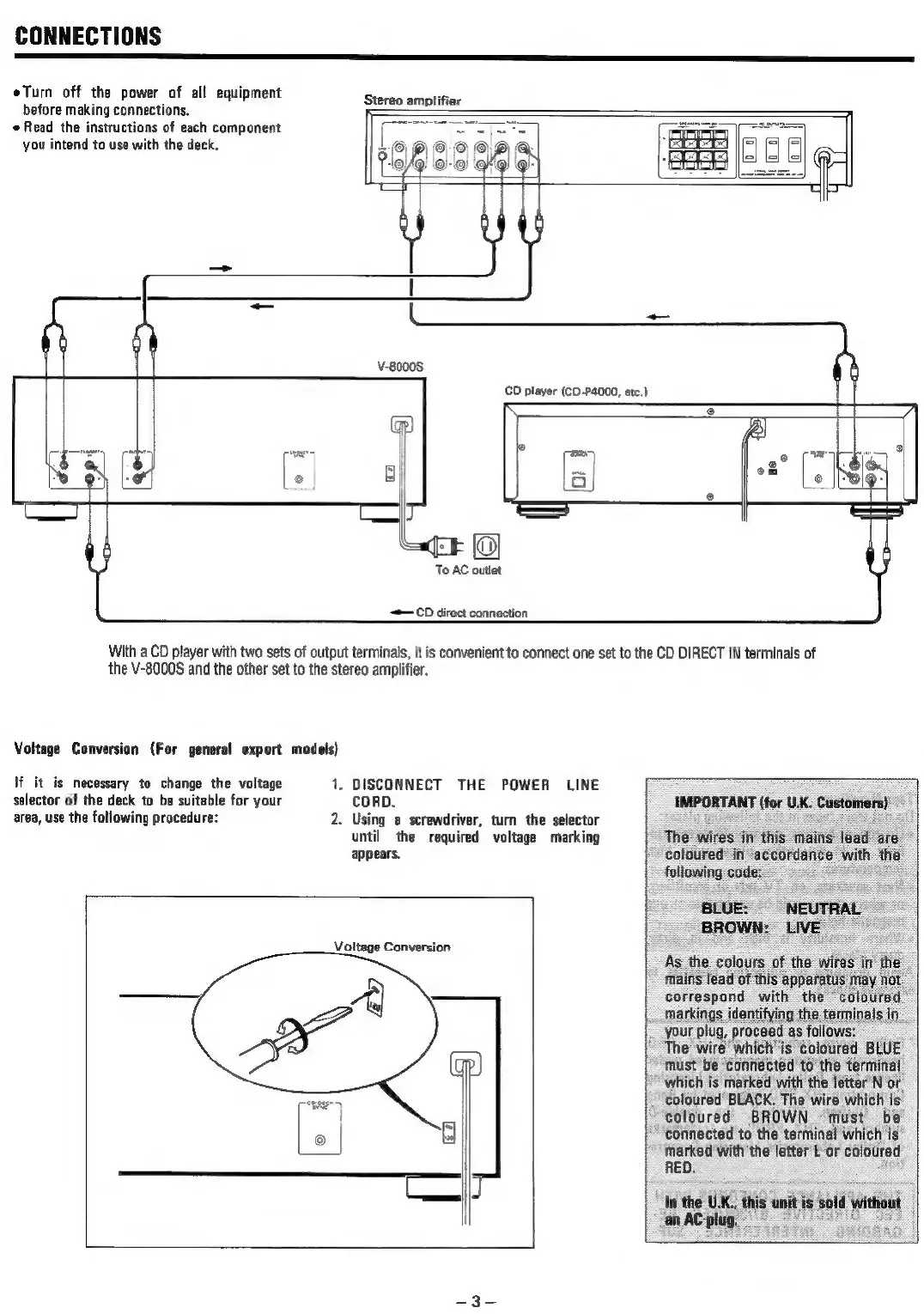
CONNECTIONS
eTurn
off
the
power
of
all
equipment
before
making
connections.
e
Read
the
instructions
of
each
component
you
intend
to
use
with
the
deck.
Stereo
amplifier
CD
player
(CD-P4000,
etc.)
To
AC
outlet
—CD
direct
connection
With
a
CD
player
with
two
sets
of
output
terminals,
it
is
convenient
to
connect
one
set
to
the
CD
DIRECT
IN
terminals
of
the
V-8000S
and
the
other
set
to
the
stereo
amplifier.
Voltage
Conversion
(For
general
export
models)
lf it is
necessary
to
change
the
voltage
1.
DISCONNECT
THE
POWER
LINE
selector
of
the
deck
to
be
suitable
for
your
CORD.
IMPORTANT
(for
U.K.
Customers)
area,
use
the
following
procedure:
2.
Using
a
screwdriver,
turn
the
selector
2 :
ee
until
the
required
voltage
marking
The
wires
in
this
mains
lead
are
appears.
coloured
in
accordance
we
ae
following
code:
_
BLUE:
“NEUTRAL
BROWN:
LIVE”
Voltage
Conversion
As
the
colours
of
the
mains
lead
of
this
apparatu:
correspond
with
the
coloured
markings
identifying
the
terminals
in
your
plug,
proceed
asfollows:
The
wire
which
is
coloured
BLUE
must
be
connected
to
the
terminal
which
is
marked
with
the
letter
N
or
coloured
BLACK.
The
wire
which
is
coloured
BROWN
must
be
connected
to
the
terminal
which
is
marked
with
the
letter
L
or
coloured
RED.

Related product manuals