EasyManua.ls Logo

Teac V-8000S - Operating Your TEAC V-8000 S; Environment and Tape Handling Precautions; Playback and Recording Procedures

Teac V-8000S
12 pages
Print Icon
To Next Page IconTo Next Page
To Previous Page IconTo Previous Page
Loading...
PRECAUTIONS
Environment
Avoid
using
the
deck
in
the
following
conditions:
eAt
high
temperatures
(near
a
heater,
exposed
to
direct
sunlight,
etc.).
©
At
extremely
low
temperatures.
o
Where
there
is
excessive
humidity.
e
Ina
dusty
atmosphere.
Where
power
line
voltage
fluctuations
are
severe
(the
use
of
a
voltage
regulator
may
be
advisable),
Cassette
Tape
Tape
Selection:
For
the
automatic
tape
select
function
to
work
properly,
metal
and
chrome
(cobalt)
tapes
must
have
tape
identification
holes.
Metal
Tapes
©
Tape
position
identification
holes
Tape
Handling:
Do
not
store
tapes
in
the
following
places:
On
top
of
heaters,
exposed
to
direct
sun-
light
or
in
any
other
places
with
high
temperatures.
Near
speakers,
on
TV
sets
or
amplifiers,
or
where
they
would
be
exposed
to
strong
magnetic
fields.
Where
humidity
is
high
and
in
dirty,
dusty
places,
Avoid
dropping
or
subjecting
cassettes
to
excessive
shocks,
—<———
“Dolby
noise
reduction
and
HX
PRO
headroom
extension
manufactured
under
license
from
Dolby
Laboratories
Licensing
Corporation.
HX
PRO
originated
by
Bang
and
Olufsen.
“Dolby”,
the
double-D
symbol
and
"HX
PRO”
are
trademarks
of
Dolby
Laboratories
Licensing
Corpara-
tion.
THE
APPLIANCE
CONFORMS
WITH
EEC
DIRECTIVE
87/308/EEC
RE-
GARDING
INTERFERENCE
sup-
PRESSION
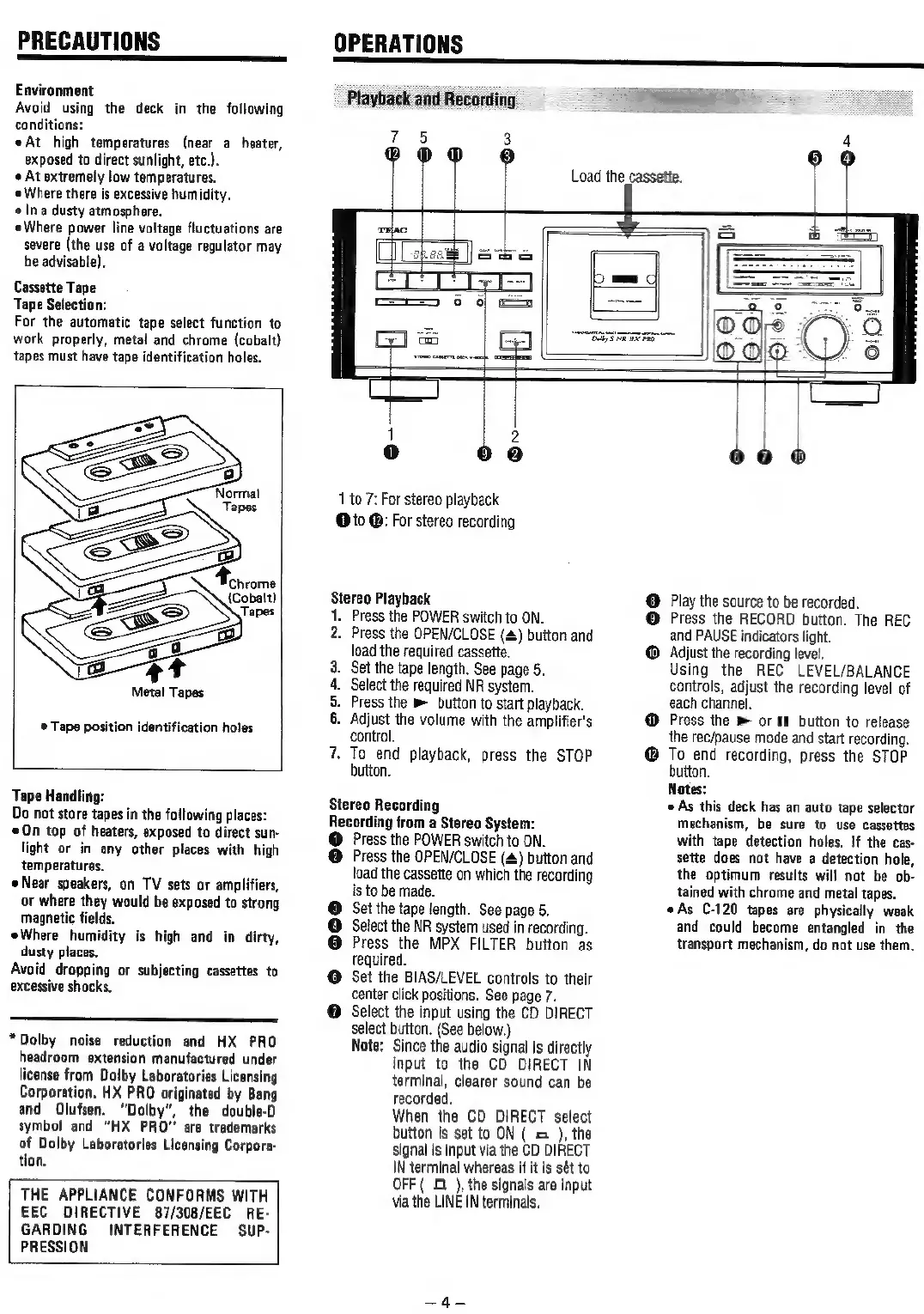
OPERATIONS
Playback
and
Recording
1
35
3
®Ooo
®
Load
the
cassette.
Rs
ae
1
to
7:
For
stereo
playback
@
to
@:
For
stereo
recording
Stereo
Playback
1.
Press
the
POWER
switch
to
ON.
2.
Press
the
OPEN/CLOSE
(#)
button
and
load
the
required
cassette.
.
Set
the
tape
length.
See
page
5.
|.
Select
the
required
NR
system.
.
Press
the
button
to
start
playback.
.
Adjust
the
volume
with
the
amplifier's
control.
.
To
end
playback,
press
the
STOP
button.
Pup
~
Stereo
Recording
Recording
from
a
Stereo
System:
@
Press
the
POWER
switch
to
ON.
@
Press
the
OPEN/CLOSE
(4)
button
and
load
the
cassette
on
which
the
recording
is
to
be
made.
Set the
tape
length.
See
page
5.
Select
the
NR
system
used
in
recording.
Press
the
MPX
FILTER
button
as
required.
Set
the
BIAS/LEVEL
controls
to
their
center
click
positions.
See
page
7.
Select
the
input
using
the
CD
DIRECT
select
button,
(See
below.)
Note:
Since
the
audio
signal
is
directly
input
to
the
CD
DIRECT
IN
terminal,
clearer
sound
can
be
recorded.
When
the
CD
DIRECT
select
button
is
set
to
ON
(
&
),
the
signal
is
input
via
the
CD
DIRECT
IN
terminal
whereas
if it
is
sét
to
OFF
(
£1 ),
the
signals
are
input
via
the
LINE
IN
terminals,
2
09
660
@
Play
the
source
to
be
recorded.
©
Press
the
RECORD
button.
The
REC
and
PAUSE
indicators
light.
@
Adjust
the
recording
level.
Using
the
REC
LEVEL/BALANCE
controls,
adjust
the
recording
level
of
each
channel.
Press
the
®
or
II
button
to
release
the
rec/pause
mode
and
start
recording.
To
end
recording,
press
the
STOP
button.
Notes:
As
this
deck
has
an
auto
tape
selector
mechanism,
be
sure
to
use
cassettes
with
tape
detection
holes.
If
the
cas-
sette
does
not
have
a
detection
hole,
the
optimum
results
will
not
be
ob-
tained
with
chrome
and
metal
tapes.
«As
C-120
tapes
are
physically
weak
and
could
become
entangled
in
the
transport
mechanism,
do
nat
use
them.

Related product manuals