EasyManua.ls Logo

Teac V-8000S - Advanced Recording Features; Tape Length and Recording Level Setup; CD Level Check and Tape Erasing

Teac V-8000S
12 pages
Print Icon
To Next Page IconTo Next Page
To Previous Page IconTo Previous Page
Loading...
a
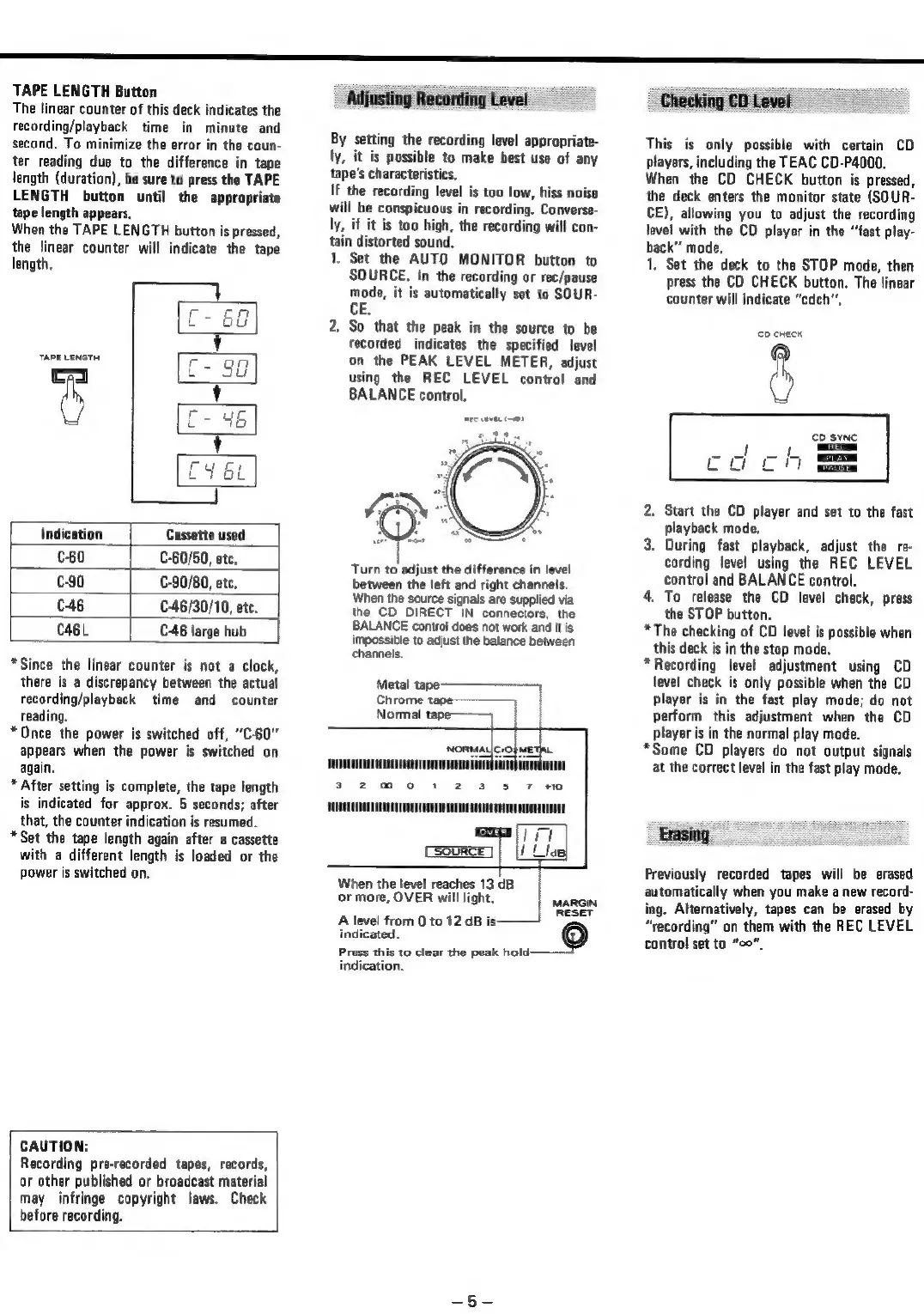
TAPE
LENGTH
Button
The
linear
counter
of
this
deck
indicates
the
recording/playback
time
in
minute
and
second.
To
minimize
the
error
in
the
coun-
ter
reading
due
to
the
difference
in
tape
length
(duration),
be
sure
to
press
the
TAPE
LENGTH
button
until
the
appropriate
tape
length
appears,
When
the
TAPE
LENGTH
button
is
pressed,
the
linear
counter
will
indicate
the
tape
length,
TAPE
LENGTHC
8
Indication
Cassette
used
C60
|
£-60/50,
etc,
C-90
C-90/80,
etc.
C46
C-46/30/10,
etc.
CaBL
C-46
large
hub
*Since
the
linear
counter
is
not
a
clock,
there
is
a
discrepancy
between
the
actual
recording/playback
time
and
counter
reading.
*
Once
the
power
is
switched
off,
“C-60"
appears
when
the
power
is
switched
on
again.
*
After
setting
is
complete,
the
tape
length
is
indicated
for
approx.
5
seconds;
after
that,
the
counter
indication
is
resumed.
*Set
the
tape
length
again
after
a
cassette
with
a
different
length
is
loaded
or
the
power
is
switched
on,
CAUTION:
Recording
pre-recorded
tapes,
records,
or
other
published
or
broadcast
material
may
infringe
copyright
laws.
Check
before
recording.
Adjusting
Recording
Level
By
setting
the
recording
level
appropriate-
ly,
it
is
possible
to
make
best
use
of
any
tape’s
characteristics.
If
the
recording
level
is
too
low,
hiss
noise
will
be
conspicuous
in
recording.
Converse-
ly,
if
it is
too
high,
the
recording
will
con-
tain
distorted
sound.
1.
Set the
AUTO
MONITOR
button
to
SOURCE.
In
the
recording
or
rec/pause
mode,
it is
automatically
set
to
SOUR-
CE.
2,
So
that
the
peak
in
the
source
to
be
recorded
indicates
the
specified
level
on
the
PEAK
LEVEL
METER,
adjust
using
the
REC
LEVEL
control
and
BALANCE
control.
Turn
to
adjust
the
difference
in
level
between
the
left
and
right
channels.
When
the
source
signals
are
supplied
via
the
CD
DIRECT
IN
connectors,
the
BALANCE
control
does
not
work
and
it
is
impossible
to
adjust
the
balance
between
channels.
Metal
=
re
|
Chrome
tagee———
|
Normal
tape———
|
When
the
level
reaches
13
dB
or
more,
OVER
will
light,
Sanne
RESET
A
level
from
0
to
12
dB
is:
indicated.
_@
Press
this
to
clear
the
peak
hold:
indication.
Checking
CD
Level
This
is
only
possible
with
certain
CD
players,
including
the
TEAC
CD-P4000.
When
the
CD
CHECK
button
is
pressed,
the
deck
enters
the
monitor
state
(SOUR-
CE),
allowing
you
to
adjust
the
recording
level
with
the
CD
player
in
the
“fast
play-
back"
mode,
1,
Set
the
deck
to
the
STOP
mode,
then
press
the
CD
CHECK
button.
The
linear
counter
will
indicate
“cdch",
2.
Start
the
CD
player
and
set
to
the
fast
playback
mode.
3.
During
fast
playback,
adjust
the
re-
cording
level
using
the
REC
LEVEL
control
and
BALANCE
control.
4.
To
release
the
CD
level
check,
press
the
STOP
button.
*The
checking
of
CD
level
is
possible
when
this
deck
is
in
the
stop
mode,
*
Recording
level
adjustment
using
CD
level
check
is
only
possible
when
the
CD
player
is
in
the
fast
play
mode;
do
not
perform
this
adjustment
when
the
CD
player
is
in
the
normal
play
mode.
*Some
CD
players
do
not
output
signals
at
the
correct
level
in
the
fast
play
mode.
Erasing
Previously
recorded
tapes
will
be
erased
automatically
when
you
make
a
new
record-
ing.
Alternatively,
tapes
can
be
erased
by
“recording”
on
them
with
the
REC
LEVEL
control
set
to
“oo”

Related product manuals