10
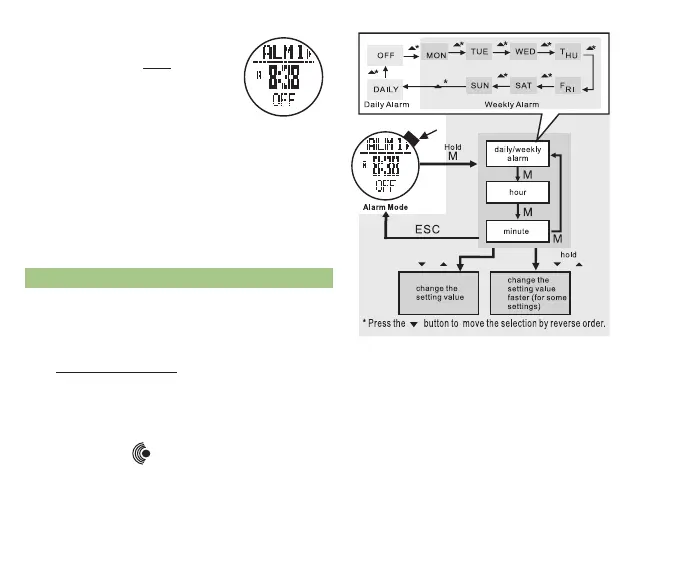
* Press ST/STP(+) or LAP/RST( - )
to adjust the alarm hour
* Press M to confirm your selection
* Press ST/STP(+) or LAP/RST( - )
to adjust the alarm minute
* Press ESC to confirm your selection
• Repeat the above steps to set additional
alarms
fig.7
* TRAIL MEnu function -
press ESC twice to access
the Time Menu and press
ST/STP(uP) or LAP/
RST(DOwn) to scroll to
the ALM icon
• Display Features:
* Top Row: Alarm number 1 or 2
* Press ST/STP to select between the
two alarms
* Middle Row: Alarm Time
* Bottom Row: Alarm Status
2.2 ALARM SETTInG See fig. 7
Access the Alarm display (See section 2.1 for how to
access the Alarm display)
• Press ST/STP to select the alarm you wish to set
• Hold M for 3 seconds to enter Alarm set mode
* Press ST/STP or LAP/RST to select the
frequency of the alarm or turn the alarm off
* Press M to confirm your selection
* When an alarm is scheduled, the alarm
icon
will appear at the bottom
of the display
fig.6



 To Next Page