13
4.0 COunTDOwn TIMER MODE
The countdown timer is useful for counting
backwards from a programmable time with
beeps at convenient intervals.
4.1 COunTDOwn TIMER DISPLAy
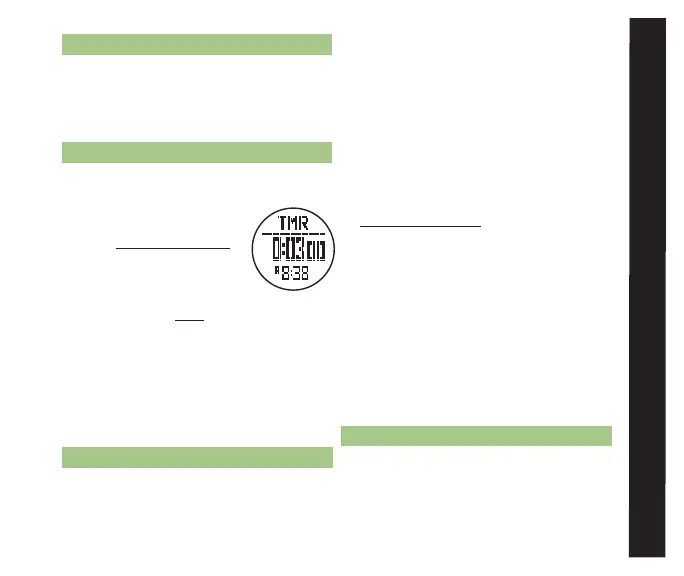
• To access the Countdown Timer display
while currently in a:
* TIME MEnu function
- continue pressing M
until the display in fig.10
is visible
* TRAIL MEnu function
- press ESC twice to access the Time
Menu and press ST/STP(uP) or LAP/
RST(DOwn) to scroll to the TMR icon
• Display Features:
* Top Row: TMR indicator
* Middle Row: Countdown time
* Bottom Row: Current time2
4.2 COunTDOwn TIMER SETTInG
Access the Countdown Timer (See section
4.1 for how to access the Countdown Timer
display)
• Countdown Timer Mode has ve preset
timers (3, 5, 10, 15, and 45min) and one
user programmable timer
To select a preset timer:
• Continue pressing LAP/RST to select
the timer you wish to use (skip to
section 4.3)
To set your own countdown timer:
• Hold M for 3 seconds to set the user
programmable timer
* Press ST/STP(+) or LAP/RST( - )
to adjust the timer hour
* Press M to confirm your selection
* Press ST/STP(+) or LAP/RST( - )
to adjust the timer minute
* Press M to confirm your selection
* Press ST/STP(+) or LAP/RST( - )
to adjust the timer seconds
* Press ESC to confirm your selection
4.3 COunTDOwn TIMER uSE
Access the Countdown Timer (See section
4.1 for how to access the Countdown Timer
display) ¬
COunTDOWn TImER mODE
fig. 10



 To Next Page