29
COmPaSS mODE
• Press LAP/RST(DOwn) to scroll to Vw. Log
• Press M to select Vw. Log
* Press ST/STP(+) or LAP/RST( - ) to
view the maximum and minimum
pressures, and maximum and
minimum temperatures, and when the
measurement occurred
* Press M to view a graphical history
of the previous 48 hours’ pressure
measurements
* Press ST/STP(+) or LAP/RST( - )
to scroll through the time/pressure
records
* Press ESC to exit the graphical history
* Press ESC to exit Vw. Log.
• Press ESC to exit Barometer set menu
8.5 SwITCH AMOnG InHG, MB, & HPA
Access the Barometer Display (See section 8.1
for how to access the Barometer display)
• Press LAP/RST to change the units amongst
inHG, mb, and hPA
9.0 COMPASS MODE
The digital compass on the Traileader
provides the confidence in knowing that
a quick check of your direction is always
at hand. In order to obtain the most
accurate compass bearing be sure to
calibrate the compass often and make
sure that you are not using this feature
near any magnetic field.
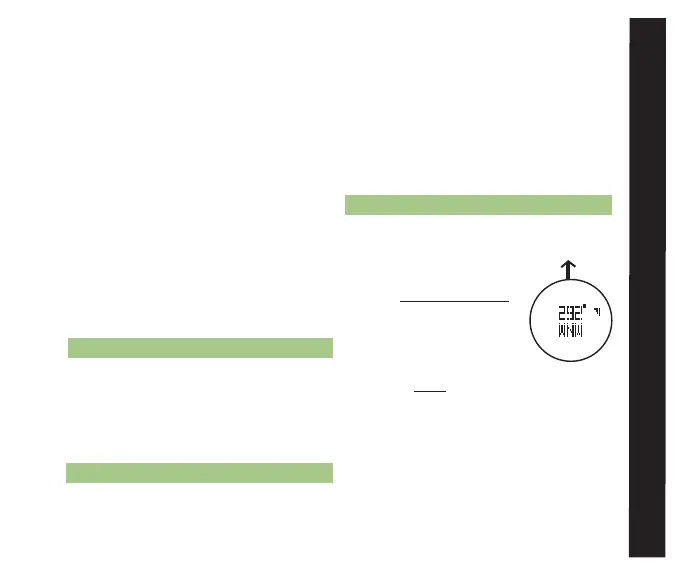
9.1 COMPASS DISPLAy
• To access Compass mode
display while currently in a:
* TRAIL MEnu function
- continue pressing M
until the display in fig.
19 is visible
* TIME MEnu
function - press
ESC twice to access the
Trail Menu and press ST/STP(uP) or
LAP/RST(DOwn) to scroll to the
COMP icon
• Display Features:
* Center: Heading degree and cardinal
direction
* Outer Ring: Magnetic north indicator
fig. 19
direction
of travel



 To Next Page