11
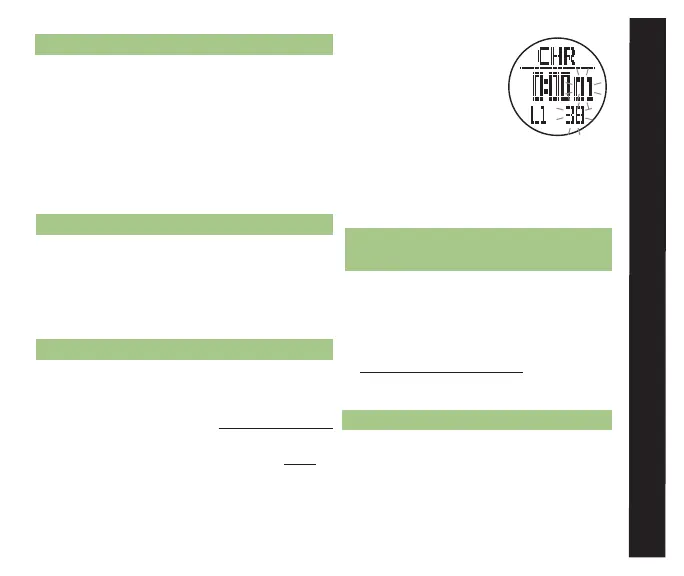
the CHR icon
• Display Features:
* Top Row: CHR
indicator
* Middle Row:
Running time /
most recent lap time (hours,
minutes, seconds)
* Bottom Row: Lap number and 100th of
a second lap time
CHROnOGRAPH uSE see fig. 9
3.2 START/STOP THE CHROnOGRAPH
Access the Chronograph (See section 3.1 for
how to access the Chronograph display)
• Press ST/STP to start the chronograph
• Press ST/STP again to stop the chronograph
• Hold LAP/RST for 3 seconds to clear
recorded time from the chronograph
3.3 EnTER LAP/SPLIT TIMES
• Press ST/STP to start the chronograph
• Press LAP/RST to record a lap
* The most recently recorded lap ¬
2.3 ALARM uSE
• The scheduled alarm chime will sound for 30
seconds and then turn off automatically
• Press any button to stop the alarm chime
• The alarm will automatically reset and sound
again at the next scheduled alarm time
• Follow the steps in section 2.2 to permanently
disable a scheduled alarm
3.0 CHROnOGRAPH MODE
The TraiLeader's chronograph can record up to
50 laps that are automatically stored for later
reference. Stored laps can also be recalled
while the chronograph is still in operation.
3.1 CHROnOGRAPH DISPLAy
• To access the Chronograph display while currently
in a:
* TIME MEnu function - continue pressing M
until the display in fig. 8 is visible
* TRAIL MEnu function - press ESC twice
to access the Time Menu and press ST/
STP(uP) or LAP/RST(DOwn) to scroll to
fig. 8
alaRm CHROnOGRaPH



 To Next Page