21
• Display Features:
* Top Row: Altitude stats (change in
altitude, total ascent, total descent,
altitude graph, current temperature)
* Press ST/STP to scroll through the 5
different altitude stats
* Middle Row: Current Altitude
* Bottom Row: Current time
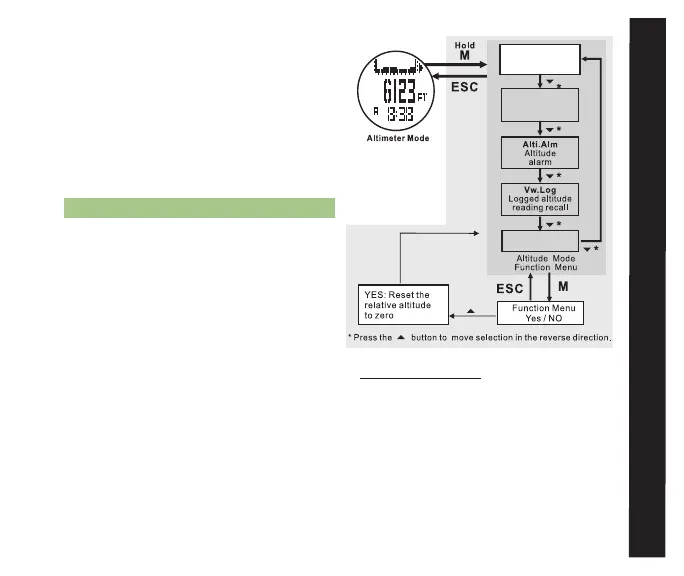
7.2 SET A REFEREnCE ALTITuDE See fig, 16
Setting a reference altitude is a key
step to ensuring accurate and useful
altitude readings. As covered in the
introduction to section 7.0 Altimeter
Mode, changes in weather conditions
will skew the altimeter readings. This
situation is quickly remedied by setting
a new, known, reference altitude.
Whenever setting a reference altitude,
please consult a trusted source such as
a topographical map or trail head or
summit signage for a benchmark.
Access the Altimeter Display (See section 7.1
for how to access the Altimeter display)
• Hold M for 3 seconds to enter Altimeter set
menu
• Press LAP/RST(DOwn) to scroll to Ref. Alt.
• Press M to select Ref. Alt.
* Press ST/STP or LAP/RST to adjust
the reference altitude to match your
current, known altitude
* Press ESC to return ¬
Alt.Dif.
Altitude difference
counter
Ref.Alt.
Reference altitude
setting
Graph Options
Chart
fig. 16
alTImETER



 To Next Page