6
Access the Time/Date display (See section 1.1
for how to access the Time/Date display)
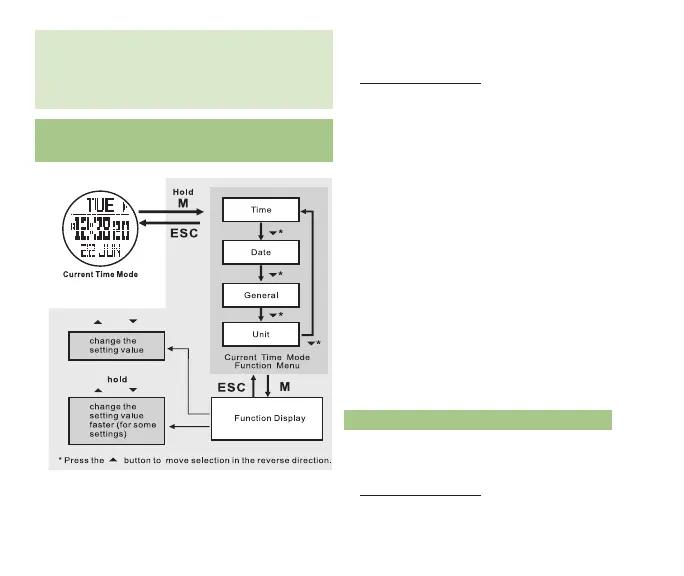
• Hold M for 3 seconds to enter Time/Date/
System set menu
• Press M to select the Time
* Press ST/STP or LAP/RST to reset the
seconds to 00.
* Press M to confirm your selection
* Press ST/STP(+) or LAP/RST( - )
to adjust the minutes
* Press M to confirm your selection
* Press the ST/STP(+) or LAP/RST( - )
to adjust the hour
* Press M to confirm your selection
* Press the ST/STP(+) or LAP/RST( - )
to adjust the time format (12 / 24hr)
* Press M to confirm your selection
• Press ESC to exit Time
• Press ESC to exit the Time/Date/System set
menu
1.3 ADJuST DATE
Access the Time/Date display (See section 1.1
for how to access the Time/Date display)
• Hold M for 3 seconds to enter Time/Date/
System set menu ¬
fig.5
altitude is maintained for several hours. For
a more in depth explanation of the altitude/
pressure/weather relationship, reference
section 10.0 Troubleshooting.
SySTEM SETTInG See fig.5
1.2 ADJuST TIME



 To Next Page