NETWORK PAGE
21
3
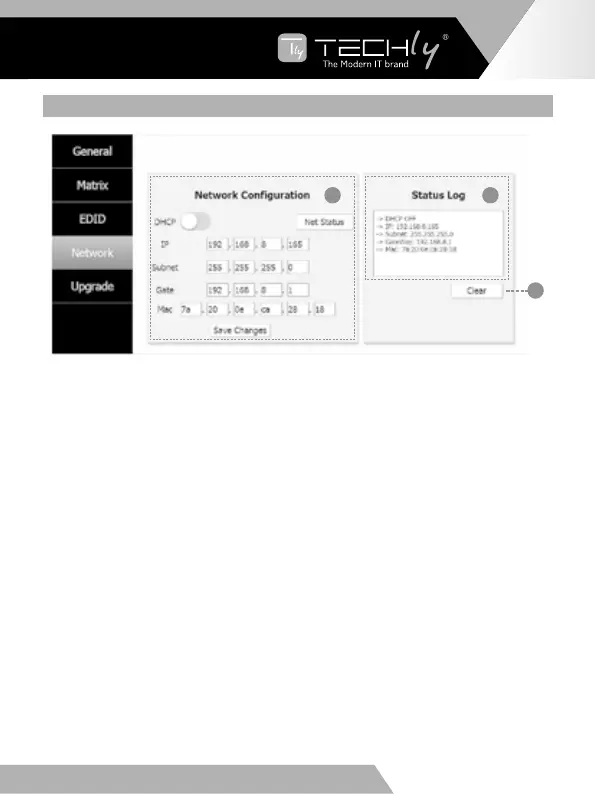
➀NetworkConfiguration
•InDHCPopenstatus:
DHCP switch: Obtian automatically the network configuration information,
includingIPaddress,Subnet,GatewayandMAC.
•InDHCPclosestatus:
DHCP switch: If the DHCP switch has been closed, user can set IP, Subnet,
GatewayandMacaddress.Inthismoment,clickthe“SaveChanges”buttonto
savecurrentstatusinformation.(Note:IfuserhavesetanewIPaddressandclick
the “Save Changes” button. At this moment, user have changed the IP address.)
Net Status button: Click this button will refreshcurrentlynetwork configuration
informationtodisplayinStatusLog.
➁StatusLog:DisplaytheNetconfigurationinformation.
➂Clearbutton:CleartheStatusLoginformation.
EN - 13
EN
WWW.TECHLY.COM WWW.TECHLY.COM
8X8 HDMI MATRIX
4K@60HZ YUV 4:4:4 18GBPS



 To Next Page