EasyManua.ls Logo

Technaxx TX-185 - User Manual

Technaxx TX-185
17 pages
Print Icon
To Next Page IconTo Next Page
Loading...
1
Model: TX-185 Article No. 4986, 04/2022
Technaxx
®
* User Manual
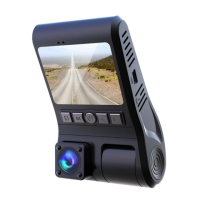
FullHD Dual Dashcam TX-185
Before using the appliance for the first time, please read the instructions
for use and safety information carefully.
This appliance is not intended for use by persons (including children) with
reduced physical, sensory or mental capacities, or by persons lacking in
experience or knowledge, unless they are supervised or instructed on the
use of this device by a person responsible for their safety. Children should
be supervised to ensure they do not play with this device.
Keep this user manual for future reference or product sharing carefully. Do
the same with the original accessories for this product. In case of warranty,
please contact the dealer or the store where you bought this product.
Enjoy your product. * Share your experience and opinion on one of
the well-known internet portals.

Questions and Answers

  • J
    John LeeJul 28, 2025
    What to do if Technaxx TX-185 stop recording automatically?
    • J
      Jimmy RobinsonJul 28, 2025
      If your Technaxx Dash Camera stops recording or does not cycle recording, it may be because the memory card's read and write speed is too slow for the high-definition video data. Try using a high-speed MicroSD card, such as a Class10 high-speed card. Another cause might be that the G-Sensor function is turned on, locking all files on the memory card. In this case, turn off the G-Sensor and format the memory card.
  • R
    Robin NguyenAug 2, 2025
    How to fix Technaxx TX-185 when it crashes?
    • K
      keith25Aug 2, 2025
      If your Technaxx Dash Camera crashes, short press the reset button to power off the device. Then, press the power button to start the dashcam again.
  • J
    Justin RossAug 7, 2025
    What to do if Technaxx TX-185 Dash Cameras do not switch on?
    • R
      Ryan DavisAug 7, 2025
      If your Technaxx Dash Camera does not switch on, check if the power supply is properly connected to the dashcam or cigarette lighter socket. If it is, try unplugging it, waiting 1 minute, and then plugging it back in. If the issue is due to software problems, you can restore it to the factory settings by pressing the reset button.
  • J
    Jacob McdonaldAug 12, 2025
    Why is the video from my Technaxx Dash Cameras not clear?
    • J
      Javier MorenoAug 12, 2025
      If the video from your Technaxx Dash Camera is not clear, check the lens for dirt or fingerprints. Clean the lens surface before shooting to keep it clean.
  • M
    mmorrowAug 18, 2025
    Why is Technaxx TX-185 video quality inconsistent?
    • B
      Brooke BennettAug 18, 2025
      The shooting light environment, such as backlight, smooth light and the intensity of light, etc., will cause different effects on the recording of your Technaxx Dash Cameras.
  • J
    John BergAug 22, 2025
    Why is loop recording different from the setting on Technaxx Dash Cameras?
    • S
      Sandra GreenAug 23, 2025
      Check whether the motion detection function is turned on because the recording time in the motion detection state depends on whether motion is detected in front of the dashcam or not.

Summary

Safety Instructions and Warnings

General Safety Precautions

Essential guidelines for safe operation, handling, and placement of the device to prevent damage or injury.

Operational Warnings

Critical warnings regarding device disassembly, battery use, cleaning agents, and environmental conditions.

Product Overview and Features

Product Features

Key capabilities of the dashcam, including dual cameras, viewing angles, resolution, and storage support.

Product Components

Identification and description of the dashcam's physical parts and their corresponding labels for easy reference.

Initial Setup and Operation

MicroSD Card Preparation

Instructions for inserting, removing, and formatting the MicroSD card for optimal performance.

Mounting Instructions

Guidance on selecting the optimal windshield placement and connecting the power cable.

First Start and Basic Setup

Steps for initial power-on, language selection, and setting the device's date and time.

Functionality Details

Menu Overview and Settings

Explanation of the menu structure and available settings for customizing device functions.

Indicator Light and Time Settings

Understanding the indicator light and adjusting the device's date and time settings.

Video Recording Procedures

Detailed steps for manual and automatic video recording, including file protection.

Advanced Recording Features

Explanation of G-Sensor, manual lock, and motion detection for enhanced recording capabilities.

Park Monitoring and Playback

Instructions for using park monitoring mode and navigating playback mode to review footage.

Troubleshooting and Specifications

Troubleshooting Common Issues

Solutions for common problems like device not switching on, recording interruptions, and poor video quality.

Technical Specifications

Detailed technical data including resolutions, frame rates, storage, power, and dimensions.

Support and Disposal

Customer Support Information

Contact details and availability for technical support via phone and email.

Care and Maintenance Guidelines

Recommendations for cleaning and maintaining the device to ensure longevity and optimal performance.

Product Disposal Instructions

Environmental guidelines for the proper disposal of packaging and old electronic equipment.

Technaxx TX-185 Specifications

General IconGeneral
Night visionYes
Product colorBlack
GPS (satellite)No
Housing materialAcrylonitrile butadiene styrene (ABS)
Languages supportCZE, DEU, DUT, ENG, FRE, ITA, POR
Number of cameras1
Main camera sensorCMOS
Maximum frame rate30 fps
Power cable length3.5 m
Supported video modes480p, 1080p
Main camera resolution1920 x 1080 pixels
Main camera sensor size1/4 \
Horizontal field of view100 °
Main camera viewing angle120 °
Video compression formatsAVI
Interior camera resolution0.3 MP
Main camera sensor resolution1 MP
Display diagonal2 \
Compatible memory cardsMicroSD (TransFlash)
Maximum memory card size32 GB
Output current1 A
Output voltage5 V
Battery capacity200 mAh
Operating voltage3.7 V
Power source typeBattery, Cigar lighter
Input operation voltage (max)24 V
Image formats supportedJPG
Weight and Dimensions IconWeight and Dimensions
Depth105 mm
Width70 mm
Height45 mm
Weight80 g

Related product manuals