EasyManua.ls Logo

Technaxx TX-124 - User Manual

Technaxx TX-124
12 pages
Print Icon
To Next Page IconTo Next Page
Loading...
Technaxx
®
* User Manual
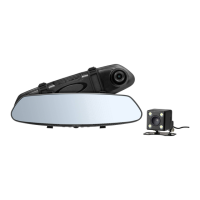
HD Rearview Mirror Dash Cam TX-124
Suitable for most of cars (& vans, SUVs, minibuses, caravans,
etc.) as assistance for reverse parking.
This system is designed to be an aid and should NOT replace
the need to drive carefully.
Under no circumstances will the manufacturer or supplier
accept any responsibility or can held liable for any direct or
indirect, incidental or consequential damage, or for injuries
resulting from installing or use of this system.
The Declaration of Conformity for this device is under the Internet link:
www.technaxx.de/ (in bottom bar “Konformitätserklärung”). Before using the
device the first time, please read the user manual carefully.
Service phone No. for technical support: 01805 012643 (14 cent/minute from
German fixed-line and 42 cent/minute from mobile networks).
Free Email: support@technaxx.de
Keep this user manual for future reference or product sharing carefully. Do
the same with the original accessories for this product. In case of warranty,
please contact the dealer or the store where you bought this product.
Warranty 2 years
Enjoy your product * Share your experience and opinion on one of the
well-known internet portals.
Features
Rearview mirror Dash cam for high resolution HD video recordings suitable
for most vehicles
Rearview camera gives more safety when driving backwards & reverse
parking
Dash cam recording angle 90° & rearview camera wide angle 160°
Simultaneous recording of dash cam & rear camera
Invisibly integrated TFT color display (Ø screen 10.9cm/4,3")
Automatic night vision mode (~2m) for rearview camera (4 white LED)
Automatic activation of rearview camera when engaging reverse gear
Recordings with time & date stamp
Attachment to the rearview mirror with adjustable rubber bands
Rear camera protection class IP68 (dustproof & protection against
permanent immersion)
Question and Answer IconNeed help?

Do you have a question about the Technaxx TX-124 and is the answer not in the manual?

Summary

Features

Technical specifications

Product Overview

Rear Camera

Installation & Wiring

Function Test

Verifies that all parts of the TX-124 work correctly by connecting components and testing power-on.

Installation of the mirror

Instructions for attaching the new mirror to the existing rearview mirror using rubber holders.

Power supply for Mirror

Guidance on routing the power cable for the mirror, including hiding it in the front window seal.

Wiring of the rearview camera

Install the rearview camera

Mirror setting menu

Function of the device

Automatic On; Off

Describes the automatic startup and shutdown of the device based on vehicle power connection.

Manual On;Off

Instructions for manually turning the device on and off using the power button.

Motion detection

Explains how motion detection works via the G-sensor for automatic recording.

Manually start video recording

Details on how to manually start and stop video recording using the OK button.

Video playback

Steps for navigating and playing recorded video files using menu and navigation buttons.

Enter menu

Procedure for accessing and navigating the device's settings menu using control buttons.

Change the live image view

FAQ

General information

Environmental conditions

Summary

Features

Technical specifications

Product Overview

Rear Camera

Installation & Wiring

Function Test

Verifies that all parts of the TX-124 work correctly by connecting components and testing power-on.

Installation of the mirror

Instructions for attaching the new mirror to the existing rearview mirror using rubber holders.

Power supply for Mirror

Guidance on routing the power cable for the mirror, including hiding it in the front window seal.

Wiring of the rearview camera

Install the rearview camera

Mirror setting menu

Function of the device

Automatic On; Off

Describes the automatic startup and shutdown of the device based on vehicle power connection.

Manual On;Off

Instructions for manually turning the device on and off using the power button.

Motion detection

Explains how motion detection works via the G-sensor for automatic recording.

Manually start video recording

Details on how to manually start and stop video recording using the OK button.

Video playback

Steps for navigating and playing recorded video files using menu and navigation buttons.

Enter menu

Procedure for accessing and navigating the device's settings menu using control buttons.

Change the live image view

FAQ

General information

Environmental conditions

Overview

The Technaxx® HD Rearview Mirror Dash Cam TX-124 is a versatile device designed to enhance driving safety and convenience, particularly for reverse parking. It functions as a rearview mirror with an integrated dash cam and includes a separate rearview camera, making it suitable for a wide range of vehicles such as vans, SUVs, minibuses, and caravans. It's crucial to remember that this system is an aid and should not replace careful driving.

Function Description:

The TX-124 provides simultaneous video recording from both the front-facing dash cam and the rear-facing rearview camera. The dash cam captures high-resolution HD video, while the rearview camera offers a wide-angle view for improved safety during backward driving and reverse parking. An invisibly integrated TFT color display (4.3" screen) shows the live view from either camera or both simultaneously. The rearview camera features an automatic night vision mode with four white LEDs, effective up to approximately 2 meters. A key feature is the automatic activation of the rearview camera display when reverse gear is engaged, provided it's correctly wired to the reversing light. All recordings are stamped with the time and date. The device supports loop recording, which means when the MicroSD card storage is full, the oldest file will be deleted to make space for new recordings. It also includes a G-Sensor for gravity sensing, which can activate recording automatically in the event of a collision. The device supports auto ignition startup and shutdown flameout, meaning it powers on and off with the vehicle's ignition.

Important Technical Specifications:

Rearview Camera:

  • Sensor / Resolution: 1/4" CMOS 0.5MP / 720x480 pixel
  • Viewing angle: 160°
  • LED light: ~2m
  • Power supply: Connection cable (6m) from Dash cam (video transmission & power supply)
  • Working temperature: -20°C up to +50°C
  • Protection class: IP68 (dustproof & protection against permanent immersion)
  • Weight / Dimensions: 28g / (L) 3.0 x (W) 2.0 x (H) 2.0cm

Mirror with Display & Dash Cam:

  • Display / Resolution: TFT colour display 10.9cm (4.3") / 480x272 pixel
  • Sensor / Resolution: 1/4" CMOS 1MP/ 1280x720 pixel
  • Viewing angle: 90°
  • Recordings: Video (AVI) (simultaneous recording of dash cam & rear camera)
  • Power consumption: 3W
  • Power input: DC 5V via Mini USB
  • Max. current: 230mA
  • MicroSD card: Max. 32GB SDHC class 10 (formatted to FAT32)
  • Loop video recording: Yes
  • Built-in microphone / speaker: Yes / Yes
  • Switch On/Off: Support auto ignition startup, shutdown flameout
  • Supported language: English, German, French, Italian, Czech, Polish, Dutch
  • Working temperature / Humidity: 0°C up to +40°C / 85% RH max.
  • Weight / Dimensions: 217g / (L) 30.0 x (W) 8.0 x (H) 3.5cm

Package Contents:

  • Rearview mirror with display & Dash cam
  • Rearview camera
  • 12V cigarette power supply for rearview mirror (2.5m)
  • Video/power cable (6m) for connection between Dash cam and rearview camera
  • 2x mirror rubber holder
  • 2x screws
  • User Manual

Usage Features:

Installation and Wiring:

The device is attached to the existing rearview mirror using adjustable rubber bands and fixation hooks. The dash cam should be positioned to the left of the vehicle's rearview mirror. The rearview camera requires drilling a 5mm hole in the car body, typically above or beneath the license plate, for cable routing and secure fastening with screws. The red cable of the rearview camera must be connected to the positive pole of the reversing light for automatic display activation when reversing. The main mirror unit is powered via a MiniUSB connection to a 12V cigarette power adapter, with the cable designed to be hidden in the seal of the front window. A MicroSD card (not included) must be inserted for recording.

Operation:

  • Automatic On/Off: The TX-124 automatically starts recording when the car ignition turns on and saves video before turning off when the cigarette lighter power is cut.
  • Manual On/Off: Long press the power button to turn the device on or off.
  • Video Recording: Press the OK button to start or stop video recording. The past record time is shown in red during recording.
  • Menu Navigation: Long press the Menu button to enter the settings menu. Use the Up/Down buttons to navigate and the OK button to confirm selections.
  • Changing Camera View: Press the Up button when in live image mode (and not recording) to switch between different display options: Front only, Back only, Front with small Back, or Back with small Front.
  • Video Playback: Short press the Menu button to enter playback mode. Use Up/Down keys to select files and OK to play.
  • Motion Detection: Supported via the G-Sensor, enabling automatic recording when movement is detected.
  • G-Sensor: Offers High, Middle, and Low sensitivity settings. If activated, recording starts upon collision.
  • Night Vision: Enhanced night vision (4x LED) can be enabled for improved visibility in low light.

Mirror Setting Menu Options:

  • Resolution: Choose between FHD (interpolated) and HD.
  • Quality: Select video quality from 1MP, 2MP (interpolated), 5MP, or 8MP (interpolated).
  • Loop recording: Set recording length to Off, 1Min, 2Min, or 3Min. Default is 2 minutes.
  • White balance: Auto, Daylight, Cloudy, Tungsten.
  • Exposure: Adjust from -3 to 3.
  • Motion Detect: Enable/disable.
  • Video with sound: Enable/disable audio recording.
  • Reversing the line: Enable/disable reverse parking distance lines.
  • Date stamp: Enable/disable date and time stamp on recordings.
  • Button sound: Enable/disable key tone.
  • Date / Time: Manually set.
  • Auto power OFF: Set idle time (1Min, 2Min, 3Min) before device turns off.
  • Language: Select interface language.
  • Frequency: Choose 50Hz or 60Hz for video frequency.
  • LCD lighting: Set display standby time (On=OFF, 10Seconds, 1Min, 3Min).
  • Format: Delete all data on MicroSD card (irreversible).
  • Default setting: Restore factory settings.
  • Version: Display current firmware version.

Maintenance Features:

Troubleshooting (FAQ):

  • Cannot take videos: Check MicroSD card space. Format the card via the menu if necessary (this will erase all data). Use a high-speed SDHC Class 10 MicroSD card.
  • Video recording stops automatically: Ensure a high-speed MicroSD card is used due to large high-definition video data.
  • "File error" during video replay: Reformat the MicroSD card if data storage issues occur.
  • Foggy videos: Clean the camera lens with a glasses cleaning cloth.
  • Incorrect color in cloudy conditions: Set "white balance" to automatic in the menu.
  • Horizontal stripes / Interference image: Adjust "light source frequency" in the menu to 50Hz (for Europe) or 60Hz (for USA).
  • Device crashes: Press the reset button on the back of the device with a thin object (e.g., paperclip) to restart.

General Information and Environmental Conditions:

  • Placement: Avoid unstable surfaces to prevent damage.
  • Child Safety: Keep out of reach of children; it is not a toy.
  • Safety Regulations: Observe accident prevention regulations for electrical installations.
  • Seller Responsibility: The seller is not responsible for damage during use or third-party complaints.
  • Mechanical Stress: Protect from vibration, hard knocks, dropping, or shaking.
  • Temperature: Do not expose to temperatures over 50°C or strong fluctuations. Avoid direct solar radiation and proximity to radiators.
  • Camera Protection: The IP68 rearview camera is dustproof and protected against temporary immersion. The monitor should only be operated indoors.
  • Material Compatibility: Be aware that some paints, plastics, or care products might affect the housing or accessories.

Environment Protection:

Packaging materials are recyclable. Do not dispose of old devices or batteries with domestic waste. Cleaning: Protect the device from contamination. Use a clean, soft cloth. Avoid rough, coarse-grained materials, solvents, or aggressive cleaners.

Technaxx TX-124 Specifications

General IconGeneral
BrandTechnaxx
ModelTX-124
CategoryDash Cameras
LanguageEnglish

Related product manuals