EasyManua.ls Logo

Technics QUARTZ ST-S4 - Page 5

Technics QUARTZ ST-S4
24 pages
Print Icon
To Next Page IconTo Next Page
To Previous Page IconTo Previous Page
Loading...
re
ee
ee
ee
ee
a
a
ie
ee
ee
ee
z
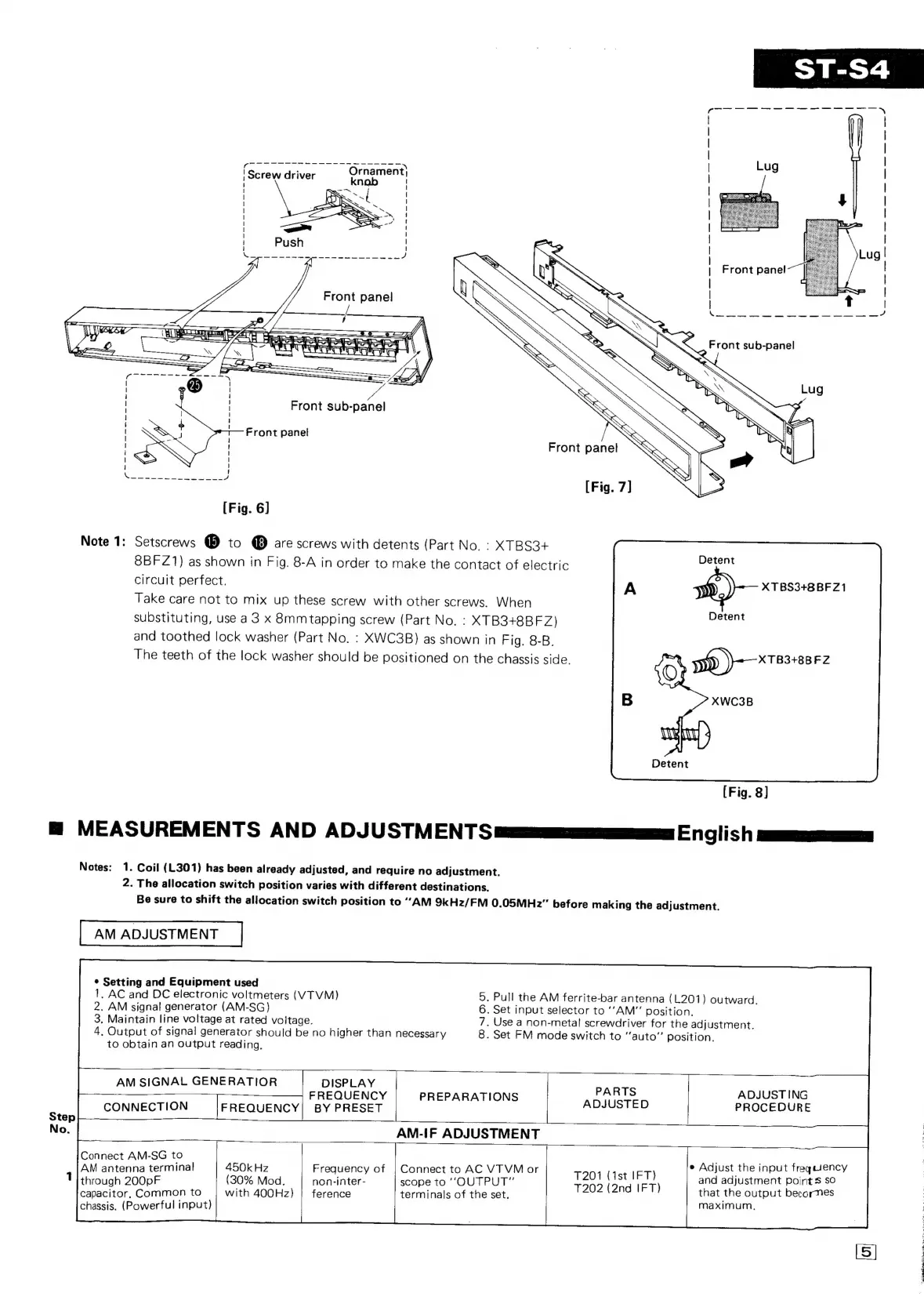
Screw
driver
Front
sub-panel
Front
panel
Front
panel
[Fig.
7]
[Fig.
6]
Note
1:
Setscrews
@
to
@
are
screws
with
detents
(Part
No.
:
XTBS3+
8BFZ1)
as
shown
in
Fig.
8-A
in
order
to
make
the
contact
of
electric
circuit
perfect.
XTBS3+8BFZ1
Take
care
not
to
mix
up
these
screw
with
other
screws.
When
substituting,
use
a3
x
8mmtapping
screw
(Part
No.
:
XTB3+8B
FZ)
and
toothed
lock
washer
(Part
No.
:
XWC3B)
as
shown
in
Fig.
8-B.
The
teeth
of
the
lock
washer
should
be
positioned
on
the
chassis
side.
Detent
Detent
Detent
(Fig.
8]
=@
MEASUREMENTS
AND
ADJUSTM
ENT
S
ees
English
eee
Notes:
1.
Coil
(L301)
has
been
already
adjusted,
and
require
no
adjustment.
2.
The
allocation
switch
position
varies
with
different
destinations.
Be
sure
to
shift
the
allocation
switch
position
to
“AM
9kHz/FM
0.05MH2”
before
making
the
adjustment.
AM
ADJUSTMENT
*
Setting
and
Equipment
used
1.
AC
and
DC
electronic
voltmeters
(VTVM)
5,
Pull
the
AM
ferrite-bar
antenna
(L201)
outward.
2.
AM
signal
generator
(AM-SG)
6.
Set
input
selector
to
‘‘AM"”
position.
3,
Maintain
line
voltage
at
rated
voltage.
7,
Use
a
non-metal
screwdriver
for
the
adjustment.
4,
Output
of
signal
generator
should
be
no
higher
than
necessary
8.
Set
FM
mode
switch
to
“auto”
position.
to
obtain
an
output
reading.
AM
SIGNAL
GENERATIOR
DISPLAY
FREQUENCY
|
PREPARATIONS
Pee
ele
Cer
ING.
5
CONNECTION
FREQUENCY|
BY
PRESET
tep
No.
AM-IF
ADJUSTMENT
Connect
AM-SG
to
AM
antenna
terminal
450k
Hz
Frequency
of
|
Connect
to
AC
VTVM
or
7201
(1st
IFT)
e
Adjust
the
input
es
oasis
1
9
-inter-
“OUTPUT”
and
adjustment
points
s
through
200pF
(30%
Mod.
non-inter
scope
to
1202
(2nd
IFT)
eer
ea
capacitor,
Common
to
with
400Hz)
|
ference
terminals
of
the
set.
p
chassis.
(Powerful
input)
ee:
Tene
ete
Lille
ton.
1
et,
oe
tee
ie.
Game.
Parc.
RS
cere
Cat

Related product manuals