EasyManua.ls Logo

Technics QUARTZ ST-S4 - Indicator Adjustment

Technics QUARTZ ST-S4
24 pages
Print Icon
To Next Page IconTo Next Page
To Previous Page IconTo Previous Page
Loading...
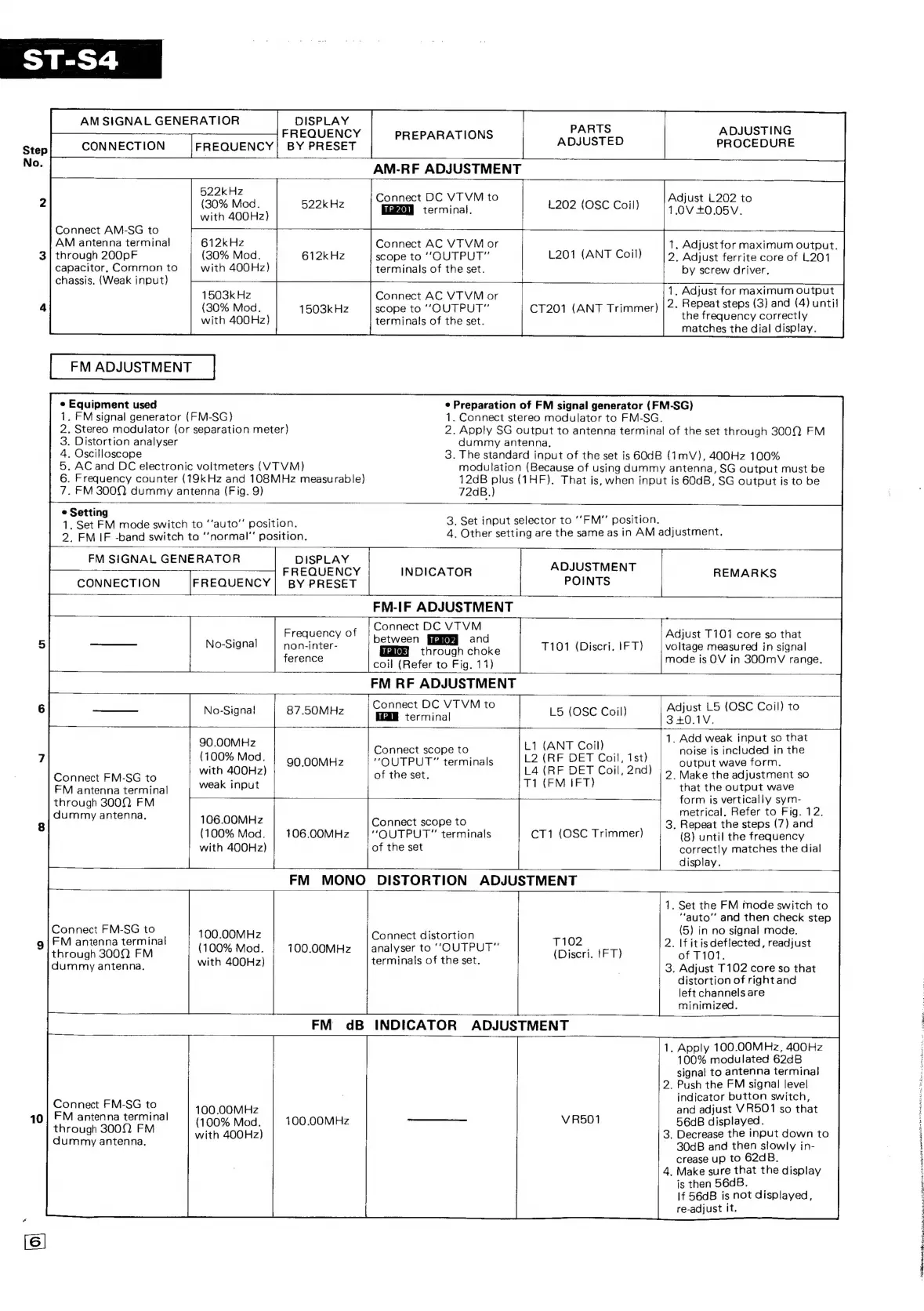
Step
No.
AM
SIGNAL
GENERATIOR
DISPLAY
FREQUENCY
CONNECTION
FREQUENCY]
BY
PRESET
522kHz
(30%
Mod.
with
400Hz)
PARTS
PREPARATIONS
ADJUSTED
AM-RF
ADJUSTMENT
Connect
DC
VTVM
to
522k
Hz
terminal.
L202
(OSC
Coil)
Connect
AM-SG
to
AM
antenna
termina!
through
200pF
capacitor,
Common
to
chassis.
(Weak
input)
612kHz
(30%
Mod.
with
400Hz)
Connect
AC
VT VM
or
scope
to
“OUTPUT”
terminals
of
the
set.
612k
Hz
L201
(ANT
Coil)
ADJUSTING
PROCEDURE
Adjust
L202
to
1.0V
+0.05V.
.
Adjust
for
maximum
output.
2,
Adjust
ferrite
core
of
L201
by
screw
driver,
1503k
Hz
(30%
Mod.
with
400Hz)
FM
ADJUSTMENT
|
*
Equipment
used
1.
FM
signal
generator
(FM-SG)
Connect
AC
VTVM
or
scope
to
“OUTPUT”
terminals
of
the
set.
1503k
Hz
.
Distortion
analyser
dummy
antenna,
.
AC
and
DC
electronic
voltmeters
(VTVM)
.
Frequency
counter
(19kHz
and
108MHz
measurable)
.
FM
300Q
dummy
antenna
(Fig.
9)
“IO
O1B
GON
72aB.)
¢
Preparation
of
FM
signal
generator
(FM-SG)
1.
Connect
stereo
modulator
to
FM-SG.
.
Stereo
modulator
(or
separation
meter)
2.
Apply
SG
output
to
antenna
terminal
of
the
set
through
3009
FM
.
Oscilloscope
3.
The
standard
input
of
the
set
is
GOdB
(1mV),
400Hz
100%
modulation
(Because
of
using
dummy
antenna,
SG
output
must
be
12dB
plus
(1HF).
That
is,
when
input
is
60dB,
SG
output
is
to
be
.
Adjust
for
maximum
output
CT201
(ANT
Trimmer)
|
2:
Repeat
steps
(3)
and
(4)
until
the
frequency
correctly
matches
the
dial
display.
Setting
a
s
was
1,
Set
FM
mode
switch
to
‘‘auto”’
position.
3.
Set
input
selector
to
'‘FM
position,
2.
FM
IF
-band
switch
to
‘’normal”
position.
4,
Other
setting
are
the
same
as
in
AM
adjustment.
FM
SIGNAL
GENERATOR
DISPLAY
FREQUENCY
INDICATOR
ADJUSTMENT
REMARKS
CONNECTION
FREQUENCY]!
BY
PRESET
POINTS
FM-IF
ADJUSTMENT
Connect
DC
VTVM
Frequency
of
',
Adjust
T1017
core
so
that
.
betwee
and
J
Sle
No-Signal
non-inter-
LP
ort
HERG
T101
(Discri.
IFT)
voltage
measured
in
signal
ference
coil
(Refer
to
Fig.
11)
mode
is
OV
in
300mV
range.
_
FM
RF
ADJUSTMENT
Sj
Connect
DC
VTVM
to
Adjust
L5
(OSC
Coil)
to
No-Signa!
87
.50MHz
taceninal
L5
(OSC
Coil)
BEGIN.
;
1.
Add
weak
input
so
that
ena
Connect
scope
to
LI
(ANT
Coil)
noise
is
included
in
the
th
200be)
|
20:00MHz
“OUTPUT”
terminals
L2
(RF
DET
Coil,
Ist)
output
wave
form.
Connect
FM-S§G
to
with
A
OHz)
of
the
set.
L4
(RF
THe
Coil,
2nd)
2.
Make
the
adjustment
so
FM
antenna
terminal
weak
input
T1
(FM
IFT)
that
the
output
wave
through
300]
FM
form
is
vertically
sym-
metrical.
Refer
to
Fig.
12.
BU
anne:
106.00MHz
Connect
scope
to
3,
Repeat
the
steps
(7)
ae
with
400Hz)
of
the
set
correctly
matches
the
dial
display.
FM
MONO
DISTORTION
ADJUSTMENT
Connect
FM-SG
to
FM
antenna
terminal
through
3000
FM
dummy
antenna.
100.00MHz
(100%
Mod.
with
400Hz)
Connect
distortion
analyser
to
“OUTPUT”
terminals
of
the
set.
T102
100.00MHz
(Discri.
1FT)
FM
dB
INDICATOR
ADJUSTMENT
Connect
FM-SG
to
FM
antenna
terminal
through
3002.
FM
100
.OOMHz
(100%
Mod.
with
400Hz)
100
.0OMHz
V
R501
dummy
antenna.
aah
.
Set
the
FM
mode
switch
to
“auto”
and
then
check
step
(5)
in
no
signal
mode.
2.
If
itisdeflected,
readjust
of
T101.
.
Adjust
T102
core
so
that
distortion
of
rightand
left
channels
are
minimized,
GO
.
Apply
100.00MHz,
400Hz
100%
modulated
62dB
signal
to
antenna
terminal
2.
Push
the
FM
signal
level
indicator
button
switch,
and
adjust
VR501
so
that
56dB
displayed.
3.
Decrease
the
input
down
to
30dB
and
then
slowly
in-
crease
up
to
62d
B.
4.
Make
sure
that
the
display
is
then
56dB.
If
56dB
is
not
displayed,
re-adjust
It.
Ce
oe
en
22
Nata
icky
ea
enw
ake
ME
+.
Ra
Ripa
eee
eles bite
Secchi:
BUI
Sb
REST
a
eS

Related product manuals